
Question Type Error When Loading Mesh from CFG File?

Thunder Chicken

Resident Lua Script Rabble-Rouser
Donator
Joined
Mar 22, 2008
Messages
5,847
Reaction score
5,509
Points
188
Location
Massachusetts
Up to now I have been in the habit of defining vessel meshes and masses within the Lua script file for an addon, which is identified in the cfg file. I wanted to see if I could use the cfg file properly to define the vessel meshes, propellant resources, etc..

From my reading of the Orbiter Developer Manual, page 58, there are a number of default vessel configuration options that can be used, and I presume are passed with the cfg handle, to clbk_setclasscaps(cfg). So I tried to pass the mesh file through the cfg file like this:

VWThingScript.cfg:

Code:
ClassName = VWThingScript
Module = ScriptVessel
Script = VWThingScript/VWThingScript.lua
MeshName = VWThing/VWThing

And I load the file in VWThingScript.lua in clbk_setclasscaps as follows:

Code:
    hmesh = oapi.load_meshglobal(MeshName)
    vi:add_mesh(hmesh)
    vi:set_mesh_visibility_mode(hmesh, MESHVIS.ALWAYS)

The mesh appears to load, but I get a host of errors from animations that are attempting to act on a nil mesh:
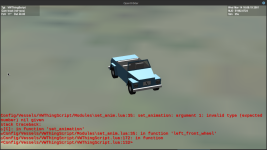
Screenshot at 2025-01-03 10-46-15.png

In the Orbiter.log, preceding these errors is an initial error that suggests a problem with the filename string:

Code:
Config/Vessels/VWThingScript/VWThingScript.lua:87: Interpreter::oapi_load_meshglobal: argument 1: invalid type (expected string)
stack traceback:
    [C]: in function 'load_meshglobal'
    Config/Vessels/VWThingScript/VWThingScript.lua:87: in function <Config/Vessels/VWThingScript/VWThingScript.lua:75>
000014.376: [ScriptVessel::LuaCall | D:\a\orbiter\orbiter\Src\Vessel\ScriptVessel\ScriptVessel.cpp | 262]

So how is the mesh visual getting loaded but still producing this error?

I am using Orbiter 2024 but I get identical behavior in OpenOrbiter 05142024 and don't believe it to be an issue with Orbiter per se.
 
If I attempt to protect the mesh load as follows I get no errors whatsoever, onscreen or in the Orbiter.log, and the mesh loads, but none of the animations seem to work. There is also a camera offset to set the cockpit viewpoint that isn't working, which seems to suggest that there is mesh location information missing. Perhaps the animations can't see/process the locations and axes of the animations?

Code:
if MeshName ~= nil then

    hmesh = oapi.load_meshglobal(MeshName)
    vi:add_mesh(hmesh)
    vi:set_mesh_visibility_mode(hmesh, MESHVIS.ALWAYS)

end

All of the other vessel physics seems to work correctly.
 
Here are the results of a few more experiments. If I enter the following in the cfg file:

Code:
MeshName = "VWThing"

I get the following errors in the Orbiter.log:

Code:
000007.558: ============================ ERROR: ===========================
000007.558: Config/Vessels/VWThingScript/VWThingScript.lua:88: Interpreter::oapi_load_meshglobal: argument 1: invalid type (expected string)
stack traceback:
    [C]: in function 'load_meshglobal'
    Config/Vessels/VWThingScript/VWThingScript.lua:88: in function <Config/Vessels/VWThingScript/VWThingScript.lua:75>
000007.558: [ScriptVessel::LuaCall | D:\a\orbiter\orbiter\Src\Vessel\ScriptVessel\ScriptVessel.cpp | 262]
000007.558: ===============================================================
000007.558: ============================ ERROR: ===========================
000007.558: Mesh not found: .\Meshes\"VWThing".msh
000007.558: [MeshManager::LoadMesh | D:\a\orbiter\orbiter\Src\Orbiter\Mesh.cpp | 1307]
000007.558: ===============================================================

So the MeshName variable is being passed.

I get similar errors when I attempt with single quotes:

Code:
MeshName = 'VWThing'

Code:
000033.564: ============================ ERROR: ===========================
000033.564: Config/Vessels/VWThingScript/VWThingScript.lua:88: Interpreter::oapi_load_meshglobal: argument 1: invalid type (expected string)
stack traceback:
    [C]: in function 'load_meshglobal'
    Config/Vessels/VWThingScript/VWThingScript.lua:88: in function <Config/Vessels/VWThingScript/VWThingScript.lua:75>
000033.564: [ScriptVessel::LuaCall | D:\a\orbiter\orbiter\Src\Vessel\ScriptVessel\ScriptVessel.cpp | 262]
000033.564: ===============================================================
000033.564: ============================ ERROR: ===========================
000033.565: Mesh not found: .\Meshes\'VWThing'.msh
000033.565: [MeshManager::LoadMesh | D:\a\orbiter\orbiter\Src\Orbiter\Mesh.cpp | 1307]
000033.565: ===============================================================

In either of the above instances Orbiter crashes straightaway.

But if I remove the quotes:

Code:
MeshName = VWThing

I get the following error:

Code:
000012.420: ============================ ERROR: ===========================
000012.420: Config/Vessels/VWThingScript/VWThingScript.lua:88: Interpreter::oapi_load_meshglobal: argument 1: invalid type (expected string)
stack traceback:
    [C]: in function 'load_meshglobal'
    Config/Vessels/VWThingScript/VWThingScript.lua:88: in function <Config/Vessels/VWThingScript/VWThingScript.lua:75>
000012.420: [ScriptVessel::LuaCall | D:\a\orbiter\orbiter\Src\Vessel\ScriptVessel\ScriptVessel.cpp | 262]
000012.420: ===============================================================

The mesh loads, but I can't seem to set anything in vessel coordinates like cameras, animations, etc..

Note that my original path was .Meshes/VWThing/VWThing.msh (VWThing/VWThing), but I moved the mesh file to the main Mesh folder thinking that the folder path was part of the problem. It doesn't seem to be the cause of the issue.
 
How to you initialise MeshName?
If you're using the usual clbk_loadstateex routine, don't forget to still forward the config line with vi:parse_scenario_line_ex after you consume it or the core won't be aware of the parameter
 
How to you initialise MeshName?
If you're using the usual clbk_loadstateex routine, don't forget to still forward the config line with vi:parse_scenario_line_ex after you consume it or the core won't be aware of the parameter
From what I've read in the Developer's manual, MeshName is a default vessel parameter name that can be initialized in the cfg file, which appears to be correct. The problem is getting the interpreter to accept it as a string that is also a readable file name. It's taking in the mesh visuals in some manner, but it seems like the mesh coordinates aren't available. It's very strange.
 
I'm not sure I understand, do you expect a MeshName variable to be magically initialised in the Lua script from the MeshName declared in the cfg file? Or do you initialise it yourself?
 
I'm not sure I understand, do you expect a MeshName variable to be magically initialised in the Lua script from the MeshName declared in the cfg file? Or do you initialise it yourself?
Did you see my first post? https://www.orbiter-forum.com/threads/type-error-when-loading-mesh-from-cfg-file.42063/#post-625319

I am attempting to put the default vessel class parameters in the cfg file using the default variable names specified on page 58 of the Orbiter Developer Manual. MeshName is one of those specified names.
 
Yes I saw :
Code:
Config/Vessels/VWThingScript/VWThingScript.lua:87: Interpreter::oapi_load_meshglobal: argument 1: invalid type (expected string)
which leads me to think that the MeshName variable is nil.
Then I presume your animations are not created because of the first error?
An add_mesh is done automatically by the Orbiter core when you specify a MeshName in the cfg file.
 
An add_mesh is done automatically by the Orbiter core when you specify a MeshName in the cfg file.
I see. That makes sense, because in theory you could build a simple vessel simply using the cfg file. There wouldn't be a module or script to run add_mesh, so it would have to be automated in some way. Can you even animate a mesh loaded in this manner as you need to be able to pass a mesh handle to create the animation?

Let me see if I can clean this up and get it to work with this information.
 
So simply putting in MeshName = VWThing into the cfg and commenting out the manual mesh load in the script does indeed load the mesh, but it seems that there is no handle or mesh index that is passed, so all the animations are looking for a mesh 0 that doesn't exist. Isn't there a way to get a handle for the loaded mesh?
 
Some more digging ... I am looking at the ShuttlePB.cfg file. It seems animations are indeed possible just using a cfg file, but only if the animations are associated with predefined flight controls and clbk_setclasscaps must be completely relocated to the cfg file. I don't see a means to get a handle for the mesh loaded under the MeshName variable and none of my animations are associated with predefined flight controls.

What motivated me to try all this is that I have a lot of vessel parameters just listed out in the main Lua script and elsewhere in the modules, and I was trying to find a means to make it more user modifiable without them having to rummage into the script files. My assumption is that the cfg file exists precisely for that reason, certainly for compiled modules.

I suppose I could use the predefined vessel parameter names where possible in the cfg file, and anything else would have to be explicitly parsed from the cfg file using custom variables. I'm not sure this is organizationally a better arrangement or not.
 
Back
Top