

Here's a full chess set for your instrument panel. ChessMFD turns any MFD into a complete chess experience:
play against a built-in engine at four strength levels, from a forgiving Novice that makes human-like mistakes to a full-strength Expert of roughly 2000+ Elo that most club players will find a serious challenge.
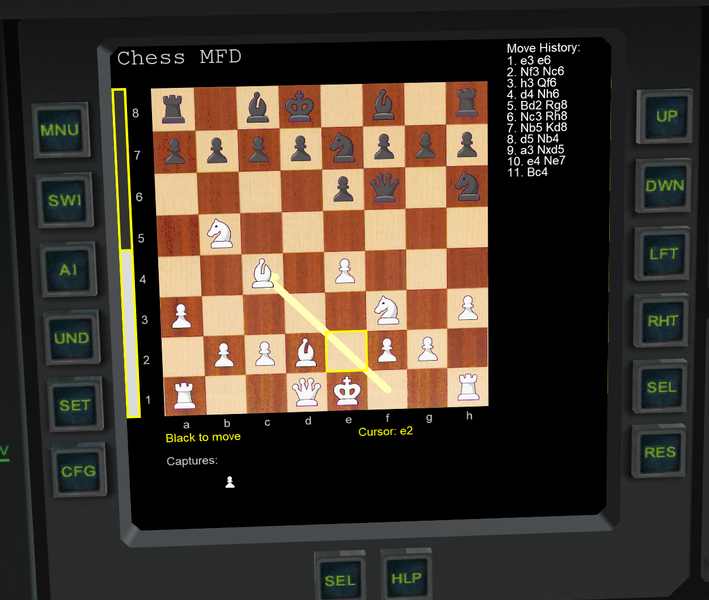
Features:
Complete rules implementation – castling, en passant, promotion, all draw rules
Four AI levels with human-like play; opening and endgame books (plain text, user-editable)
Spoken move narration via Windows text-to-speech, plus XRSound sound effects (optional)
Animated evaluation bar – watch the engine's assessment live while it thinks
Tactics puzzle trainer, board editor with FEN import, save/load with automatic PGN export
Game state persists in your scenario files – quicksave mid-game and resume later
Custom board and piece graphics – drop BMP files in a folder and select them in-MFD (see manual, Section 16)
Works with Orbiter 2016 and Orbiter 2024. XRSound is optional; narration needs nothing beyond Windows itself. Full source code is included under the MIT license, and the package contains a comprehensive 15-page manual covering everything from controls to creating your own piece sets.
Feedback, bug reports, and custom artwork are all very welcome. Enjoy!
play against a built-in engine at four strength levels, from a forgiving Novice that makes human-like mistakes to a full-strength Expert of roughly 2000+ Elo that most club players will find a serious challenge.
Features:
Complete rules implementation – castling, en passant, promotion, all draw rules
Four AI levels with human-like play; opening and endgame books (plain text, user-editable)
Spoken move narration via Windows text-to-speech, plus XRSound sound effects (optional)
Animated evaluation bar – watch the engine's assessment live while it thinks
Tactics puzzle trainer, board editor with FEN import, save/load with automatic PGN export
Game state persists in your scenario files – quicksave mid-game and resume later
Custom board and piece graphics – drop BMP files in a folder and select them in-MFD (see manual, Section 16)
Works with Orbiter 2016 and Orbiter 2024. XRSound is optional; narration needs nothing beyond Windows itself. Full source code is included under the MIT license, and the package contains a comprehensive 15-page manual covering everything from controls to creating your own piece sets.
Feedback, bug reports, and custom artwork are all very welcome. Enjoy!
- Supported Orbiter Version
- 2024
- 2016


Glad you are enjoying the MFD. The buttons follow the MFD convention that applies to all MFDs. To use a keyboard shortcut you need to have the shift button pressed. Left shift or right shift depends on the side you opened the MFD. I have mapped most buttons to follow the WASD convention so it would be more comfortable for you to open the ChessMFD on the left side, and have the left Shift key pressed. This is an Orbiter limitation/implementation and not Chess MFD's "wrong doing". For the actual buttons and their functions, you can consult the manual , or press the HLP/MNU button on the MFD's bottom row.
All the best,
Dimitris