

View attachment 42737
After installing Read the MusicPlayerMFD.pdf located in the Doc\MusicPlayerMFD folder.
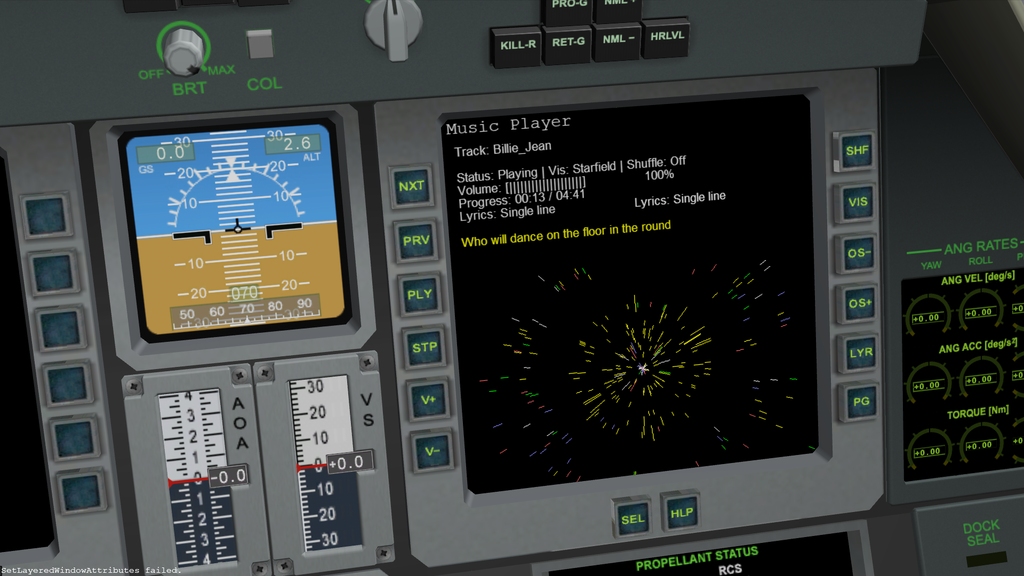
Music Player MFD is an advanced audio player for Orbiter Space Flight Simulator
that transforms your space journeys with rich audio experiences. Beyond basic playback functionality, this
MFD features sophisticated audio visualizations, beat-reactive animations, track management, and lyric display
capabilities.
This MFD uses pre-analyzed audio data to provide dynamic visualizations that respond to the audio
characteristics of each track. Using the included Python script, your music files are processed to extract
detailed audio features such as beat information, frequency analysis, and waveform data. These visualizations
are then synchronized with playback, creating five different visualization modes along with lyric
synchronization for an immersive audiovisual experience during your space exploration.
INSTALLATION
1. Download the Music Player MFD package (zip file)
2. Unzip the downloaded file directly into your Orbiter root directory
This will automatically place all files in their correct locations
The MFD configuration will be placed in Config\MFD directory
The proAudioRt module will be installed in the appropriate location
Activating the MFD in Orbiter
1. Edit the ScriptMFD.cfg file in your Orbiter Config directory with a text editor
2. Add the following line to the file:
3. Save the file and exit the text editor
4. Launch Orbiter and go to the Modules tab in the Orbiter Launchpad
5. In the "Script tools and drivers" section, check the box next to "ScriptMFD"
6. Start your simulation and press M to access the Music Player MFD
After installing Read the MusicPlayerMFD.pdf located in the Doc\MusicPlayerMFD folder.
After installing Read the MusicPlayerMFD.pdf located in the Doc\MusicPlayerMFD folder.
Music Player MFD is an advanced audio player for Orbiter Space Flight Simulator
that transforms your space journeys with rich audio experiences. Beyond basic playback functionality, this
MFD features sophisticated audio visualizations, beat-reactive animations, track management, and lyric display
capabilities.
This MFD uses pre-analyzed audio data to provide dynamic visualizations that respond to the audio
characteristics of each track. Using the included Python script, your music files are processed to extract
detailed audio features such as beat information, frequency analysis, and waveform data. These visualizations
are then synchronized with playback, creating five different visualization modes along with lyric
synchronization for an immersive audiovisual experience during your space exploration.
INSTALLATION
1. Download the Music Player MFD package (zip file)
2. Unzip the downloaded file directly into your Orbiter root directory
This will automatically place all files in their correct locations
The MFD configuration will be placed in Config\MFD directory
The proAudioRt module will be installed in the appropriate location
Activating the MFD in Orbiter
1. Edit the ScriptMFD.cfg file in your Orbiter Config directory with a text editor
2. Add the following line to the file:
3. Save the file and exit the text editor
4. Launch Orbiter and go to the Modules tab in the Orbiter Launchpad
5. In the "Script tools and drivers" section, check the box next to "ScriptMFD"
6. Start your simulation and press M to access the Music Player MFD
After installing Read the MusicPlayerMFD.pdf located in the Doc\MusicPlayerMFD folder.
- Supported Orbiter Version
- 2024
- 2016


