SDK Question Converting .tex Files to Quadtree Format

Luke Reichelt

Well-known member
Joined
Oct 29, 2012
Messages
702
Reaction score
255
Points
78
Location
Manitoba
Does anyone here know how to convert old-style planetary textures to the quadtree format? I ask because I no longer have the original bitmaps for many of my STPSP worlds, meaning that their texture files will need to be converted if I am to produce heightmaps for said worlds. I know such a process is possible, as the user GB managed to do so with cmoon55's Alien add-on, but I have no idea how it actually works, although I think it's similar to the procedure used to convert old-style surface tiles.

If there's anyone here who knows how to do it, your assistance would be very much appreciated.
 
Does anyone here know how to convert old-style planetary textures to the quadtree format? I ask because I no longer have the original bitmaps for many of my STPSP worlds, meaning that their texture files will need to be converted if I am to produce heightmaps for said worlds. I know such a process is possible, as the user GB managed to do so with cmoon55's Alien add-on, but I have no idea how it actually works, although I think it's similar to the procedure used to convert old-style surface tiles.

If there's anyone here who knows how to do it, your assistance would be very much appreciated.
Do you mean how to convert something like this: Earth_2_W0462_N0161.dds to the quadtree format?
I believe the Doc\PlanetTextures.pdf has all the info you need. If that's not what you mean, please provide an example of what exactly you want to convert to quad tree format.


Ok, my bad. Somehow I failed to see that the title of the post clearly said ".tex Files to Quadtree Format"

There was an old addon named Tune your planet that could extract the textures from the .tex files.
Here it is: https://orbiter-forum.com/resources/tune-your-planet-v0-3.5347/
 
Last edited:
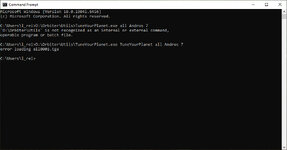
it seems that it can't find the file Andros.tex in the D:\Orbiter\Textures\ folder
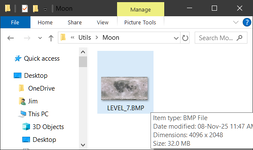
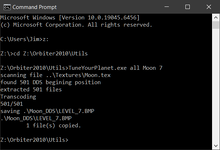
Make sure that the file exists and it is located in the correct folder. You can also try an existing one to see if it works. You also have the option's first letter capital but I don't think that's it. Here is my extraction of the Moon.tex at level 7
1762595298660.png

This created a folder in Z:\Orbiter2010\Utils named Moon and inside the folder there was a single bmp image named LEVEL_7.BMP with dimensions 4096x2048
1762595446401.png
 
it seems that it can't find the file Andros.tex in the D:\Orbiter\Textures\ folder
Make sure that the file exists and it is located in the correct folder.
Well, it's there in that exact folder, so I have no idea why it's doing that.
 
Try one of the default tex files that come with the Orbiter2010 installation.
If that doesn't run, do it exactly as you see in the example above.
(Go to D:\Orbiter\Utils first and then run TuneYourPlanet.exe all Andros 7 )

It may be a relative path issue. You are running TuneYourPlanet.exe but you are not doing it from the utils folder.
 
It may be a relative path issue. You are running TuneYourPlanet.exe but you are not doing it from the utils folder.
I am running it from the utils folder, though. So why isn't it working for me? Perhaps Tune Your Planet just doesn't work in Orbiter 2016?

CommandPrompt7.jpg
 
I am running it from the utils folder, though. So why isn't it working for me? Perhaps Tune Your Planet just doesn't work in Orbiter 2016?

View attachment 45499
It works just fine in Orbiter2016. As long as you are running it from the utils folder and the corresponding tex file exists in the Textures folder
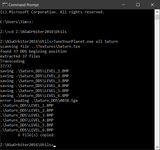
1762597992535.png
Please follow these instructions EXACTLY and post your screenshot.

In C:\Users\l_rei>
type "D:" and press enter. (without the quotes)
Then type "cd Orbiter\Utils" and press enter. (without the quotes)
Your prompt should now read: D:\Orbiter\Utils>
Now type "TuneYourPlanet.exe all Andros 7" and press enter. (without the quotes)
If you get a "Tga failed" or some related message try again with just
"TuneYourPlanet.exe all Andros"

Post your screenshot so we can see exactly what you did.
 
It works just fine in Orbiter2016. As long as you are running it from the utils folder and the corresponding tex file exists in the Textures folder
View attachment 45500
Please follow these instructions EXACTLY and post your screenshot.

In C:\Users\l_rei>
type "D:" and press enter. (without the quotes)
Then type "cd Orbiter\Utils" and press enter. (without the quotes)
Your prompt should now read: D:\Orbiter\Utils>
Now type "TuneYourPlanet.exe all Andros 7" and press enter. (without the quotes)
If you get a "Tga failed" or some related message try again with just
"TuneYourPlanet.exe all Andros"

Post your screenshot so we can see exactly what you did.
So that's what was causing my problem - I was using the wrong command sequence. Now I just need to remember the correct one.
 
Back
Top