Lucy
in the sky, with diamonds.
Administrator
Moderator
Orbiter Contributor
Addon Developer
Webmaster
GFX Staff
Beta Tester
- Joined
- Aug 9, 2009
- Messages
- 7,111
- Reaction score
- 1,310
- Points
- 203
- Location
- 10.0.0.1
- Website
- www.orbiter-radio.co.uk
- Preferred Pronouns
- she/her
Ahoy there Orbinauts,
You can now link your Discord account, should you have one, to your Orbiter-Forum account! By the way, did you know that we have an official Orbiter-Forum discord server? Check it out!
So, why would you want to link your two accounts together? Well, this allows for a little better synchronisation between the two systems - including your forum username, any badges you might have here, and so on. It's also how we're controlling access to The Basement area of the Discord server now, and being a registered Orbiter-Forum user also grants you access to an "Orbinauts Only" section of the Discord server, that special secret club where all the cool kids hang out to talk about space.
How does the linkage (linking? linkery? linkaging?) work? It's pretty straightforward, and it uses Xenforo's built-in connected account system, which we've enabled for Discord now.
Just hit the "Connected Accounts" option in your user settings, here;
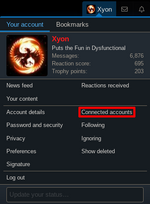
This brings you to the place where you can see that, at the moment, you probably don't have a discord account connected to your Orbiter Forum account. Not to worry! Fix that by hitting the big friendly blue button there;

This takes you to a Discord login and authorisation page. Those pages are controlled entirely by Discord, but it'll ask you to log in with your Discord account if you're not already logged in, and then it'll ask you if you want to let our coordination robot CAPCOM have some basic information about your account;
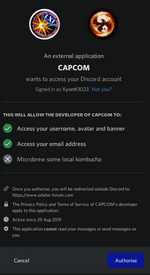
For the integration to work, you need to hit the "Authorise" button here (the blue one, the text will be different in different languages, of course).
Discord should then redirect you back to your settings page, where you'll be asked to authenticate the link from the forum side by re-inputting the password for your Orbiter-Forum account.
Once linked, you should see that the connected accounts screen bears the record of your linkage (linking? linkery? longitude?) and you're good to go - assuming the discord account you linked is in the Orbiter-Forum discord server, of course...
You can now link your Discord account, should you have one, to your Orbiter-Forum account! By the way, did you know that we have an official Orbiter-Forum discord server? Check it out!
So, why would you want to link your two accounts together? Well, this allows for a little better synchronisation between the two systems - including your forum username, any badges you might have here, and so on. It's also how we're controlling access to The Basement area of the Discord server now, and being a registered Orbiter-Forum user also grants you access to an "Orbinauts Only" section of the Discord server, that special secret club where all the cool kids hang out to talk about space.
How does the linkage (linking? linkery? linkaging?) work? It's pretty straightforward, and it uses Xenforo's built-in connected account system, which we've enabled for Discord now.
Just hit the "Connected Accounts" option in your user settings, here;
This brings you to the place where you can see that, at the moment, you probably don't have a discord account connected to your Orbiter Forum account. Not to worry! Fix that by hitting the big friendly blue button there;
This takes you to a Discord login and authorisation page. Those pages are controlled entirely by Discord, but it'll ask you to log in with your Discord account if you're not already logged in, and then it'll ask you if you want to let our coordination robot CAPCOM have some basic information about your account;
For the integration to work, you need to hit the "Authorise" button here (the blue one, the text will be different in different languages, of course).
Discord should then redirect you back to your settings page, where you'll be asked to authenticate the link from the forum side by re-inputting the password for your Orbiter-Forum account.
Once linked, you should see that the connected accounts screen bears the record of your linkage (linking? linkery? longitude?) and you're good to go - assuming the discord account you linked is in the Orbiter-Forum discord server, of course...


 . I do have a Discord account and I'm using Firefox .