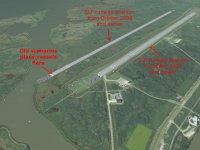
Problem How to correct the runway?

kelvan311

New member
Joined
Jul 15, 2010
Messages
11
Reaction score
0
Points
0
For this question first is,when i m run aircraft or delta glider scenario, it should place on correct runway...but aircraft or delta glider is not on the runway actually...how to correct it??
 
If this is about the old 2006 scenarios putting you a hundred meters or so off from the runway in 2010, it's pretty easy to fix it using the scenario editor and adjusting your latitude and longitude manually.
 
Yes, that's right.
Cape's runways are moved slightly in Orbiter2010.

Here's my way to work around:
I have added a small file in ..\Orbiter\Config\Earth\Base\
named KSC33.cfg

Code:
BASE-V2.0
Name = KSC33
Location = -80.68264 +28.59701
Size = 1000
MapObjectsToSphere = TRUE

Now I only need to open the ScenarioEditor (F4->Custom->ScenarioEditor) and change my location to KSC33 if I have started a KSC-scenario that comes along with an older addon.

This also helps with (reentry-) approaches, because of the fact that you are aiming at a point 8.5km south if you have selected Cape Canaveral in MapMFD.
 
man that's very helpful!

i have a couple of addons myself that carry this nuissance, and having to tweak the vessels onto the runway by hand was beggining to get a little old :rolleyes:


this is much easier! thanks!
 
Taxi there?

I am not sure what your asking...

I think I know what that person is talking about. In the default Orbiter 2010 (Patch 1) installation, if you go to the Delta-glider folder and select Cape Canaveral, the description says, "A Delta-glider, parked at the visitor parking lot of the Kennedy Space Center - ready for takeoff."

However, the Delta-glider is parked at a landing pad and there is no taxiway to the Runway.

9VeNK.jpg


I've wondered about this myself. (I figured out a way around it ... I opened some other scenario file that had a Delta-glider already parked at the Runway ... and copied the data out of it and pasted it into the Cape Canaveral scenario file.) From what I remember, that worked.

If that Cape Canaveral scenario is buggy (as it appears to be), it would be preferable to have it fixed in some upcoming release. IMHO. (Why have a buggy scenario in the default system?)

 
I think I know what that person is talking about. In the default Orbiter 2010 (Patch 1) installation, if you go to the Delta-glider folder and select Cape Canaveral, the description says, "A Delta-glider, parked at the visitor parking lot of the Kennedy Space Center - ready for takeoff."

However, the Delta-glider is parked at a landing pad and there is no taxiway to the Runway.

9VeNK.jpg


I've wondered about this myself. (I figured out a way around it ... I opened some other scenario file that had a Delta-glider already parked at the Runway ... and copied the data out of it and pasted it into the Cape Canaveral scenario file.) From what I remember, that worked.

If that Cape Canaveral scenario is buggy (as it appears to be), it would be preferable to have it fixed in some upcoming release. IMHO. (Why have a buggy scenario in the default system?)
Reduce your fuel level (via the scenario editor) and you'll be able to make a vertical takeoff.
 
I think I know what that person is talking about. In the default Orbiter 2010 (Patch 1) installation, if you go to the Delta-glider folder and select Cape Canaveral, the description says, "A Delta-glider, parked at the visitor parking lot of the Kennedy Space Center - ready for takeoff."

However, the Delta-glider is parked at a landing pad and there is no taxiway to the Runway.
This is not the issue that person is talking about:
aircraft or delta glider scenario, it should place on correct runway...but aircraft or delta glider is not on the runway actually...
It is this issue:
SLF_pos.jpg


If that Cape Canaveral scenario is buggy (as it appears to be), it would be preferable to have it fixed in some upcoming release. IMHO. (Why have a buggy scenario in the default system?)
If you consider this a bug, post a bug report.
 
Back
Top