

- Joined
- Mar 17, 2008
- Messages
- 179
- Reaction score
- 116
- Points
- 43
- Location
- Southwest Pennsylginia
- Website
- sites.google.com
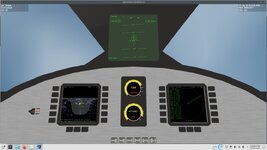
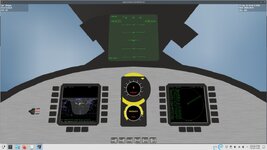
I'm working on a gauge set using layers of animated mesh groups.
If I advance or retard the throttle slowly using ctrl/num+ everything is fine but if I blip the throttle using num+ the involved meshgroups start to scale.
The more I blip the throttle, the bigger they get.
The animations are done like so:
And are called like this:
Any Idea what I'm doing wrong?
If I advance or retard the throttle slowly using ctrl/num+ everything is fine but if I blip the throttle using num+ the involved meshgroups start to scale.
The more I blip the throttle, the bigger they get.
The animations are done like so:
Code:
trans_thrust1 = {
  type = "rotation",
  mesh = 0,
  grp = 20,
  ref = {x=0,y=0.287,z=0.221},
  axis = {x=0,y=0.23,z=-1},
  angle = 270*RAD
}

trans_thrust2 = {
  type = "rotation",
  mesh = 0,
  grp = 21,
  ref = {x=0,y=0.287,z=0.221},
  axis = {x=0,y=0.23,z=-1},
  angle = 180*RAD
}

trans_thrust3 = {
  type = "rotation",
  mesh = 0,
  grp = 22,
  ref = {x=0,y=0.287,z=0.221},
  axis = {x=0,y=0.23,z=-1},
  angle = 90*RAD
}
animcomp_thrust1 = oapi.create_animationcomponent(trans_thrust1)
animcomp_thrust2 = oapi.create_animationcomponent(trans_thrust2)
animcomp_thrust3 = oapi.create_animationcomponent(trans_thrust3)
anim_thrust = vi:create_animation(0)
vi:add_animationcomponent(anim_thrust,0,1,animcomp_thrust1)
vi:add_animationcomponent(anim_thrust,0,1,animcomp_thrust2)
vi:add_animationcomponent(anim_thrust,0,1,animcomp_thrust3)
And are called like this:
Code:
function redraw_panel_thrust()

    local thrst = vi:get_thrusterlevel(thmain)
    vi:set_animation(anim_thrust, thrst)

end
Any Idea what I'm doing wrong?


