SSU Development thread (4.0 to 5.0) [DEVELOPMENT HALTED DUE TIME REQUIREMENTS!]

Status
Not open for further replies.
If the team is commited to the inline engine ok, but I have two points in my mind:
1) How many orbinauts still use DX7?
2) Does it make sense to "downgrade" an addon to the default GC or wouldn't it be better that the users upgrade their GC (free and harmless BTW) to meet the addon requirements?

Maybe there are other reasons behind that I ignore but to me it makes very little sense to down scale photoreal textures (unless this would be a munor res reduction which turns to be running well with DX7 with no or very little impact on the textures quality)
We have a poll running on that very subject here: https://www.orbiter-forum.com/showthread.php?t=39302


It's been running for over 3 months now and so far the tally is 3 for MOGE and 12 for D3D9Client.
 
If the team is commited to the inline engine ok, but I have two points in my mind:
1) How many orbinauts still use DX7?
2) Does it make sense to "downgrade" an addon to the default GC or wouldn't it be better that the users upgrade their GC (free and harmless BTW) to meet the addon requirements?


I would also add a "3)" there. For being able to check for bugs, we need to support multiple graphics engines, so we are not just looking at one. If that graphics engine has a bug, how should we be able to know, that it is not caused by our graphics?
 
I think Face summed this "MOGE vs D3D9" thing very well: "if an addon is not compatible with MOGE, then it's not compatible with Orbiter".
 
Thanks for the replies.
The reason why I made photoreal textures for the Fleet first and then for SSU is simply because I was not happy with the level of detail and the image quality of the default ones.
Thanks to the much higher resolution adopted I have the chance to draw and paint even the slightest detail of orbiter skin which in turns makes her look realistic (i.e. ideally the goal would be to have a screenshot of the orbiter taken in sim look very close to the same shot of the real orbiter).
I don’t know how much of a down scaling would be required in order for the textures to be DX7 compatible (I ll do some testing and see) but should the outcome generate a quality loss then this whole project would not make sense anymore.
 
I don’t know how much of a down scaling would be required in order for the textures to be DX7 compatible (I ll do some testing and see) but should the outcome generate a quality loss then this whole project would not make sense anymore.


Actually, this isn't expected of you. We just need DX7 compatible textures for our add-on to be MOGE compatible. Just we. Its not your problem at all.


Your textures can still be happily focussing on DX9. Its maybe an add-on for an add-on for an add-on then in the worst case, but thats your add-on we are talking about.
 
Actually, this isn't expected of you. We just need DX7 compatible textures for our add-on to be MOGE compatible. Just we. Its not your problem at all.


Your textures can still be happily focussing on DX9. Its maybe an add-on for an add-on for an add-on then in the worst case, but thats your add-on we are talking about.

Someone a few days ago, I think DaveS, suggested to use a lower resolution version of my textures. If that s the case then what I ve written above applies.
If that is not then you already have the default SSU textures that work with DX7..
 
Someone a few days ago, I think DaveS, suggested to use a lower resolution version of my textures. If that s the case then what I ve written above applies.
If that is not then you already have the default SSU textures that work with DX7..


I think the idea was to use your highres textures as baseline to produce a low-res version, but seriously: Even the best interpolation function won't make it look good when it is scaled down I fear then, all we can do then is to blur it more than necessary, so the worst artifacts are gone.
 
I think the idea was to use your highres textures as baseline to produce a low-res version, but seriously: Even the best interpolation function won't make it look good when it is scaled down I fear then, all we can do then is to blur it more than necessary, so the worst artifacts are gone.
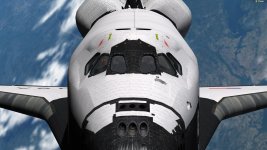
Well, I just made some early tests and here the full res textures work fine in MOGE. No issues at all. Here's a screenshot that shows it (sorry for the 1080 size of the screenshot, that's the maximum resolution of MOGE): https://www.dropbox.com/s/ks5luo5frmp07jt/SSU_hires_MOGE.jpg?dl=0
 
How is that possible?? They never worked in the past, you always had a plain white orbiter with no textures showing
I have no idea. Maybe the latest Win 10 update did something or it could be any of the number of NVIDIA driver updates since I last did my tests that ended up with the same result (white orbiter).

---------- Post added at 10:25 PM ---------- Previous post was at 10:02 PM ----------

Well, I just made some early tests and here the full res textures work fine in MOGE. No issues at all. Here's a screenshot that shows it (sorry for the 1080 size of the screenshot, that's the maximum resolution of MOGE): https://www.dropbox.com/s/ks5luo5frmp07jt/SSU_hires_MOGE.jpg?dl=0
So with these news, what is the forward plan? Go with the full res textures or not?
 
So with these news, what is the forward plan? Go with the full res textures or not?

I'd like to confirm this in my modest hardware... right now I'm working on auto derotation and NWS and I'd like to get this "stable" before switching subjects.
 
I'd like to confirm this in my modest hardware... right now I'm working on auto derotation and NWS and I'd like to get this "stable" before switching subjects.
Since you updated the OrbiterSimBeta branch with the latest trunk, you should be able to apply the textures and run a few quick tests. The textures shouldn't harm anything on the code side since they are just texture replacements. There's no meshes involved.
 
Well, I just made some early tests and here the full res textures work fine in MOGE. No issues at all. Here's a screenshot that shows it (sorry for the 1080 size of the screenshot, that's the maximum resolution of MOGE): https://www.dropbox.com/s/ks5luo5frmp07jt/SSU_hires_MOGE.jpg?dl=0


I can see from the screenshot the new rudder mesh. Did you check in those new mesh? I have the latest SVN update (2865) and still the old rudder shows :shrug:
There are also many issues in the forward fuselage/nose section (sharp edges and so on)
564.jpg

are they a "yet to do" thing or maybe something is not right with the mesh I am using?
 
Last edited:
I can see from the screenshot the new rudder mesh. Did you check in those new mesh? I have the latest SVN update (2865) and still the old rudder shows :shrug:
There are also many issues in the forward fuselage/nose section (sharp edges and so on)
View attachment 15907

are they a "yet to do" thing or maybe something is not right with the mesh I am using?
The new mesh is still pending a decision on the textures.
 
Anyone knowledgeable of both Orbiter's aerodynamics and our "stuff" in that department? Looking at what we have it appears a switch was made for one "system" to another... except for the rudder, which happens to be what I was working on the FCS...

BTW: there's isn't much info on the FCS rudder commands. :facepalm:
BTW2: it looks like Orbiter "generates" a lot of wind, and crosswinds get very close to (or above) the 15 knot limit.
 
Boy, do we need to organize the aero code.... :facepalm:
Currently there is an AerosurfacePositions structure that is where the aero code gets the aerosurface positions and does its magic. But that only gets input sometimes, and it is not saved (except the speedbrake). IMO that structure is very good on the "low level", i.e. interface with Orbiter, and we only need to work on saving the position of the aerosurfaces, and also on who (subsystem) writes into that structure and reads the positions for feedback and display usage.
Also, the "aero code" at the begining of Atlantis.cpp could probably be moved to its own file.

Anyway, added a few items to the Autoland (actually these are in the FCS... :uhh: don't kill the messenger): derotation, load balancing and yaw control, which is super-hacked and, in all honesty, I'm not really sure if it is doing much. There is tons of crosswind and the lateral guidance somehow keeps the vehicle lined up with the runway regardless of rudder position. :shrug:
Also, the hacked-inside-AerojetDAP NWS (another system in need of work) now gets auto commands, so the vehicle can now fly from 10kft to a stop somewhere past the runway end (it doesn't have auto brakes), but still right on the centerline :thumbup:.

Still tons of work to do: maybe 90% HUD-related, and also working out the Autoland reference parameters for the other 3 AL trajectories, and maybe tunning the FCS pitch channel to follow the auto commands more closely.

I'll now test the large textures.

---------- Post added at 06:05 PM ---------- Previous post was at 05:34 PM ----------

I was expecting a CTD, but it actually loaded... then I switched to the outside view and the vehicle was all white. Log output:
Code:
000000.000: Texture load: .\Textures\SSU\Atlantis_5thmod.dds
000000.000: ---------------------------------------------------------------
000000.000: >>> ERROR: DDraw error DDERR_INVALIDCAPS
000000.000: >>> [ReadDDSSurface | .\Texture.cpp | 292]
000000.000: ---------------------------------------------------------------
============================ ERROR: ===========================
ReadDDSSurface failed (code: -2005532572)
[TextureManager::LoadTexture | .\Texture.cpp | 1227]
===============================================================
--------------------------- WARNING: --------------------------
>>> Texture not found: SSU\Atlantis_5thmod.dds
Skipping.
>>> [TextureManager::AcquireTexture | .\Texture.cpp | 1040]
---------------------------------------------------------------

 
Boy, do we need to organize the aero code.... :facepalm:
Currently there is an AerosurfacePositions structure that is where the aero code gets the aerosurface positions and does its magic. But that only gets input sometimes, and it is not saved (except the speedbrake). IMO that structure is very good on the "low level", i.e. interface with Orbiter, and we only need to work on saving the position of the aerosurfaces, and also on who (subsystem) writes into that structure and reads the positions for feedback and display usage.
Also, the "aero code" at the begining of Atlantis.cpp could probably be moved to its own file.

Anyway, added a few items to the Autoland (actually these are in the FCS... :uhh: don't kill the messenger): derotation, load balancing and yaw control, which is super-hacked and, in all honesty, I'm not really sure if it is doing much. There is tons of crosswind and the lateral guidance somehow keeps the vehicle lined up with the runway regardless of rudder position. :shrug:
Also, the hacked-inside-AerojetDAP NWS (another system in need of work) now gets auto commands, so the vehicle can now fly from 10kft to a stop somewhere past the runway end (it doesn't have auto brakes), but still right on the centerline :thumbup:.

Still tons of work to do: maybe 90% HUD-related, and also working out the Autoland reference parameters for the other 3 AL trajectories, and maybe tunning the FCS pitch channel to follow the auto commands more closely.

I'll now test the large textures.

---------- Post added at 06:05 PM ---------- Previous post was at 05:34 PM ----------

I was expecting a CTD, but it actually loaded... then I switched to the outside view and the vehicle was all white. Log output:
Code:
000000.000: Texture load: .\Textures\SSU\Atlantis_5thmod.dds
000000.000: ---------------------------------------------------------------
000000.000: >>> ERROR: DDraw error DDERR_INVALIDCAPS
000000.000: >>> [ReadDDSSurface | .\Texture.cpp | 292]
000000.000: ---------------------------------------------------------------
============================ ERROR: ===========================
ReadDDSSurface failed (code: -2005532572)
[TextureManager::LoadTexture | .\Texture.cpp | 1227]
===============================================================
--------------------------- WARNING: --------------------------
>>> Texture not found: SSU\Atlantis_5thmod.dds
Skipping.
>>> [TextureManager::AcquireTexture | .\Texture.cpp | 1040]
---------------------------------------------------------------
The fact that the texture was not found explains the white orbiter. And you have confirmed that the texture still exists at that path?
 
The fact that the texture was not found explains the white orbiter. And you have confirmed that the texture still exists at that path?

Yes, they are all there.
 
Does it go away if you try to downsize the texture?

I'll try. I did notice that they have mipmaps... are they needed?

---------- Post added at 07:44 PM ---------- Previous post was at 07:42 PM ----------

BTW, what is the limit in MOGE? Why not go with that?

---------- Post added at 07:55 PM ---------- Previous post was at 07:44 PM ----------

I took the mipmaps out and resaved in DXT5 with the same resolution and it works!
But... it takes A LOT of resources... given that the graphics are already the long pole in the tent, adding more to that as a baseline doesn't seem to be a good idea. As an addon? Absolutely, it looks super fabulous. :hail:
 
Status
Not open for further replies.
Back
Top