
-
ORBITER-FORUM will be temporarily closed at 2026-07-23 18:00 UTC while we complete some OF maintenance tasks. The amount of downtime is expected to take up to one hour, but probably less.
You are using an out of date browser. It may not display this or other websites correctly.
You should upgrade or use an alternative browser.
You should upgrade or use an alternative browser.
Project Orbiter texture tree tools (OT3)
- Thread starter Face
- Start date

Hello, Face,
I'm not sure to understand well, as usual , all the content of the last post, but as i was experiencing, at the end of 2015, with Heathrow, and a release candidate ( wich one, i don't remember ) it was clearly possible to show a 2010 base in that RC. But at sea level...and with the .elv file there up (*) the base and the runway.
http://www.orbiter-forum.com/showthread.php?p=493161&postcount=481
(*) the second picture:
http://www.orbiter-forum.com/showthread.php?p=493185&postcount=485
I'm not sure to understand well, as usual
, all the content of the last post, but as i was experiencing, at the end of 2015, with Heathrow, and a release candidate ( wich one, i don't remember ) it was clearly possible to show a 2010 base in that RC. But at sea level...and with the .elv file there up (*) the base and the runway.http://www.orbiter-forum.com/showthread.php?p=493161&postcount=481
(*) the second picture:
http://www.orbiter-forum.com/showthread.php?p=493185&postcount=485
Last edited:

I'm not sure to understand well, as usual
OK. Interesting, I always had the impression that they don't show up at all, but perhaps it was just a very early RC I tried. :shrug:
Anyway, with that information now, I highly doubt that treeman's -b option makes any sense at all, except maybe for old to new coordinate transformation. With people here wanting to go the manual way, and with the initial confusion about coordinate transformation solved thanks to your explanations, I think I should not invest anymore time into the -b option.
4throck's argument with the OBM path would be a strong one if the resulting base wouldn't be usable in 2016. OBM bases are usable just as they were before, so there is no need to pursuit this. The elevation thing has to be solved, of course, but that's nothing the -b option was intended to do, anyway.
Last edited:
OK. Interesting, I always had the impression that they don't show up at all, but perhaps it was just a very early RC I tried.
No, to my memory, the possibility to show up old 2010 base in all RC since 2010 version has never stopped.
.../...
I think the -b option ( if i completely understand all the field of action of that option...i'm afraid that it's not the case but...) may not be said its last word, with, and maybe, for example, issues, with the mipmaping of the 2010 tiles with the one - wich don't need mipmap - for the similar effect, in the presentation by level/tree (2016).
But also, and probably there is something I did not understand again, but as surf and elev are intrinsically linked: how to give an elevation to a 2010 tile/set of tiles, outside the tree ?
Last edited:
I think the -b option ( if i completely understand all the field of action of that option...i'm afraid that it's not the case but...) may not be said its last word, with, and maybe, for example, issues, with the mipmaping of the 2010 tiles with the one - wich don't need mipmap - for the similar effect, in the presentation by level/tree (2016).
But also, and probably there is something I did not understand again, but as surf and elev are intrinsically linked: how to give an elevation to a 2010 tile/set of tiles, outside the tree ?
Well, for me the -b option has said its last word :lol: .
You can use old-style base declaration and additionally do high-res terrain for it AFAICS, so no -b is needed at all. Its a bit sad I realize that so late
 . I'll concentrate on ele2png a bit more now.
Please...don't be cruel...give it a second chance...
Who is AFAICS ? Where does he lives ?
At least, i still don't understand how it's possible to achieve appropriate local elevation for tiles registered in a cfg file ( ele2png ? ). If not, the tiles will always be under the .elv, ( looking in that disposition as meshes, with fatal artefact ) but i still follow your work so i will see. :shifty:
Who is AFAICS ? Where does he lives ?
At least, i still don't understand how it's possible to achieve appropriate local elevation for tiles registered in a cfg file ( ele2png ? ). If not, the tiles will always be under the .elv, ( looking in that disposition as meshes, with fatal artefact ) but i still follow your work so i will see. :shifty:
Last edited:
Please...don't be cruel...give it a second chance...
Who is AFAICS ? Where does he lives ?
At least, i still don't understand how it's possible to achieve appropriate local elevation for tiles registered in a cfg file ( ele2png ? ). If not, the tiles will always be under the .elv, ( looking in that disposition as meshes, with fatal artefact ) but i still follow your work so i will see. :shifty:
Hehe, I'm not cruel. I just meant that the -b option is not necessary anymore. AFAICS is an abbreviation for As Far As I Can See.
For tiles registered in a cfg file, you'll have to create/modify the appropriate elevation tile in the tree. I.e. if you know the path of the elevation tile, you can just create a PNG with that path, and use ele2png to convert it to ELV. Then you'll have your elevation for your base, too. The conversion of the surface textures is superfluous, if Orbiter supports the old-style textures, anyway.
I create a base in the Himalaya for example.
I create my cfg.
I inscribe my surftiles in it, level 18 for example.
There already exist in the basic Orbiter tree, files for Himalaya - surf and elv - at level 16 for example, managed by Orbiter.
In this configuration - I just made, few minutes ago, the experience, again, for myself, but on Heathrow where the difference is only of a few meters, but the artefact well visible - ...in this configuration my tiles (and my runway) will be on the ground ( on the the "theoretical" sphere) - mapobjecttosphere or not - at 3000 or 4000 meters under the tiles of the Orbiter tree, visible through.
How to raise to 3000 or 4000 meters the surftiles present in my cfg?
I dont see.
Create a .elv ? But there is already a .elv ( well, at level 16, but it could be sufficient for what i want to create ).
Is there 'something' wich can create a sort of link between that .elv and my base ( surftiles in the Textures folder ), to indicate to Orbiter that my tiles, my base, are at 3000 or 4000 m in altitude and show it at that elevation ?
I create my cfg.
I inscribe my surftiles in it, level 18 for example.
There already exist in the basic Orbiter tree, files for Himalaya - surf and elv - at level 16 for example, managed by Orbiter.
In this configuration - I just made, few minutes ago, the experience, again, for myself, but on Heathrow where the difference is only of a few meters, but the artefact well visible - ...in this configuration my tiles (and my runway) will be on the ground ( on the the "theoretical" sphere) - mapobjecttosphere or not - at 3000 or 4000 meters under the tiles of the Orbiter tree, visible through.
How to raise to 3000 or 4000 meters the surftiles present in my cfg?
I dont see.
Create a .elv ? But there is already a .elv ( well, at level 16, but it could be sufficient for what i want to create ).
Is there 'something' wich can create a sort of link between that .elv and my base ( surftiles in the Textures folder ), to indicate to Orbiter that my tiles, my base, are at 3000 or 4000 m in altitude and show it at that elevation ?
Last edited:
I create a base in the Himalaya for example.
I create my cfg.
I inscribe my surftiles in it, level 18 for example.
There already exist in the basic Orbiter tree, files for Himalaya - surf and elv - at level 16 for example, managed by Orbiter.
In this configuration - I just made, few minutes ago, the experience, again, for myself, but on Heathrow where the difference is only of a few meters, but the artefact well visible - ...in this configuration my tiles (and my runway) will be on the ground ( on the the "theoretical" sphere) - mapobjecttosphere or not - at 3000 or 4000 meters under the tiles of the Orbiter tree, visible through.
Is this with D3D9Client or with inline client? Could you send me the test files to check for myself?
Is this with D3D9Client or with inline client? Could you send me the test files to check for myself?
It is the standard orbiter. Not the D3D9 ( that i cant experiment cause there is not D3D9 actually for XP. Jarmonik, if you read this...
)No, everything I wrote yesterday, ( cf: Hymalaya ) was only a hypothesis, In others words: what could i do if...?
But I was trying this morning to really experience there. I will try to find the files that I used for Heathrow last year but I have already done this morning the test at Mount Everest. To to see.
I will attach the files of this experiment in a following message but I give you a first overview:
Here a level 0 tile ( Earth_0_e0123_n0039.dds mipmaped - dxtbmp) in a cfg (Baikonour renamed Everest) at Mount Everest. Unlike the observations I made on Heathrow (*), this time, the tile is at the summit of the mountain, flat for its entire extent, with geometric effects little readable vis-a-vis ( in interference ) with textures of the Surf folder.

(*) but when standard tiles in a cfg interfere with tiles from the Surf 2016 folder and if the elevation is low, it is not easy to distinguish what is on or below. However, even for Gran Canaria, although at almost level 0 for the runway, one can see from a certain angle, grazing, sometimes the textures of the cfg, sometimes the textures of the Surf folder.
Here a level 5 surftile ( Earth_5_e3956_n1273.dds mipmaped - dxtbmp). Curiously, the object, hangar, tanks..., seems to match / to be on the mountain itself.

The files for Everest in the next message.
Last edited:
I see it to be DXT1 with mipmaps. I'll try to rework that with DXT5 without mipmaps.
Last edited:
Just tried with the same tiles registered as DXT5 without mipmaps. The result is the same.
Why DXT1 or DXT 5 should change the process, the result ? Yes, I saw yesterday that Gran Canaria tiles are in DXT5 ( and mipmaped ) but i don't see what could make a different result.
Why DXT1 or DXT 5 should change the process, the result ? Yes, I saw yesterday that Gran Canaria tiles are in DXT5 ( and mipmaped ) but i don't see what could make a different result.
Just tried with the same tiles registered as DXT5 without mipmaps. The result is the same.
Why DXT1 or DXT 5 should change the process, the result ? Yes, I saw yesterday that Gran Canaria tiles are in DXT5 ( and mipmaped ) but i don't see what could make a different result.
Well, DXT5 has a separate alpha channel, so it could be that Orbiter code is processing such tiles differently. But I've tried it for myself, too, and indeed it is like the tile is just like a plane put upon the elevation mesh.
I have to check back with that olympus and Gran Canaria to see if the vanilla install is also showing that "hovering plane" effect.
---------- Post added at 16:21 ---------- Previous post was at 16:02 ----------
Ok, this gets stranger the more I play with it. Gran Canaria's reasonable result with simple drop-in comes obviously from the fact that surface tiles shine through the terrain meshes. Looks pretty strange. I don't know yet why the plane is hovering in the case of Everest, though.
However, given that this means that old-style textures are NOT usable out of the box - just as I've thought at the beginning - the -b option is still a necessary utility for users and/or developers.
I have done tests again as in the past on Heathrow. I had forgotten how I had done last year.
In fact, at that time, practicing on London, I amused myself by seeing what happened to replace a London elv by a Himalayan elv of the same level, this with surftiles in a cfg.
The result is quite horrible ( but maybe not significant because non really standard ) but, with surftiles supposed to be on the ground, to to observe the scene, at different distances, it's difficult to undersatnd what is under and what is above ( surftiles from the cfg or 2016 tiles from the Surf folder ). The surftiles seems to float in the air. The same effect, from certain angle of view, that when one see through a mesh, or when an object in a cfg is not completely on the ground.
To my opinion, as Gran Canaria is at the level of the sea for the airport, i think that the .elv is also at 0 or near 0 altitude and as the tiles there coming from the cfg are themself at 0 alt they are , i dont know how to say, mixed. The difference for altitude is invisible. But if you take a point of view vith the camera on the runway, behind the DG, near the ground, you nevertheless see that the 2016 texture is above the surftiles ( maybe some cm, not more ), darker than the surftiles.
One can always use the old bases by removing the artefacts with the relief by unchecking, in the launchpad, first or second tab, the option 'relief'. But by the fact, the relief is no longer
there ( I dont know but i think that it was an idea of Martin to give us the possibility to still use for a moment old bases ).
Hence the utility of OT3.
In fact, at that time, practicing on London, I amused myself by seeing what happened to replace a London elv by a Himalayan elv of the same level, this with surftiles in a cfg.
The result is quite horrible ( but maybe not significant because non really standard ) but, with surftiles supposed to be on the ground, to to observe the scene, at different distances, it's difficult to undersatnd what is under and what is above ( surftiles from the cfg or 2016 tiles from the Surf folder ). The surftiles seems to float in the air. The same effect, from certain angle of view, that when one see through a mesh, or when an object in a cfg is not completely on the ground.
To my opinion, as Gran Canaria is at the level of the sea for the airport, i think that the .elv is also at 0 or near 0 altitude and as the tiles there coming from the cfg are themself at 0 alt they are , i dont know how to say, mixed. The difference for altitude is invisible. But if you take a point of view vith the camera on the runway, behind the DG, near the ground, you nevertheless see that the 2016 texture is above the surftiles ( maybe some cm, not more ), darker than the surftiles.
One can always use the old bases by removing the artefacts with the relief by unchecking, in the launchpad, first or second tab, the option 'relief'. But by the fact, the relief is no longer
there ( I dont know but i think that it was an idea of Martin to give us the possibility to still use for a moment old bases ).
Hence the utility of OT3.
Last edited:

4throck
Enthusiast !
- Joined
- Jun 19, 2008
- Messages
- 3,489
- Reaction score
- 1,012
- Points
- 153
- Location
- Lisbon
- Website
- orbiterspaceport.blogspot.com
Gran Canaria's reasonable result with simple drop-in comes obviously from the fact that surface tiles shine through the terrain meshes.
Base tiles are rendered at base 0 altitude.
If no terrain is present, they will be at datum, same as in Orbiter 2010.
And since Martin only added terrain for Earth, Moon, Vesta and Mars (if not mistaken) you need the legacy tiles + global textures for all other bodies.
If you have terrain, the tiles will be on a plane, same as for example the landing pads.
Orbiter 2016 will get the altitude of the center of that plane and use that.
That's whats happening in the Himalaya example.
So yes, on a 2016 planet with terrain, the tiles must be converted with OT3.
---------- Post added at 17:31 ---------- Previous post was at 17:26 ----------
4throck's argument with the OBM path would be a strong one if the resulting base wouldn't be usable in 2016.
Still better to not to mix tiles with surf and keep them on separate Orbiter installations. Of course, this is only valid for bodies where you have SURF / ELEV. If not, nothing has changed from Orbiter 2010.
I'm sorry Face. It must be a bit of a disappointment for this that you could have freed yourself to devote to ele2png.
I have not had the time (and because my main OS is 32-bit), nor had the need to use OT3 at the moment.
I think I would need it later when I will start applying my exercises on the nightlights, in series. And Photoshop. And imagemagick. I would probably have alpha chanell to configure with the mask files.
good day.
I have not had the time (and because my main OS is 32-bit), nor had the need to use OT3 at the moment.
I think I would need it later when I will start applying my exercises on the nightlights, in series. And Photoshop. And imagemagick. I would probably have alpha chanell to configure with the mask files.
good day.
I'm sorry Face. It must be a bit of a disappointment for this that you could have freed yourself to devote to ele2png.
Absolutely not. I just don't like implementing things nobody really needs. It looked like that before, but with the detailed explanation of the effects, it gets clearer why -b is needed.
And besides that, I could free myself anytime I like, because it is not like I'm obligated to do that.
4throck
Enthusiast !
- Joined
- Jun 19, 2008
- Messages
- 3,489
- Reaction score
- 1,012
- Points
- 153
- Location
- Lisbon
- Website
- orbiterspaceport.blogspot.com
Again not directly related to OT3, but I think it's useful for troubleshooting.
Cleaned up my Orbiter 2016 of all tiles and half converted bases and started some tests.
Converted my Lukla base from OBM, no DDS transparency, let's keep it simple.
Got this:
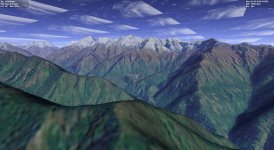
All seems well (the clouds are due to changing earth.cfg path limits to level 20 ) but:
» Orbiter switches to global lower resolution on the mountain tops, yet my converted tiles extend much farther away.
OK, it's logical that it's reverting to the global tileset based on distance, but that's not very seamless... Don't think there's much OT3 can do here.
By analogy I guess that elevation will behave in the same fashion and with the same problems.
Cleaned up my Orbiter 2016 of all tiles and half converted bases and started some tests.
Converted my Lukla base from OBM, no DDS transparency, let's keep it simple.
Got this:
All seems well (the clouds are due to changing earth.cfg path limits to level 20
) but:» Orbiter switches to global lower resolution on the mountain tops, yet my converted tiles extend much farther away.
OK, it's logical that it's reverting to the global tileset based on distance, but that's not very seamless... Don't think there's much OT3 can do here.
By analogy I guess that elevation will behave in the same fashion and with the same problems.
Similar threads


- Replies
- 12
- Views
- 5K


- Replies
- 7
- Views
- 5K
- Replies
- 16
- Views
- 5K
