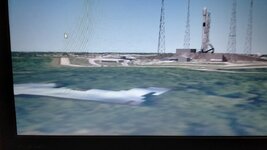
Problem Water surface edges appearing blocky in D3D9

SpaceBoy2

Member
Joined
Jan 29, 2022
Messages
48
Reaction score
10
Points
23
Location
India
I noticed the edges of pools of water appears blocky when running in D3D9 but works fine in DX7. Is this some problem with the D3D9 Beta I'm running with OpenOrbiter?
 
I noticed the edges of pools of water appears blocky when running in D3D9 but works fine in DX7. Is this some problem with the D3D9 Beta I'm running with OpenOrbiter?
There's been no reports of problem like that before. It is known that old Intel GMA graphics chips could produce problems like that as well as some other graphics chips from that era. If that's the case then there's nothing I can do, otherwise you could provide a screen shot showing the problem, it would be helpful.
 
Wait just when I was about to post a screenshot, I loaded up the Atlantis launch scenario and it seems fine! The problem was only with the Falcon9 addon I guess. Mine is an AMD Radeon R4 iGPU for your information. Thanks
 
I could be wrong, but I don't think that is a problem at all. That is just the water mask of a lower resolution surface texture of Florida. You can download the hi-res surface tileset for the Florida and Georgia region and that should up the fidelity of the texture work, and that will make that area around the launch pad closer to reality.

 
But as I said, the Shuttle scenario works fine and all things work fine in DX7.
Now since you said that I got a hunch that maybe I should re-download LC39A add-on that Falcon 9 uses.
Thank you
 
Back
Top