CurlSnout
Well-known member
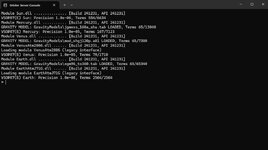
If I load in console-mode only it still crashes. I get the window below and then CTD.
?
?

ORBITER-FORUM will be temporarily closed at 2026-07-23 18:00 UTC while we complete some OF maintenance tasks. The amount of downtime is expected to take up to one hour, but probably less.

I just looked at Mars.cfg both in Orbiter 2016 and Orbiter 2024 archives, and they are different. I didn't know the file was changed for Orbiter 2024. I should have checked this before replying. I'm really sorry for confusing you.I found that my Mars.cfg file in Orbiter 24 already contained the edits you pointed out, with one exception. The MaxPatchResolution in Orbiter 24 was 20, not 16. Will this make a significant difference?



Yes, it's a multi-select box. Hold CTRL while clicking to select multiple applicable options.First of all: A big thanks to all who created Orbiter 2024!
_____
Question: Is it possible to state both "Orbiter 2024" and "Orbiter 2016" in the Orbiter Downloads 'Supported Orbiter version'?
I will check my addons over the next weeks to see if they are Orbiter 2024 ready.
But I would like to retain the backwards compatibility to Orbiter 2016, at least for the near future.
View attachment 41706

Exactly the same for me. Tried adding Orbiter_ng.ex in Nvidia control panel. But nope. Seems to stall and then crash when loading Earth/Base files.If I load in console-mode only it still crashes. I get the window below and then CTD.
View attachment 41676
?
There's no reason to assign the high performance graphics (discrete video card) for "Orbiter_ng.exe". It makes sence to do that for "/Modules/Server/Orbiter.exe". But I'm not sure if this will solve your problem.Tried adding Orbiter_ng.ex in Nvidia control panel.
There's no reason to assign the high performance graphics (discrete video card) for "Orbiter_ng.exe". It makes sence to do that for "/Modules/Server/Orbiter.exe". But I'm not sure if this will solve your problem.
The Europe mirror just returns HTTP 301 Moved Permenantly on all of the files, so downloading them does not react. The 302 Temporary Redirect responses also do not start a download.
 orbit.medphys.ucl.ac.uk

Any chance you copied Orbiter, rather than just making a shortcut to it?Now, here is a funny one:
View attachment 41761
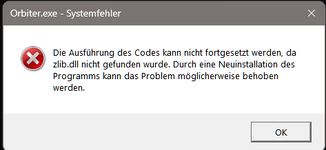
When trying to start Orbiter 2024 (Orbiter_ng) via a desktop shortcut, it shows this error message.
It cannot find zlib.dll.
However, when starting from within the Orbiter-2024 folder, everything runs fine.
zlib.dll is present.
Orbiter with the internal graphcis client is not affected, it runs both from a shortcut or when started direct in the Orbiter-2024 folder.
Has anybody experienced this?
Any recommendation what to do?

Has anybody experienced this?
Any recommendation what to do?
This is because in Orbiter a mesh group cannot have more than 32768 vert or faces, I can't remember exactly.

I'm interested what is the exact quantity limit for elements of a mesh group in Orbiter 2024 and what it refer to (vertices/edges/faces/triangles)?
The question is related to:
There is no bug. The client is using 16bit index list limiting the maximum vertex count to 65536 vertices per a mesh group. If you want to create a larger mesh you need to split the mesh into a multiple mesh groups.My first question : is the 100,000 faces limit can be overrided without bug ?
I would like super-detailled meshes with 500,000 faces, this is why I ask that.