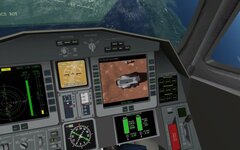
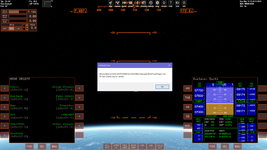
This thread is no longer maintained by me, as the project evolved into a full Media Player MFD. Please see thread:
This is the test thread for VideoPlayerMFD.
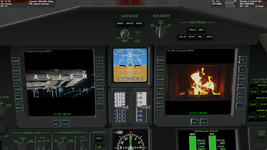
It would be great if a few members of the forum could test this and give me some feedback. I'd like to check if there are any bugs and make the final release a bit more polished (if needed).
How to use:
1. Unzip in your Orbiter root directory and everything will go in its place.
2. Place any videos that you want to watch in the VideoPlayerMFD\OriginalVideos folder
3. Double-click on the file "ProcessVideos_default.bat" located in he VideoPlayerMFD folder. --Your original video(s) will be moved to the ProcessedVideos folder and a copy of their audio will be created --read the manual to find out why this preprocessing step is needed.
4. Run Orbiter_ng.exe and activate the VideoPlayerMFD in the modules tab.
5. In the Parameters tab, set your MFD refresh rate to 0.03 (or lower).
5. Run any Orbiter scenario, open an MFD and select the VideoPlayerMFD.
6. Press LOAD to see the list of playable videos. (These are located in the VideoPlayerMFD\ProcessedVideos folder)
7. Press PLAY to watch the video.
Notes:
This was created and tested in Orbiter2016 with D3D9. I haven't tested in Orbiter2024 (probably needs a recompile for that).
A test video is included in the release. Please try your own videos as well. They may be small clips or entire movies.
For subtitles, place an srt file (named exactly the same as the video) in the ProcessedVideos folder. When the video is playing, press the SUBS button.
If you are using XRSound and you want to disable the ATC chatter (it can be annoying when you want to watch a video), press the ATC button to toggle it off.
Please test and report your findings here.
I am interested in:
-Frame-rate impact on your Orbiter simulation --it should be negligible.
-Audio/video problems --does the video play at an acceptable speed? (~30 fps --remember to set your MFD refresh rate correctly)
-Audio/Video synchronization --the sync should be near perfect. Although it might drift on an individual frame, there is a self-correcting mechanism that prevents it from going out of sync.
-Do you hear the audio clearly? --XRSound is not needed, the MFD plays audio using the native Windows Direct Sound.
-When you switch views, (different view in the cockpit or external view), does the MFD persist? (video and audio should keep playing normally, or pause and continue from where it left off).
-Anything else you would like to add/report.
If you find a bug:
-Please check that you followed the installation steps correctly and also read the manual.
-Please report bugs in a way that can be reproduced by me or others. "HELP it won't play my video!" types of comments are not helpful.
-The source code is included in the zip, under standard MIT license (you can do pretty much what you want with it).
Thanks in advance for testing!

---------------EDIT: THREAD IS CLOSED------------------------------
TEST VERSION ZIP FILE HAS BEEN REMOVED.
ADDON HAS BEEN RELEASED HERE:
-------------------------------------------------------------------------
Hi everyone,
I'm making a beta version of the MediaPlayerMFD available for testing.
This module provides media playback capabilities, including video, audio and web-radio, for the Orbiter cockpit.
I am seeking community feedback regarding stability, bugs, and potential features before committing to a final...
TEST VERSION ZIP FILE HAS BEEN REMOVED.
ADDON HAS BEEN RELEASED HERE:
-------------------------------------------------------------------------
Hi everyone,
I'm making a beta version of the MediaPlayerMFD available for testing.
This module provides media playback capabilities, including video, audio and web-radio, for the Orbiter cockpit.
I am seeking community feedback regarding stability, bugs, and potential features before committing to a final...
- dgatsoulis
- Replies: 12
- Forum: Addon Development


This is the test thread for VideoPlayerMFD.
It would be great if a few members of the forum could test this and give me some feedback. I'd like to check if there are any bugs and make the final release a bit more polished (if needed).
How to use:
1. Unzip in your Orbiter root directory and everything will go in its place.
2. Place any videos that you want to watch in the VideoPlayerMFD\OriginalVideos folder
3. Double-click on the file "ProcessVideos_default.bat" located in he VideoPlayerMFD folder. --Your original video(s) will be moved to the ProcessedVideos folder and a copy of their audio will be created --read the manual to find out why this preprocessing step is needed.
4. Run Orbiter_ng.exe and activate the VideoPlayerMFD in the modules tab.
5. In the Parameters tab, set your MFD refresh rate to 0.03 (or lower).
5. Run any Orbiter scenario, open an MFD and select the VideoPlayerMFD.
6. Press LOAD to see the list of playable videos. (These are located in the VideoPlayerMFD\ProcessedVideos folder)
7. Press PLAY to watch the video.
Notes:
This was created and tested in Orbiter2016 with D3D9. I haven't tested in Orbiter2024 (probably needs a recompile for that).
A test video is included in the release. Please try your own videos as well. They may be small clips or entire movies.
For subtitles, place an srt file (named exactly the same as the video) in the ProcessedVideos folder. When the video is playing, press the SUBS button.
If you are using XRSound and you want to disable the ATC chatter (it can be annoying when you want to watch a video), press the ATC button to toggle it off.
Please test and report your findings here.
I am interested in:
-Frame-rate impact on your Orbiter simulation --it should be negligible.
-Audio/video problems --does the video play at an acceptable speed? (~30 fps --remember to set your MFD refresh rate correctly)
-Audio/Video synchronization --the sync should be near perfect. Although it might drift on an individual frame, there is a self-correcting mechanism that prevents it from going out of sync.
-Do you hear the audio clearly? --XRSound is not needed, the MFD plays audio using the native Windows Direct Sound.
-When you switch views, (different view in the cockpit or external view), does the MFD persist? (video and audio should keep playing normally, or pause and continue from where it left off).
-Anything else you would like to add/report.
If you find a bug:
-Please check that you followed the installation steps correctly and also read the manual.
-Please report bugs in a way that can be reproduced by me or others. "HELP it won't play my video!" types of comments are not helpful.
-The source code is included in the zip, under standard MIT license (you can do pretty much what you want with it).
Thanks in advance for testing!
Last edited: