Project TrajectoryOptimizerMFD open for testing

dgatsoulis

ele2png user
Donator
Joined
Dec 2, 2009
Messages
2,021
Reaction score
623
Points
128
Location
Sparta
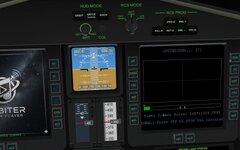
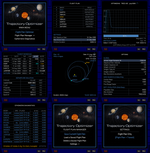
I am releasing a test version of my new project: Trajectory Optimizer MFD.

Download from here:

This is an internal mission planning tool designed to calculate optimal interplanetary transfers entirely within Orbiter. Unlike traditional tools that require manual variable tuning, this MFD uses numerical solvers (Grid Search and Differential Evolution) to find the best flight plan for you based on your constraints.
It is basically a newer (better?) version of Arrowstar's Trajectory Optimization Tool v2.1 external tool from way back in 2012, that you can use entirely within Orbiter as an MFD, with minimum impact on the frame-rate while a trajectory solution is calculated.

Works on Orbiter 2016 and 2024

Key Features:
  • Multi-Body Support: Plan simple transfers (Earth -> Mars) or complex multi-leg tours (e.g., Earth -> Venus -> Mars -> Jupiter).
  • Integrated Optimization: Uses Differential Evolution to solve for deep space maneuvers, powered swingbys, and arrival velocities.
  • Visual Feedback: Watch the solver converge in real-time with a cost-function graph.
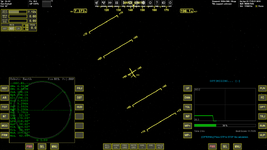
  • Trajectory View: Visualize your path, animate the flight, and check encounter dates visually.
  • Constraint System: Adjust the returned results by constraining the max duration, Launch C3, or Arrival V_inf.

How to Use

I have integrated a full help system into the MFD. Press the HLP button on any page to see context-specific controls and instructions. You shouldn't need a manual to get started.

Quick Workflow:
  1. PLN (Plan): Select your Departure, Arrival, and any Swingby bodies. Set your launch window.
  2. FC (Constraints): (Optional) Set limits for flight time or dV.
  3. RUN: Press RUN and watch the solver work.
  4. TRJ (Trajectory): Once a solution is found, view the flight path and animation.

Testing Focus

This is a beta release, and I am looking for specific feedback on the following:

  1. Performance: Please report if you notice any significant frame-rate drops, specifically while the optimizer is running (computing phase) or when the Trajectory View is animating.
  2. Stability: Report any CTDs or freeze-ups.
  3. Usability: Is the interface intuitive? Did the HLP pages provide enough info?
Here is a video the MFD in action:


Your feedback is welcome!
 
Very cool:cool:
The trajectory viewer is nice too! Very fast, ~1m for a flyby calc, and no noticable fps hit at all!
Only very minor bug I found is text is displayed too large when calculating, but only when it can't find a solution! (could change text to just "Press stop to cancel").
0790.jpg
 
Very cool:cool:
The trajectory viewer is nice too! Very fast, ~1m for a flyby calc, and no noticable fps hit at all!
Only very minor bug I found is text is displayed too large when calculating, but only when it can't find a solution! (could change text to just "Press stop to cancel").
View attachment 46420

Thanks for the feedback!
Nice to hear that it runs fast and smooth (y)
Thanks for catching that bug.
I've confirmed it on unsuccessful calculations too. A simple matter of changing the font size before starting the calculation instead of after finding the first solution.
 
Thank you for the tool. I tried it in Orbiter 2024 quickly. It calculates and animate a trajectory. It looks everything is working as expected, although I haven't tested it much yet.

Do I understand correctly that this tool gives the only information, namely it's not enough for interplanetary flights, so it needs some other MFDs like TransX, etc?
 
Thank you for the tool. I tried it in Orbiter 2024 quickly. It calculates and animate a trajectory. It looks everything is working as expected, although I haven't tested it much yet.

Do I understand correctly that this tool gives the only information, namely it's not enough for interplanetary flights, so it needs some other MFDs like TransX, etc?
Thanks for the quick test and verification that it runs on Orbiter 2024.

Yes you understand correctly. This is a mission planning tool; in order to fly the mission, you need to set it up in some other dedicated MFD (like TransX and/or IMFD).
 
Thank you. I'll try it later when I get more free time.
 
you need to set it up in some other dedicated MFD
Could "ModuleMessagingExt" be used to link it wth TransX/BurntimeCalc?
If you can get it to support moons as well along with your Multimedia player it would be a space truckers dream!;)
 
Could "ModuleMessagingExt" be used to link it wth TransX/BurntimeCalc?
If you can get it to support moons as well along with your Multimedia player it would be a space truckers dream!;)
About the ModuleMessagingExt"
I am not entirely sure, but I think such a thing would need a TransX/BTC recompile. Reason is that I need to send info to TransX, not get info from it. Perhaps it would be "simpler" to have the TrajOpt MFD create the TransX plan as a text that you can then copy to the scenario and have the plan pre-setup with the dates, legs and dV (pro/pl.ch/out) for the first ejection already setup. You still need to enter the angles for the flybies though.
I'll think a bit more about it, in terms of added complexity to the MFD compared to the trade-off.

About the moons:
I have almost completed an additional tool that can be used to create custom kernel files for any body in the Orbiter sim. Real or fictional, as long as it is in Orbiter, the user can create a file for it that can be used by the MFD to calculate its future positions.
The problem with the moons is the time-scale of the orbits and the number of samples needed.
The main bsp file that is distributed with the MFD (Nasa's de442.bsp) has several centuries worth of sample data for the 8 planets + Pluto. ( IIRC the time range is 31-DEC-1549 to 25-JAN-2650). That file alone is 116MB
I made a custom bsp file for Vesta (included in the files of this test, using an earlier iteration of the tool I mentioned). It spans 1950 to 2150 and its size is 4MB
For Deimos, a similar time-span would need many more samples, because of the much faster orbit around Mars. It would take hundreds of MB to cover a similar two century span.
I'll need to create some kind of Solar System Hierarchy finder, to check the main body and its "children". Trivial if the body in question has a dll, but not so much if it doesn't.

Anyways, the moons are on my to do list. I definitely want to setup and fly an Io-Europa-Ganymede-Callisto plan.
 
I am not entirely sure, but I think such a thing would need a TransX/BTC recompile. Reason is that I need to send info to TransX
Yeah, I think your right, Burntime lets you input the "link", TransX doesn't have that.
Perhaps it would be "simpler" to have the TrajOpt MFD create the TransX plan as a text that you can then copy to the scenario and have the plan pre-setup with the dates, legs and dV (pro/pl.ch/out) for the first ejection already setup. You still need to enter the angles for the flybies though.
I'll think a bit more about it, in terms of added complexity to the MFD compared to the trade-off.
(y) There are only 4 variables (/orbit) for a given burn, if one could copy paste in Orbiter?
About the moons:
I have almost completed an additional tool that can be used to create custom kernel files for any body in the Orbiter sim. Real or fictional, as long as it is in Orbiter, the user can create a file for it that can be used by the MFD to calculate its future positions.
The problem with the moons is the time-scale of the orbits and the number of samples needed.
The main bsp file that is distributed with the MFD (Nasa's de442.bsp) has several centuries worth of sample data for the 8 planets + Pluto. ( IIRC the time range is 31-DEC-1549 to 25-JAN-2650). That file alone is 116MB
I made a custom bsp file for Vesta (included in the files of this test, using an earlier iteration of the tool I mentioned). It spans 1950 to 2150 and its size is 4MB
For Deimos, a similar time-span would need many more samples, because of the much faster orbit around Mars. It would take hundreds of MB to cover a similar two century span.
I'll need to create some kind of Solar System Hierarchy finder, to check the main body and its "children". Trivial if the body in question has a dll, but not so much if it doesn't.

Anyways, the moons are on my to do list. I definitely want to setup and fly an Io-Europa-Ganymede-Callisto plan.
Wow! I thought moons were off the menu, that sounds really cool!:)
Fictional system support would be amazing!?
 
It looks the "STP" button label isn't diesplayed for me (but it's presented on a screenshot by @Buck Rogers above) during optimizing (but clicking on "RUN" stops the optimizing):

Без імені.png
 
It looks the "STP" button label isn't diesplayed for me (but it's presented on a screenshot by @Buck Rogers above) during optimizing (but clicking on "RUN" stops the optimizing):

View attachment 46483

Good catch! I've been testing only in the VC of the DeltaGlider, where the button updates are handled by the vessel.
It seems that In the glass-cockpit, Orbiter caches the button labels and does not redraw them unless you explicitly tell it to.
I did not include a button update in the optimization page, thus the STP button not turning into a RUN and vice-versa. Will be fixed in the next version.
 
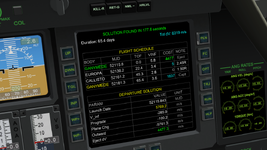
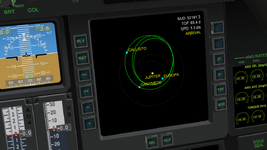
It took a while and was much harder than I expected, but we finally have moon tours implemented. Also the MFD can work with custom solar systems, real or fictional bodies included. I also added a way for the user to create custom spice kernels for any body they want in the sim.

1767734583388.png

1767734250758.png

New version will be uploaded for testing some time in the next few days.
 
Work on the MFD is moving a bit slower these days. I’ve found myself stuck in a bit of a loop while trying to "optimize the optimizer." I want the tool to find "Grand Tour" style solutions for the outer planets, but these are essentially "needle in a haystack" problems. Mathematically, they are often not the most "optimal" in a raw energy sense, so I’m working on coaxing the solver to go against its nature and evolve toward those unlikely, suboptimal trajectories.

The alternative is providing exact start/end dates and hoping the solver "bumps" into the solution, but that feels like it defeats the purpose of having a search engine in the first place.

The Inner Solar System "Rite of Passage"​

For the inner planets, I’ve been using a specific test case that should be every Orbitnaut’s rite of passage:
  • Mission: KSC -> Mercury (Landing) -> KSC (Landing).
  • Constraints: No refueling. Max 7-year total duration.
  • Vessel: Default DeltaGlider.
After a standard ascent to LEO, you're left with roughly 21–21.5 km/s of dV. That sounds like a lot, but a Mercury round trip is brutal. Between the landing and the subsequent launch back to orbit, you burn about 6.5 km/s, leaving only 15 km/s for the entire transfer to AND from Mercury. A direct transfer is impossible; you must use gravity assists, but the 7-year limit prevents you from taking too many "slow" inner-planet slings.

I’ve flown this manually, so I know it’s possible. Currently, the solver can find the trajectory if the mission is split into two solutions, and it just barely squeezes under the dV limit. Since it can now handle this, along with various Earth-Mars-Venus combinations (free returns, cyclers, etc.), I’m confident the core engine is robust for the inner system.

The "Saturn Wall"​

As for the outer solar system, I’m not quite satisfied yet. The MFD finds Jupiter trajectories with multiple inner slings easily, but as soon as I throw Saturn into the mix (trying to replicate Cassini-style trajectories), I hit a wall. I suspect I need to transition from "hard penalties" to "soft directional penalties" in the code. I’ll keep experimenting. Even now, though, I’d venture to say it rivals NASA’s Trajectory Browser—plus, it doesn’t have that pesky 2050 year limit.

This looks amazing and much more realistic then IMFD. I tried targeting the Moon but it would not let me?
Thanks. This has been a passion project for me, ever since I saw Arrowstar's Trajectory Optimization Tool back in 2012. I had thought "it would be really cool to have such a thing as an MFD within Orbiter".
To clarify, this MFD is a planning tool, not a flight computer. It calculates dates and dV requirements, but you’ll still use TransX or IMFD to actually fly the maneuvers (I usually run both).

The optimizer is designed for bodies orbiting a common parent (e.g., planets orbiting the Sun, or moons orbiting Jupiter). It calculates how to move between "siblings." Since a LEO-to-Moon hop doesn't involve moving between two bodies under the same primary gravitational influence in that specific way, there is nothing for the engine to optimize. For Lunar transfers, TransX, IMFD or the dedicated Lunar Transfer MFD remain your best bets.
 
Would it be useful it
The problem with the moons is the time-scale of the orbits and the number of samples needed.
The main bsp file that is distributed with the MFD (Nasa's de442.bsp) has several centuries worth of sample data for the 8 planets + Pluto. ( IIRC the time range is 31-DEC-1549 to 25-JAN-2650). That file alone is 116MB
I made a custom bsp file for Vesta (included in the files of this test, using an earlier iteration of the tool I mentioned). It spans 1950 to 2150 and its size is 4MB
For Deimos, a similar time-span would need many more samples, because of the much faster orbit around Mars. It would take hundreds of MB to cover a similar two century span.
I'll need to create some kind of Solar System Hierarchy finder, to check the main body and its "children". Trivial if the body in question has a dll, but not so much if it doesn't.

Perhaps we can share kernals files: https://github.com/n7275/orbiter/tree/SPICE2 (no promise on timing)
 
Dimitris,

This MFD is amazing! It makes traveling across the Solar System so much simpler. Now, with IMFD, I can just enter the TEj and TIn dates that this MFD provides and I basically have the optimal plan right away! Thank you so much for making it!

I recently uploaded a base I created on Vesta and used this MFD to create my flight plan to get there from Earth. It worked beautifully and came up with the solution in just 14.4 seconds. I credit you in the video (Part 1) which you can see on this thread if you like: https://www.orbiter-forum.com/threads/olbers-base-on-vesta.43511/

One cosmetic change I would suggest would be that you don't need to populate the current value of an item you are changing when you press the INP button. You are pressing that button because you want to change the value, so I don't see the point of having it pop-up with the current value. You just have to erase it first to put your new value in, so I'd suggest you just have it pop-up blank like the other pop-ups in Orbiter.

Great work, sir! (y)
 
Back
Top