OrbitHangar
Addon Comments
- Joined
- Apr 9, 2008
- Messages
- 3,832
- Reaction score
- 18
- Points
- 0

Author: 4th rock
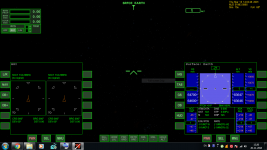
This addon will add a virtual cockpit to the Buran shuttle. The original spacecraft3.dll config file was changed to display the VC. No other visual or performance changes were made.
Also two original textures were changed, so that the cargo bay is more yellow and the cockpit displays the correct panels when on exterior view.
I couldn't find a good image of the instruments between the central windows, so I used some status panels from the LEK/LOK. Not 100% accurate but close IMHO.
This add-on for an add-on is intended to provide a more imersive simulation environment within what is possible without reprograming other authors addons. As far as I'm concerned, I'd very much like to see it included as part of future updates of any Buran addon. So go ahead and use the mesh if you want, just give propper credit.
Required:
CVEL-Buran: http://orbithangar.com/searchid.php?ID=755
Credits:
John Bowles (Nerull) - original addon, configs
diogom - configs
Donamy - original meshes and textures
4throck - cockpit mesh, textures and updated config
Original photo references:
Cockpit mock-up, Central House of Aviation - http://www.flankers-site.co.uk/modl_buran.html
Cockpit instruments, Technik Museum Speyer - http://commons.wikimedia.org/wiki/File:BURAN_Cockpit-Instrumente_0,_Gesamtansicht.jpg
Vadim Lukashevich, http://www.darkroastedblend.com/2007/11/rare-photos-of-russian-buran-space.html
DOWNLOAD