Project Das Fliewatüüt

It's not a bird, or a plane, and neither a car, nor a boat, it's a Fliewatüüt!

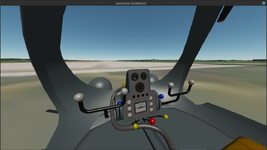
Started on the cockpit.
View attachment 43059
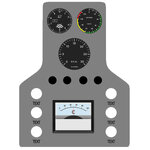
And made a prelimanary plan for the console.
View attachment 43060
Black switches, white lights.
3x lights for the 3 modes (blue?).
One for stowed (yellow).
Treibstoff, fuel low (red)
Raspberry hatch open light?
Do you want animated switches for the internal/external lights?
How would you like it?

Thinking about it, that the console is on the floor it might be better to have the text above or (as you mentioned) on the sides of the lights.

This is a good start. I'll need to think about it a bit. I know that there are some amber lights on the panel. I want to look harder at the videos and see if some visual themes are apparent. I need to sketch up a flowchart of the system transitions and verify what information needs to be conveyed. Not only will the modes need to be indicated, but a ready light of some sort is needed to indicate that the transition between modes is complete. The blades will be foldable and only when the mode is set for water or land operation (no folding blades in flight).
 
The blades will be foldable and only when the mode is set for water or land operation (no folding blades in flight).
Glad to see your keeping safety measures in mind;)

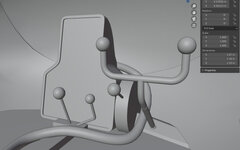
Only problem I see so far, the blue lever blocks the twist of the yoke. Shorter and lower?
Unbenannt-1.jpg
 
Glad to see your keeping safety measures in mind;)

Only problem I see so far, the blue lever blocks the twist of the yoke. Shorter and lower?
View attachment 43073
We'll have to make some adjustments as these are really not feasible controls to use for flight. My idea was to leave the yokes more or less static as they really can't move forward or back or turn like a conventional yoke. Call them pressure sensitive controls, apply sprinkle of pixie dust.

The colored levers I wanted to animate simply as visual indicators. The red center lever is the throttle and I figured that could swing forward to increase throttle and backwards to decrease. Same for the yellow levers which control the folded status for the blades - push them forward to deploy the rotor blades, pull them back to retract them.

The blue levers are to indicate whether the rotor, propellers, or wheels are employed. I think the location of those levers could be adjusted. Perhaps the blue knobs could be aligned horizontally with the lights and labels on either side of the panel. Top light and label for rotor, middle light and label for propeller, and bottom light and label for wheels. In the show there were large amber lights on the sides of the panel, something like those might be visually good and useful for this.

fwtcon-jpg.43060


The four spots above the black rectangle could be annunciator lights or switches. A low fuel light would be a good idea. The other three might be good spots for an engine on indicator, brake indicator, and perhaps an autopilot, like in the R-4.

Maybe the collective indicator could go in the black box area. We could make it a wide white analog display. There is an old type of analog tape gage that moves a horizontal indicator up and down on a white background, similar idea to the collective indicator on the R-4 but wider with a white background which would be reminiscent of the rectangular voltage gauges used in the model. I'll see if I can find some photos of them.

Or maybe we could just wink and nod at the prop instruments used in the show and use an analog voltage indicator and just re-label it the collective? Circular arc from 0 - 100 in the same shape as the volt meter used in the show? This one isn't quite right but is the general style:

41fEhxPrqKL._SY445_SX342_QL70_ML2_.jpg
 
We'll have to make some adjustments as these are really not feasible controls to use for flight. My idea was to leave the yokes more or less static as they really can't move forward or back or turn like a conventional yoke. Call them pressure sensitive controls, apply sprinkle of pixie dust.
Oh there's certainly room for a functional yoke, and the blue lever...
The colored levers I wanted to animate simply as visual indicators. The red center lever is the throttle and I figured that could swing forward to increase throttle and backwards to decrease. Same for the yellow levers which control the folded status for the blades - push them forward to deploy the rotor blades, pull them back to retract them.
So the neutral/starting position is down. Will set accordingly.
The blue levers are to indicate whether the rotor, propellers, or wheels are employed. I think the location of those levers could be adjusted. Perhaps the blue knobs could be aligned horizontally with the lights and labels on either side of the panel
This already nearly the case, starting at the top, If they are shorter they'll line up better and not interfere with the yoke.
Or maybe we could just wink and nod at the prop instruments used in the show and use an analog voltage indicator and just re-label it the collective? Circular arc from 0 - 100 in the same shape as the volt meter used in the show? This one isn't quite right but is the general style:
I can draw one up, apart from the "V" should be a "C" what needs to be changed?
 
Oh there's certainly room for a functional yoke, and the blue lever...

So the neutral/starting position is down. Will set accordingly.

This already nearly the case, starting at the top, If they are shorter they'll line up better and not interfere with the yoke.

I can draw one up, apart from the "V" should be a "C" what needs to be changed?
Not much. It's basically just a level indicator from 0-100.
 
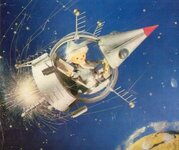
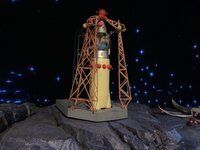
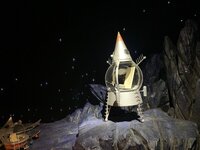
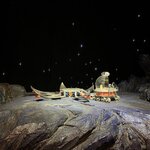
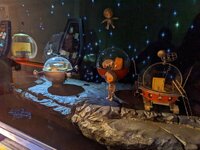
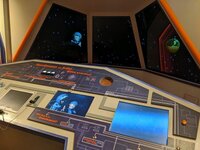
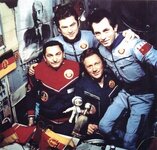
TV show Sandmännchen had a great selection of space technology
img_2997.jpgd9b3a35249f551a35952ff0186df2868.jpg
 
Looks like good material for another project/thread ;)

Progress:
3D 98%, UV's almost sorted (?). To do: textures (this can take a while...).
Did a test skinning, no warping! Just need to find a better font.
Unbenannt-1.jpg
Which begs the question: What color should it be? One is blue, another silver, the other grey?
And a console update:
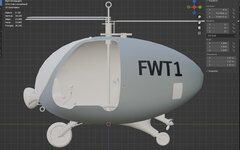
fwtcon.jpg
 
Which begs the question: What color should it be? One is blue, another silver, the other grey?
Are you referring to the the Fliewatüüt from the TV show? I've only seen it as the grey in the show, but I haven't watched all of the episodes. The grey hits my eye as similar to the grey used on German Eurofighters, but my color vision is not the best:

MMP_072_FS_35237_Medium_Grey_large.jpg
 
Now I want Fridolin the dolphin as a propulsion mode. Once a day it will stop towing you, spit water on the windshield, and demand three herring.
 
Are you referring to the the Fliewatüüt from the TV show
I was referring to the screenshots in the zip you posted.
grey used on German Eurofighters
Perfect :)
Now I want Fridolin the dolphin as a propulsion mode. Once a day it will stop towing you, spit water on the windshield, and demand three herring.
That's some deep rabbit hole..., sounds like there needs to be some herrings aboard?

Making progress but still a lot to do. Pressing ahead so long as I have time. Hope to make a first import to Orbiter this weekend (tonight?).
If all goes well I can post it, so you can work your magic and make it "COME ALIVE!" (would you use the .blend file for coord.?), and I can continue with the tex.
2 things still open, The dash/console arrangement, the needles etc. need mesh groups. And some more details need to be added, any pictures/ideas for the cabin back wall?
 
That's some deep rabbit hole..., sounds like there needs to be some herrings aboard?
They did take a bucket of herring with them when Fridolin towed them to the arctic from Mathias's lighthouse. I could make a herring propellant tank :) But they would also need skis for this. I think this would be fun, but perhaps this can wait until we get the base model sorted out.

I've been working through most of the episodes, but not all of them can be autocaptioned in English, and my German is practically nil, so I only have a very general sense of what is happening. They visit Loch Ness, and they go to some spooky old castle, but I'm not sure what is happening there.
Making progress but still a lot to do. Pressing ahead so long as I have time. Hope to make a first import to Orbiter this weekend (tonight?).
If all goes well I can post it, so you can work your magic and make it "COME ALIVE!" (would you use the .blend file for coord.?), and I can continue with the tex.
I will need to get various coordinates and try to figure out the vectors for the propeller shaft axis and the other geometry, so having access to the blender file would be helpful.
2 things still open, The dash/console arrangement, the needles etc. need mesh groups.
Some of this might need to remain open until I get into the nitty gritty of coding it. It'll become obvious what is needed with testing, and once I get a sense of the pilot's viewpoint I will be able to suggest arrangements.
And some more details need to be added, any pictures/ideas for the cabin back wall?
Tobbi had a list of "bits and bobs" that includes rope, a yellow life ring, etc. If you're interested in adding some visual interest that might be a good source for ideas. From what I recall in the show the back wall of the cabin was a rather dark pit where stuff was stowed, not much to see through the windscreen.
 
I will need to get various coordinates
I've tried to use whole numbers for angles where possible to make life hopefully a little easier.
the blender file
I think this is the easiest way.
Some of this might need to remain open until I get into the nitty gritty of coding it. It'll become obvious what is needed with testing, and once I get a sense of the pilot's viewpoint I will be able to suggest arrangements.
No problem, there will be mesh group changes then, the mesh is pretty tidy so that shouldn't be a big problem.
not much to see through the windscreen.
yes
Tobbi had a list of "bits and bobs" that includes rope, a yellow life ring, etc
Great, I can hang a rope there, an inflated life ring might be a bit to big, the seat height is misleading, it's actually quite cramped (not to mention leg room!), and a little hatch, that should do it.

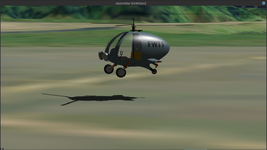
First Orbiter render, still a lot to do but you get idea.
0653.jpg
Mesh, blend, tex attached.
 

Attachments

I have it and the mesh is in Orbiter 2024 here:

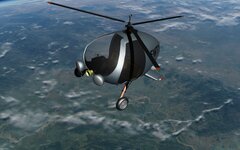
Screenshot at 2025-04-05 19-00-32.png
So much animation to do. I have the basic flight model already in, but getting everything tied together will take a while, especially with work as it is.

I'm excited this is happening. It's just such a cool thing. Thanks @Buck Rogers !
 
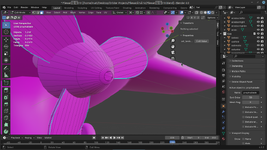
Is there a good way to get the center location of an object (volumes and/or faces) in Blender 4.0? I am trying to determine the wheel axis locations so I can set the contact points correctly.
 
Is there a good way to get the center location of an object (volumes and/or faces) in Blender 4.0?
I'm sure that one can probably script something, but
I am trying to determine the wheel axis locations so I can set the contact points correctly.
Are you using the cursor tool? Zoom in and snap to vertex and you get precision locations.
In object mode click on the right side bar- view for the 3d cursor position.

And no rush from my side, I've just finished the wheels and will probably be busy with the rest for a week or so:)
 
Last edited:
Is there a good way to get the center location of an object (volumes and/or faces) in Blender 4.0? I am trying to determine the wheel axis locations so I can set the contact points correctly.
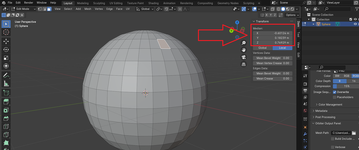
You can select an object in Object Mode, then press Ctrl+A and choose "Location" to reset the object origin to zero in global coordinate system. Switch to Edit Mode, press N to open the Item panel, select an vertex/edge/face and look at coordinates of its median:

Без імені.png

Or you can not to reset the object origin, but then switch from "Local" to "Global" (below the red rectangle).
 
You can select an object in Object Mode, then press Ctrl+A and choose "Location" to reset the object origin to zero in global coordinate system. Switch to Edit Mode, press N to open the Item panel, select an vertex/edge/face and look at coordinates of its median:

View attachment 43148

Or you can not to reset the object origin, but then switch from "Local" to "Global" (below the red rectangle).
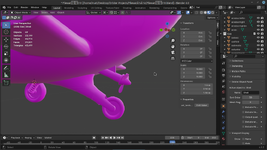
OK, I see how this works now. Next trick is to get the center and axis of rotation of the propeller, rear caster wheel, and yokes.

Screenshot at 2025-04-07 14-50-47.png
Screenshot at 2025-04-07 14-54-08.png
 
Back
Top