
SDK Question Head up Display

huddi

New member
Joined
Apr 20, 2009
Messages
38
Reaction score
0
Points
0
Hi,

I'd like to modify a few things in the HUD (not the artificial horizon),
but I cant find the Code for it. Does anybody know where to find it?

Thanks!
 
What is it you would like to modify?
 
I'd like to be able to choose the reference koordinatesystem between NED-system, orbit-system and the bodyfixed-system of a reference satellite.

I want to change some other things too but this is the start ;)
 
Orbiter is not open-source. Since the HUD is drawn by the orbiter core, you can't change it completely.

However, you can draw additional things on top of what's already there. The default DG does so.
 
You can also disable the default HUD display altogether by simply not calling the base class clbkDrawHUD method. Then you have a clean canvas, and you can do with it whatever you like (within the limits of decency and good taste).
 
Drawing to the HUD can only be (properly*) done from inside the VESSEL class or subclasses. This means that you can't do it from an MFD or non-vessel addon.


*OK, it is possible by modifying the vessel's virtual function table at runtime. LaunchMFD, OMP and a couple of other addons do this. These addons do not seem to play nice together as a result. See the LaunchMFD code here.
 
Thanks, I actually didn't realize that it is closed Source :D...
hope I can still handle it
 
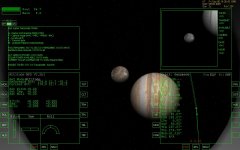
A little question: is possible doing a HUD like this (see attachments) or should i instead use a 2D panel?

These images show in a side (left) the key map and other systems implemented and the other (right, if no rooster, hen :P) side shows a picture captured by the camera (if any), and data transmiter systems. I've capture these images using igel's Luna 3. :P
 

Attachments

  • HUD PROBE.JPG
    HUD PROBE.JPG
    132.1 KB · Views: 33
  • HUD TICOSAT B.JPG
    HUD TICOSAT B.JPG
    132.2 KB · Views: 32
A little question: is possible doing a HUD like this (see attachments) or should i instead use a 2D panel?

These images show in a side (left) the key map and other systems implemented and the other (right, if no rooster, hen :P) side shows a picture captured by the camera (if any), and data transmiter systems. I've capture these images using igel's Luna 3. :P
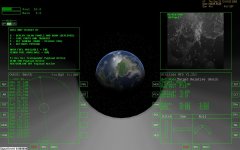
Yes, it's perfectly possible to do that. the clbkDrawHUD method gives you the handle of the screen to draw to, so you can draw anything you like there.
 
Back
Top