
Okay, I've been having this problem for several years now. Every time I install orbiter on my computer, every single scenario loads completely offset to my monitor display. It's like the display has been dragged almost totally off screen to the left, but the game window itself is perfectly centered but mostly white. 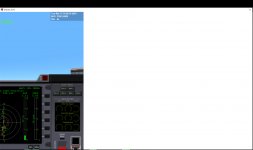 It's happened with 2010 and 2016 Orbiter. I have a Windows 10 64 bit desktop. This is driving me crazy because I have no idea how to fix it, and I used to play Orbiter a lot on my old laptop. Can someone give me some pointers please?
It's happened with 2010 and 2016 Orbiter. I have a Windows 10 64 bit desktop. This is driving me crazy because I have no idea how to fix it, and I used to play Orbiter a lot on my old laptop. Can someone give me some pointers please?


