Project Orbiter MediaPlayerMFD open for testing [CLOSED]

dgatsoulis

ele2png user
Donator
Joined
Dec 2, 2009
Messages
2,021
Reaction score
623
Points
128
Location
Sparta
---------------EDIT: THREAD IS CLOSED------------------------------
TEST VERSION ZIP FILE HAS BEEN REMOVED.
ADDON HAS BEEN RELEASED HERE:
-------------------------------------------------------------------------

Hi everyone,
I'm making a beta version of the MediaPlayerMFD available for testing.
This module provides media playback capabilities, including video, audio and web-radio, for the Orbiter cockpit.
I am seeking community feedback regarding stability, bugs, and potential features before committing to a final release.

1. Installation & Essential Setup
This is the quick guide. Please pay attention to the FFmpeg step, as it's required for video processing.

  • Grab the attached MediaPlayerMFD.zip and extract its contents into your Orbiter root directory, maintaining folder structure.
  • Download FFmpeg: The FFmpeg tool is required to prepare media files.
  • Head to the download page: https://www.gyan.dev/ffmpeg/builds/
  • Scroll down to the "Release Builds" section and download the ffmpeg-release-essentials.7z archive.
  • Open the downloaded 7z file and extract ffmpeg.exe into the [Orbiter Root]\MediaPlayerMFD\ffmpeg\ folder
-Activate in Orbiter: Launch Orbiter, go to the Modules tab, and check MediaPlayerMFD to activate it.

2. Why Videos Need Processing
All videos need processing because the module requires two separate files for playback: the video itself and a dedicated, ultra-stable 11025 Hz WAV audio file.
This low-overhead wav stream acts as the necessary master clock to keep the video synchronized, which is key for playback stability.
Processing Steps:
Put your original video files into: [Orbiter Root]\MediaPlayerMFD\OriginalVideos.
In the [Orbiter Root]\MediaPlayerMFD folder, run Video_Processing_Menu.bat.
Choose your processing quality (e.g., Default).
The script will output the processed video and the synchronized .wav file into [Orbiter Root]\ProcessedVideos.
Use the MFD's MNU to access media from the ProcessedVideos folder.

3. What to Test
The MFD does quite a bit. Here are the main areas to focus on when testing:
Media Sources: Test Video MP4, WMV, etc., Music MP3, FLAC, etc., and the Web Radio feature.
Core Playback: Check for audio/video synchronization issues, especially when using seek (FWD/BCK) buttons.
Performance: Does loading, playing, or stopping media cause the Orbiter frame rate to noticeably drop?
Playlists: Verify the entire workflow: New List, adding tracks, saving, loading, shuffling, and cycling Repeat.
XRSound Control: Enter the XRS Config screen and confirm you can toggle individual components (e.g., ATC, Cabin ambience, etc.
Visuals & Text: Test the different Visualizations (VIS) during music playback.
Check the TXT button for subtitles and lyrics support for videos/music. (samples included in the download).

❓ Quick FAQ for Testers

"I can't process the videos."
1. Check ffmpeg.exe location: It must be named exactly ffmpeg.exe and placed inside MediaPlayerMFD\ffmpeg\ folder.
2. Check input folder: Your original videos must be directly in MediaPlayerMFD\OriginalVideos.

"I loaded a video but I hear no audio."
The video processing step failed to create the companion wav file.
Run the processing script again and check the output for error messages.
If the video truly has no audio track, this is expected behavior.

"The MNU button does nothing."
Check your folder structure. The browser expects media to be in MediaPlayerMFD\ProcessedVideos or XRSound\Default\Music.
If the media file lists are empty, the MNU button may appear to do nothing.

Please report any observed bugs or suggested improvements below.
Thanks for helping out!

Here is a video of the MediaPlayerMFD in action:
 
Last edited:
Hello, i tried this..and after hitting the .bat i can choose option 1-4 but after doing that i got an error report : "Launching Default processing script.." - System cannot find the path
i think i have the wrong path in the .bat file - this is the original path
REM Change directory to the location of THIS script
cd /d "%~dp0"

i tried this path-format :
REM Change directory to the location of THIS script.
cd /D:\Games\Orbiter_2016_25\MediaPlayerMFD
but no success..
 
Hello, i tried this..and after hitting the .bat i can choose option 1-4 but after doing that i got an error report : "Launching Default processing script.." - System cannot find the path
i think i have the wrong path in the .bat file - this is the original path
REM Change directory to the location of THIS script
cd /d "%~dp0"

i tried this path-format :
REM Change directory to the location of THIS script.
cd /D:\Games\Orbiter_2016_25\MediaPlayerMFD
but no success..
(so you chose option 3 in the menu).
Thanks for catching that. I checked the paths and it seems that there is an incorrect path setting in the file MediaPlayerMFD\ffmpeg\ProcessVideos_1024.bat

open that file with a text editor and find the line:
set "FFMPEG_PATH=bin\ffmpeg.exe"

change it to
set "FFMPEG_PATH=ffmpeg.exe"

So now when you choose option 3 in the menu, it should work (provided you downloaded ffmpeg and placed ffmpeg.exe in the MediaPlayerMFD\ffmpeg\ folder.


The other bat files don't seem to have this error. For now, other users should follow this fix.
 
I had the path-error in all 3 options.
now i changed the .bat in : set "FFMPEG_PATH=ffmpeg.exe" in the ffmpeg-folder, but still the path error..
But, what worked for me to process the video was : i operate the .bat-file direct in the ffmpeg-folder (for example - ProcessVideos_512.bat)
 
I had the path-error in all 3 options.
now i changed the .bat in : set "FFMPEG_PATH=ffmpeg.exe" in the ffmpeg-folder, but still the path error..
But, what worked for me to process the video was : i operate the .bat-file direct in the ffmpeg-folder (for example - ProcessVideos_512.bat)
thanks for the feedback. I've corrected all the paths. There should be no more errors now. Please download the new file attached in post #1. unzip in your Orbiter folder and overwrite all the previous files.
 
Thanks Dimitris! Great work!
The only issue I have run across so far is getting a CTD when opening the MFD while XRSound module is active. It runs just fine if I deactivate XRSound module in the launchpad.
-Orbiter 2016
-Orbiter Sound 5.0
-XRSound 2.0
-Sound Bridge OS by Abdullah Radwan

Other than that, all seems well.

No problems adding, processing and playing my original videos... works great.
 
Thanks Dimitris! Great work!
The only issue I have run across so far is getting a CTD when opening the MFD while XRSound module is active. It runs just fine if I deactivate XRSound module in the launchpad.
-Orbiter 2016
-Orbiter Sound 5.0
-XRSound 2.0
-Sound Bridge OS by Abdullah Radwan

Other than that, all seems well.

No problems adding, processing and playing my original videos... works great.
Hey Aztro, thanks for testing! Glad to hear it works well on your end. The XRS CTD is probably because the Sound Bridge is replacing the XRSound module.
 
Thanks Dimitris. Uninstalling the sound bridge and then reinstalling XR Sound 2.0 did the trick. Works great now with all XRS options available.
 
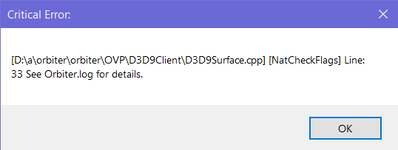
Hi, I just wanted to ask if it's supposed to work with Orbiter 2024 and if anyone got it worked with Orbiter 2024? I just get the error after choosing the MFD:

Без імені.png

Here's my Orbiter.log:
Code:
**** Orbiter.log
000000.001: Build Dec 31 2024 [v.602931718]
000000.010: Timer precision: 1e-07 sec
000000.079: Found 0 joystick(s)
000000.315: ---------------------------------------------------------------
000000.322: BaseDir    : C:\Users\xolms\Downloads\Orbiter 2024 for flights\
000000.331: ConfigDir  : C:\Users\xolms\Downloads\Orbiter 2024 for flights\Config\
000000.338: MeshDir    : C:\Users\xolms\Downloads\Orbiter 2024 for flights\Meshes\
000000.346: TextureDir : C:\Users\xolms\Downloads\Orbiter 2024 for flights\Textures\
000000.354: HightexDir : C:\Users\xolms\Downloads\Orbiter 2024 for flights\Textures2\
000000.362: ScenarioDir: C:\Users\xolms\Downloads\Orbiter 2024 for flights\Scenarios\
000000.370: ---------------------------------------------------------------
000000.418: D3D9 DLLs  : C:\Windows\SYSTEM32\d3d9.dll [v 10.0.19041.5794]
000000.427:            : C:\Windows\SYSTEM32\d3dx9_43.dll [v 9.29.952.3111]
000000.436: ---------------------------------------------------------------
000000.445: Module D3D9Client.dll ........ [Build 241231, API 241231]
000001.416: [D3D9] Native Interface
000001.426: [D3D9] DirectX9 Created...
000001.437: [D3D9] Initialize VideoTab...
000001.465: Loading module D3D9Client
000001.475: Module ScnEditor.dll ......... [Build 241231, API 241231]
000001.485: Loading module ScnEditor (legacy interface)
000001.496: Module XRSound.dll ........... [Build 241231, API 241231]
000001.506: Loading module XRSound
000001.516: Module TerrainToolKit.dll .... [Build 241231, API 241231]
000001.526: Loading module TerrainToolKit
000001.537: Module MediaPlayerMFD.dll .... [Build 251109, API 160828]
000001.547: MediaPlayerMFD: Orbiter Root Path (derived from module path): C:\Users\xolms\Downloads\Orbiter 2024 for flights
000001.556: MediaPlayerMFD: Module Initialized.
000001.568: Loading module MediaPlayerMFD (legacy interface)
000001.578: Module AtlantisConfig.dll .... [Build 241231, API 241231]
000001.588: Loading module AtlantisConfig (legacy interface)
000001.597: Module AtmConfig.dll ......... [Build 241231, API 241231]
000001.607: Loading module AtmConfig (legacy interface)
000001.617: Module DGConfigurator.dll .... [Build 241231, API 241231]
000001.628: Loading module DGConfigurator (legacy interface)
000005.190:
000005.200: **** Creating simulation session
000005.213: D3D9: [DirectX 9 Initialized]
000005.223: D3D9: 3D-Adapter.............. : NVIDIA GeForce GTX 1650 Ti
000005.234: D3D9: MaxTextureWidth......... : 16384
000005.246: D3D9: MaxTextureHeight........ : 16384
000005.257: D3D9: MaxTextureRepeat........ : 8192
000005.267: D3D9: VolTexAddressCaps....... : 0x3F
000005.278: D3D9: NumSimultaneousRTs...... : 4
000005.288: D3D9: VertexDeclCaps.......... : 0x30F
000005.298: D3D9: MiscCaps................ : 0x2FCEF2
000005.307: D3D9: Separate AlphaBlend..... : Yes
000005.317: D3D9: Shadow Mapping.......... : Yes
000005.327: D3D9: D3DFMT_A16B16G16R16F.... : Yes
000005.338: D3D9: Vertex_A16B16G16R16F.... : Yes
000005.347: D3D9: Vertex_A32B32G32R32F.... : Yes
000005.357: D3D9: Vertex_R16F............. : Yes
000005.367: D3D9: Vertex_R32F............. : Yes
000005.377: D3D9: D3DFMT_A32B32G32R32F.... : Yes
000005.387: D3D9: D3DFMT_D32F_LOCKABLE.... : Yes
000005.397: D3D9: D3DFMT_A2R10G10B10...... : Yes
000005.408: D3D9: D3DFMT_L8............... : Yes
000005.418: D3D9: D3DDTCAPS_DEC3N......... : No
000005.428: D3D9: D3DDTCAPS_FLOAT16_2..... : Yes
000005.438: D3D9: D3DDTCAPS_FLOAT16_4..... : Yes
000005.448: D3D9: Runs under WINE......... : No
000005.457: D3D9: D3D9Build Date.......... : 0
000006.143: D3D9: Available Texture Memory : 4080 MB
000006.153: D3D9: [3DDevice Initialized]
000016.582: Loaded 41057 records from star database
000018.221: D3D9: [D3D9Client Initialized]
000021.190: Module Sun.dll ............... [Build 241231, API 241231]
000021.213: VSOP87(E) Sun: Precision 1.0e-06, Terms 554/6634
000021.240: Module Mercury.dll ........... [Build 241231, API 241231]
000021.250: GRAVITY MODEL: GravityModels\jgmess_160a_sha.tab LOADED, Terms 65/13040
000021.275: VSOP87(B) Mercury: Precision 1.0e-05, Terms 167/7123
000021.307: Module Venus.dll ............. [Build 241231, API 241231]
000021.318: GRAVITY MODEL: GravityModels\mod_shgj120p.a01 LOADED, Terms 65/7380
000021.329: Module VenusAtm2006.dll ...... [Build 241231, API 241231]
000021.339: Loading module VenusAtm2006 (legacy interface)
000021.349: VSOP87(B) Venus: Precision 1.0e-05, Terms 79/1710
000021.381: Module Earth.dll ............. [Build 241231, API 241231]
000021.418: GRAVITY MODEL: GravityModels\egm96_to360.tab LOADED, Terms 65/65340
000021.429: Module EarthAtmJ71G.dll ...... [Build 241231, API 241231]
000021.439: Loading module EarthAtmJ71G (legacy interface)
000021.449: VSOP87(B) Earth: Precision 1.0e-08, Terms 2564/2564
000022.281: Module Moon.dll .............. [Build 241231, API 241231]
000022.292: GRAVITY MODEL: GravityModels\jgl165p1.sha LOADED, Terms 65/13860
000022.302: ELP82: Precision 1.0e-05, Terms 116/829
000022.339: Module Mars.dll .............. [Build 241231, API 241231]
000022.349: GRAVITY MODEL: GravityModels\jgmro_120f_sha.tab LOADED, Terms 65/7380
000022.359: Module MarsAtm2006.dll ....... [Build 241231, API 241231]
000022.370: Loading module MarsAtm2006 (legacy interface)
000022.392: VSOP87(B) Mars: Precision 1.0e-05, Terms 405/6400
000022.424: Module Phobos.dll ............ [Build ******, API 060425]
000022.439: Module Deimos.dll ............ [Build ******, API 060425]
000022.473: GRAVITY MODEL: GravityModels\JGDWN_VES20H_SHA.TAB LOADED, Terms 65/230
000022.507: Module Galsat.dll ............ [Build 241231, API 241231]
000022.517: Module Jupiter.dll ........... [Build 241231, API 241231]
000022.530: VSOP87(B) Jupiter: Precision 1.0e-06, Terms 1624/3625
000022.541: Module Io.dll ................ [Build 241231, API 241231]
000022.556: Module Europa.dll ............ [Build 241231, API 241231]
000022.573: Module Ganymede.dll .......... [Build 241231, API 241231]
000022.589: Module Callisto.dll .......... [Build 241231, API 241231]
000022.624: Module Satsat.dll ............ [Build 241231, API 241231]
000022.634: Module Saturn.dll ............ [Build 241231, API 241231]
000022.657: VSOP87(B) Saturn: Precision 1.0e-06, Terms 2904/6365
000022.668: Module Mimas.dll ............. [Build 241231, API 241231]
000022.679: SATSAT Mimas: Terms 113
000022.689: Module Enceladus.dll ......... [Build 241231, API 241231]
000022.699: SATSAT Enceladus: Terms 33
000022.710: Module Tethys.dll ............ [Build 241231, API 241231]
000022.719: SATSAT Tethys: Terms 101
000022.729: Module Dione.dll ............. [Build 241231, API 241231]
000022.739: SATSAT Dione: Terms 59
000022.750: Module Rhea.dll .............. [Build 241231, API 241231]
000022.760: SATSAT Rhea: Terms 68
000022.772: Module Titan.dll ............. [Build 241231, API 241231]
000022.782: SATSAT Titan: Terms 100
000022.806: Module Iapetus.dll ........... [Build 241231, API 241231]
000022.817: SATSAT Iapetus: Terms 605
000022.839: Module Uranus.dll ............ [Build 241231, API 241231]
000022.858: VSOP87(B) Uranus: Precision 1.0e-06, Terms 1827/5269
000022.869: Module Miranda.dll ........... [Build ******, API 060425]
000022.899: Module Ariel.dll ............. [Build ******, API 060425]
000022.911: Module Umbriel.dll ........... [Build ******, API 060425]
000022.923: Module Titania.dll ........... [Build ******, API 060425]
000022.939: Module Oberon.dll ............ [Build ******, API 060425]
000022.972: Module Neptune.dll ........... [Build 241231, API 241231]
000022.982: VSOP87(B) Neptune: Precision 1.0e-06, Terms 391/2024
000023.024: Finished initialising world
000028.088: Module DeltaGlider.dll ....... [Build 241231, API 241231]
000028.100: Module LuaInline.dll ......... [Build 241231, API 241231]
000028.109: Loading module LuaInline
000042.957: Module ShuttleA.dll .......... [Build 241231, API 241231]
000043.298: Module ShuttlePB.dll ......... [Build 241231, API 241231]
000043.337: Finished initialising status
000043.348: Finished initialising camera
000043.473: Finished setting up render state
000043.498: D3D9: [Scene Initialized]
000043.858: Finished initialising panels
000043.877: XRSound 3.00 RC2 [32-bit Release], Build Date : Dec 31 2024 initialized using sound driver DirectSound8; irrKlang version = 1.6.0.  XRSound UpdateInterval = 0.050 (20.0 updates per second)
000045.781: D3D9: NewShader [DG\deltaglider_ns]=4
000045.792: D3D9: NewShader [DG\deltaglider_ns]=4
000056.805: MFPlayer: DirectSound Initialized Successfully.
000056.816: MFPlayer: Engine initialized and thread started.
000056.826: MusicPlayer: MFStartup successful.
000056.836: MusicPlayer(Thread): DSound Secondary resources released.
000056.846: MusicPlayer: DirectSound Initialized Successfully.
000056.855: MusicPlayer: KissFFT allocated.
000056.866: MusicPlayer(Thread): MFStartup successful.
000056.876: MusicPlayer(Thread): Entering PlaybackLoop.
und API version 2.00
000056.886: OAPISURFACE_GDI is incomaptible with OAPISURFACE_RENDERTARGET and OAPISURFACE_SKETCHPAD
 
Hi, I just wanted to ask if it's supposed to work with Orbiter 2024 and if anyone got it worked with Orbiter 2024? I just get the error after choosing the MFD:

View attachment 46060

Here's my Orbiter.log:
Code:
**** Orbiter.log
000000.001: Build Dec 31 2024 [v.602931718]
000000.010: Timer precision: 1e-07 sec
000000.079: Found 0 joystick(s)
000000.315: ---------------------------------------------------------------
000000.322: BaseDir    : C:\Users\xolms\Downloads\Orbiter 2024 for flights\
000000.331: ConfigDir  : C:\Users\xolms\Downloads\Orbiter 2024 for flights\Config\
000000.338: MeshDir    : C:\Users\xolms\Downloads\Orbiter 2024 for flights\Meshes\
000000.346: TextureDir : C:\Users\xolms\Downloads\Orbiter 2024 for flights\Textures\
000000.354: HightexDir : C:\Users\xolms\Downloads\Orbiter 2024 for flights\Textures2\
000000.362: ScenarioDir: C:\Users\xolms\Downloads\Orbiter 2024 for flights\Scenarios\
000000.370: ---------------------------------------------------------------
000000.418: D3D9 DLLs  : C:\Windows\SYSTEM32\d3d9.dll [v 10.0.19041.5794]
000000.427:            : C:\Windows\SYSTEM32\d3dx9_43.dll [v 9.29.952.3111]
000000.436: ---------------------------------------------------------------
000000.445: Module D3D9Client.dll ........ [Build 241231, API 241231]
000001.416: [D3D9] Native Interface
000001.426: [D3D9] DirectX9 Created...
000001.437: [D3D9] Initialize VideoTab...
000001.465: Loading module D3D9Client
000001.475: Module ScnEditor.dll ......... [Build 241231, API 241231]
000001.485: Loading module ScnEditor (legacy interface)
000001.496: Module XRSound.dll ........... [Build 241231, API 241231]
000001.506: Loading module XRSound
000001.516: Module TerrainToolKit.dll .... [Build 241231, API 241231]
000001.526: Loading module TerrainToolKit
000001.537: Module MediaPlayerMFD.dll .... [Build 251109, API 160828]
000001.547: MediaPlayerMFD: Orbiter Root Path (derived from module path): C:\Users\xolms\Downloads\Orbiter 2024 for flights
000001.556: MediaPlayerMFD: Module Initialized.
000001.568: Loading module MediaPlayerMFD (legacy interface)
000001.578: Module AtlantisConfig.dll .... [Build 241231, API 241231]
000001.588: Loading module AtlantisConfig (legacy interface)
000001.597: Module AtmConfig.dll ......... [Build 241231, API 241231]
000001.607: Loading module AtmConfig (legacy interface)
000001.617: Module DGConfigurator.dll .... [Build 241231, API 241231]
000001.628: Loading module DGConfigurator (legacy interface)
000005.190:
000005.200: **** Creating simulation session
000005.213: D3D9: [DirectX 9 Initialized]
000005.223: D3D9: 3D-Adapter.............. : NVIDIA GeForce GTX 1650 Ti
000005.234: D3D9: MaxTextureWidth......... : 16384
000005.246: D3D9: MaxTextureHeight........ : 16384
000005.257: D3D9: MaxTextureRepeat........ : 8192
000005.267: D3D9: VolTexAddressCaps....... : 0x3F
000005.278: D3D9: NumSimultaneousRTs...... : 4
000005.288: D3D9: VertexDeclCaps.......... : 0x30F
000005.298: D3D9: MiscCaps................ : 0x2FCEF2
000005.307: D3D9: Separate AlphaBlend..... : Yes
000005.317: D3D9: Shadow Mapping.......... : Yes
000005.327: D3D9: D3DFMT_A16B16G16R16F.... : Yes
000005.338: D3D9: Vertex_A16B16G16R16F.... : Yes
000005.347: D3D9: Vertex_A32B32G32R32F.... : Yes
000005.357: D3D9: Vertex_R16F............. : Yes
000005.367: D3D9: Vertex_R32F............. : Yes
000005.377: D3D9: D3DFMT_A32B32G32R32F.... : Yes
000005.387: D3D9: D3DFMT_D32F_LOCKABLE.... : Yes
000005.397: D3D9: D3DFMT_A2R10G10B10...... : Yes
000005.408: D3D9: D3DFMT_L8............... : Yes
000005.418: D3D9: D3DDTCAPS_DEC3N......... : No
000005.428: D3D9: D3DDTCAPS_FLOAT16_2..... : Yes
000005.438: D3D9: D3DDTCAPS_FLOAT16_4..... : Yes
000005.448: D3D9: Runs under WINE......... : No
000005.457: D3D9: D3D9Build Date.......... : 0
000006.143: D3D9: Available Texture Memory : 4080 MB
000006.153: D3D9: [3DDevice Initialized]
000016.582: Loaded 41057 records from star database
000018.221: D3D9: [D3D9Client Initialized]
000021.190: Module Sun.dll ............... [Build 241231, API 241231]
000021.213: VSOP87(E) Sun: Precision 1.0e-06, Terms 554/6634
000021.240: Module Mercury.dll ........... [Build 241231, API 241231]
000021.250: GRAVITY MODEL: GravityModels\jgmess_160a_sha.tab LOADED, Terms 65/13040
000021.275: VSOP87(B) Mercury: Precision 1.0e-05, Terms 167/7123
000021.307: Module Venus.dll ............. [Build 241231, API 241231]
000021.318: GRAVITY MODEL: GravityModels\mod_shgj120p.a01 LOADED, Terms 65/7380
000021.329: Module VenusAtm2006.dll ...... [Build 241231, API 241231]
000021.339: Loading module VenusAtm2006 (legacy interface)
000021.349: VSOP87(B) Venus: Precision 1.0e-05, Terms 79/1710
000021.381: Module Earth.dll ............. [Build 241231, API 241231]
000021.418: GRAVITY MODEL: GravityModels\egm96_to360.tab LOADED, Terms 65/65340
000021.429: Module EarthAtmJ71G.dll ...... [Build 241231, API 241231]
000021.439: Loading module EarthAtmJ71G (legacy interface)
000021.449: VSOP87(B) Earth: Precision 1.0e-08, Terms 2564/2564
000022.281: Module Moon.dll .............. [Build 241231, API 241231]
000022.292: GRAVITY MODEL: GravityModels\jgl165p1.sha LOADED, Terms 65/13860
000022.302: ELP82: Precision 1.0e-05, Terms 116/829
000022.339: Module Mars.dll .............. [Build 241231, API 241231]
000022.349: GRAVITY MODEL: GravityModels\jgmro_120f_sha.tab LOADED, Terms 65/7380
000022.359: Module MarsAtm2006.dll ....... [Build 241231, API 241231]
000022.370: Loading module MarsAtm2006 (legacy interface)
000022.392: VSOP87(B) Mars: Precision 1.0e-05, Terms 405/6400
000022.424: Module Phobos.dll ............ [Build ******, API 060425]
000022.439: Module Deimos.dll ............ [Build ******, API 060425]
000022.473: GRAVITY MODEL: GravityModels\JGDWN_VES20H_SHA.TAB LOADED, Terms 65/230
000022.507: Module Galsat.dll ............ [Build 241231, API 241231]
000022.517: Module Jupiter.dll ........... [Build 241231, API 241231]
000022.530: VSOP87(B) Jupiter: Precision 1.0e-06, Terms 1624/3625
000022.541: Module Io.dll ................ [Build 241231, API 241231]
000022.556: Module Europa.dll ............ [Build 241231, API 241231]
000022.573: Module Ganymede.dll .......... [Build 241231, API 241231]
000022.589: Module Callisto.dll .......... [Build 241231, API 241231]
000022.624: Module Satsat.dll ............ [Build 241231, API 241231]
000022.634: Module Saturn.dll ............ [Build 241231, API 241231]
000022.657: VSOP87(B) Saturn: Precision 1.0e-06, Terms 2904/6365
000022.668: Module Mimas.dll ............. [Build 241231, API 241231]
000022.679: SATSAT Mimas: Terms 113
000022.689: Module Enceladus.dll ......... [Build 241231, API 241231]
000022.699: SATSAT Enceladus: Terms 33
000022.710: Module Tethys.dll ............ [Build 241231, API 241231]
000022.719: SATSAT Tethys: Terms 101
000022.729: Module Dione.dll ............. [Build 241231, API 241231]
000022.739: SATSAT Dione: Terms 59
000022.750: Module Rhea.dll .............. [Build 241231, API 241231]
000022.760: SATSAT Rhea: Terms 68
000022.772: Module Titan.dll ............. [Build 241231, API 241231]
000022.782: SATSAT Titan: Terms 100
000022.806: Module Iapetus.dll ........... [Build 241231, API 241231]
000022.817: SATSAT Iapetus: Terms 605
000022.839: Module Uranus.dll ............ [Build 241231, API 241231]
000022.858: VSOP87(B) Uranus: Precision 1.0e-06, Terms 1827/5269
000022.869: Module Miranda.dll ........... [Build ******, API 060425]
000022.899: Module Ariel.dll ............. [Build ******, API 060425]
000022.911: Module Umbriel.dll ........... [Build ******, API 060425]
000022.923: Module Titania.dll ........... [Build ******, API 060425]
000022.939: Module Oberon.dll ............ [Build ******, API 060425]
000022.972: Module Neptune.dll ........... [Build 241231, API 241231]
000022.982: VSOP87(B) Neptune: Precision 1.0e-06, Terms 391/2024
000023.024: Finished initialising world
000028.088: Module DeltaGlider.dll ....... [Build 241231, API 241231]
000028.100: Module LuaInline.dll ......... [Build 241231, API 241231]
000028.109: Loading module LuaInline
000042.957: Module ShuttleA.dll .......... [Build 241231, API 241231]
000043.298: Module ShuttlePB.dll ......... [Build 241231, API 241231]
000043.337: Finished initialising status
000043.348: Finished initialising camera
000043.473: Finished setting up render state
000043.498: D3D9: [Scene Initialized]
000043.858: Finished initialising panels
000043.877: XRSound 3.00 RC2 [32-bit Release], Build Date : Dec 31 2024 initialized using sound driver DirectSound8; irrKlang version = 1.6.0.  XRSound UpdateInterval = 0.050 (20.0 updates per second)
000045.781: D3D9: NewShader [DG\deltaglider_ns]=4
000045.792: D3D9: NewShader [DG\deltaglider_ns]=4
000056.805: MFPlayer: DirectSound Initialized Successfully.
000056.816: MFPlayer: Engine initialized and thread started.
000056.826: MusicPlayer: MFStartup successful.
000056.836: MusicPlayer(Thread): DSound Secondary resources released.
000056.846: MusicPlayer: DirectSound Initialized Successfully.
000056.855: MusicPlayer: KissFFT allocated.
000056.866: MusicPlayer(Thread): MFStartup successful.
000056.876: MusicPlayer(Thread): Entering PlaybackLoop.
und API version 2.00
000056.886: OAPISURFACE_GDI is incomaptible with OAPISURFACE_RENDERTARGET and OAPISURFACE_SKETCHPAD

For now this is strictly for Orbiter 2016. It will not work with Orbiter 2024.
 
I added Lua script interface. You can now play videos from a Lua script.
Allows for cinematic intros, mission briefings, or automated cues.

Code:
require("VideoPlayer")

local MFD_ID = 0 -- Left MFD
local vid = oapi.get_filepath("MediaPlayerMFD\\ProcessedVideos\\briefing.mp4")

-- Start playback
VideoPlayer.play(MFD_ID, vid, false, 1.0)

-- Loop until the video finishes
while VideoPlayer.is_playing(MFD_ID) do
    local t = VideoPlayer.get_time(MFD_ID)
    local d = VideoPlayer.get_duration(MFD_ID)
    
    -- Print status to debug console every frame
    oapi.dbg_out(string.format("Time: %.1f / %.1f", t, d))
    
    proc.skip() -- Wait for next frame
end

oapi.dbg_out("Briefing Complete.")

The test zip file at the top has not been updated yet.
I will do some more testing myself and write up the manual.
The MFD will be released in about a week from now.
 
Back
Top