

You are using an out of date browser. It may not display this or other websites correctly.
You should upgrade or use an alternative browser.
You should upgrade or use an alternative browser.
Discussion Space: 1999 updates ?
- Thread starter 4throck
- Start date
try this
Still no exhaust
Do you mean no thrust or no exhaust textures?
exhaust textures.
And I get:
.\UPROBEFRONT.CPP(182) : error C2660: 'UPROBEFRONT::AddExhaust' : function does not take 5 arguments
.\UPROBEFRONT.CPP(183) : error C2660: 'UPROBEFRONT::AddExhaust' : function does not take 5 arguments
.\UPROBEFRONT.CPP(184) : error C2660: 'UPROBEFRONT::AddExhaust' : function does not take 5 arguments
.\UPROBEFRONT.CPP(185) : error C2660: 'UPROBEFRONT::AddExhaust' : function does not take 5 arguments
Not sure what is going on. It is the same code from the rear section which has exhuast.
On the MBA look at post #7.http://www.orbiter-forum.com/showthread.php?t=18953. You have to add the lines to the base.cfg.
Do you mean no thrust or no exhaust textures?
Code:
 PROPELLANT_HANDLE TANK;
    TANK = CreatePropellantResource (FUELMASS);

    // ***************** thruster definitions *******************
    th_main = CreateThruster (_V(0,0,0), _V(0,0,1), 13000000, TANK, ISP);
    CreateThrusterGroup (&th_main, 1, THGROUP_MAIN);

    th_retro = CreateThruster (_V(0,0,0), _V(0,0,-1), 13000000, TANK, ISP);
    CreateThrusterGroup (&th_retro, 1, THGROUP_RETRO);
//th_hover = CreateThruster (_V(0,0,0), _V(0,1,0), 1300, TANK, ISP);
//    CreateThrusterGroup (&th_hover, 1, THGROUP_HOVER);

    //AddExhaust (th_main, 5, .25, _V(1.7,0, -6.7), _V(0, 0,-1));
    //AddExhaust (th_main, 5, .25, _V(-1.7,0, -6.7), _V(0,0,-1));

    AddExhaust (th_main, 7, .75, _V(-.125,1.934, -58.11), _V(0,0,-1));
    AddExhaust (th_main, 7, .75, _V(-4.125,-1.934, -58.11), _V(0,0,-1));
    AddExhaust (th_main, 7, .75, _V(4.125,0, -58.11), _V(0,0,-1));
    AddExhaust (th_main, 7, .75, _V(-.125,0, -58.11), _V(0,0,-1));
And I get:
.\UPROBEFRONT.CPP(182) : error C2660: 'UPROBEFRONT::AddExhaust' : function does not take 5 arguments
.\UPROBEFRONT.CPP(183) : error C2660: 'UPROBEFRONT::AddExhaust' : function does not take 5 arguments
.\UPROBEFRONT.CPP(184) : error C2660: 'UPROBEFRONT::AddExhaust' : function does not take 5 arguments
.\UPROBEFRONT.CPP(185) : error C2660: 'UPROBEFRONT::AddExhaust' : function does not take 5 arguments
Not sure what is going on. It is the same code from the rear section which has exhuast.
On the MBA look at post #7.http://www.orbiter-forum.com/showthread.php?t=18953. You have to add the lines to the base.cfg.
Last edited:
Ok got the exhuast on the cm. Now back to the how to fly the cm and rear section. One thought would be if they are attached set a camera point for the rear to be in the cockpit of the cm.
This is the result.
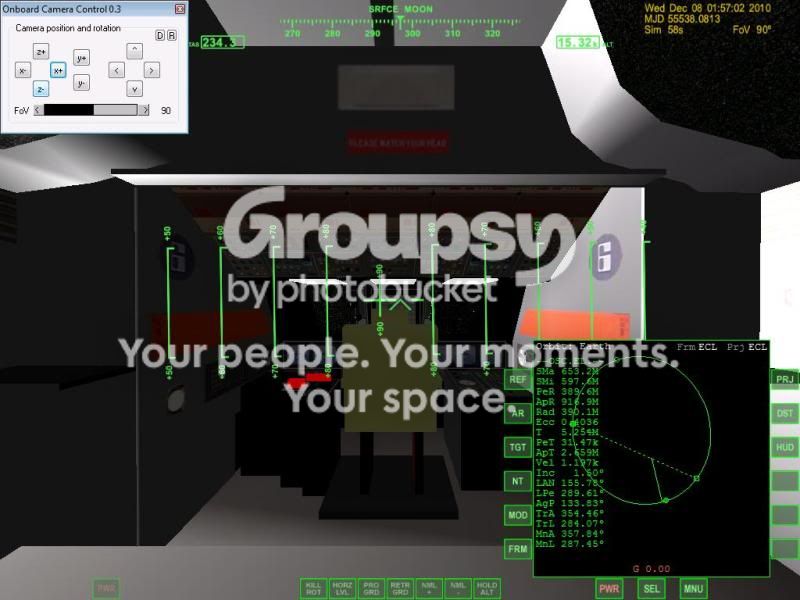
if I move more forward I run into a clip issue.
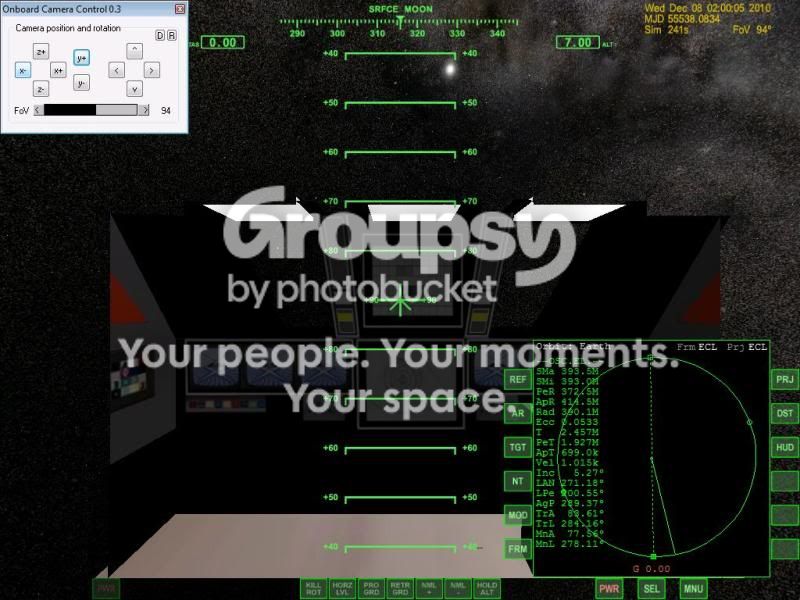
I have this set
So any thoughts or ideas?
One thought not sure if possible is have 1 vessel that when detach it is deleted and then the 2 appear. Not sure if that is possible.
This is the result.
if I move more forward I run into a clip issue.
I have this set
Code:
SetClipRadius(0.01);So any thoughts or ideas?
One thought not sure if possible is have 1 vessel that when detach it is deleted and then the 2 appear. Not sure if that is possible.
Try this UltraProbe:
http://www.4shared.com/file/Vtz0Muod/ULTRAPROBE3.html
Keys: V selects Camera view, G opens/closes legs on the CM. J/K attach the cm to the rear section. 5 open inner top hatch 6 raises/lowers the inner ramp
Ultraprobe docked to Centauri


interior view from rear section. So that you can fly via the rear section when the CM is attached.

http://www.4shared.com/file/Vtz0Muod/ULTRAPROBE3.html
Keys: V selects Camera view, G opens/closes legs on the CM. J/K attach the cm to the rear section. 5 open inner top hatch 6 raises/lowers the inner ramp
Ultraprobe docked to Centauri
interior view from rear section. So that you can fly via the rear section when the CM is attached.

Ark
New member
- Joined
- Jan 31, 2009
- Messages
- 2,199
- Reaction score
- 0
- Points
- 0
In that upload, the "Vessels" folder is labeled "Vessel". Therefore, when it tries to load the config file, it crashes because the config files weren't extracted into the proper "Vessels" folder.
Also, I think the clipping distance on the rear section is off, the model clips from a lot further away than it should.
Also, I think the clipping distance on the rear section is off, the model clips from a lot further away than it should.
Last edited:
CAn you send a image of the clipping issue
Not sure why. I kinda saw this but I zoomed out and it was fine.
According to meshwizard the length of the rear section is 117.469. I have the size set to 117
According to meshwizard the length of the rear section is 117.469. I have the size set to 117
Code:
SetSize (117);//117
	SetEmptyMass (420000.0);
	SetCameraOffset (_V(0,0,59));
	SetCameraDefaultDirection (_V(0,0,1));
	InitNavRadios (4);
	SetRotDrag (_V(0.2, 0.2, 0.05));
	SetCW (0.35, 0.35, 2, 6);
	SetCrossSections (_V(250,600,38));
	SetPMI (_V(272, 285, 16));
	EnableTransponder (true);
SetClipRadius(0.01);
Attachments
Here will be a new area to visit:
http://www.space1999.net/catacombs/main/cguide/umndabow.html
http://www.space1999.net/~catacombs/main/maog/maog5.html
There will be 7 domes located here in the crater Fracastorius.


http://www.space1999.net/catacombs/main/cguide/umndabow.html
http://www.space1999.net/~catacombs/main/maog/maog5.html
There will be 7 domes located here in the crater Fracastorius.
Are the interiors going to be at ground level to walk around in?
Yes. There will be 7 domes. Only one had a monitoring station. So only Dome 4 has a interior.


One other thing I need to do is add 4 docking tubes to the Centauri on the bottom hub.

I am reworking the Hawk by adding side RCS thrust:

The Hawk had only 2 sets. Should it have another set upfront? if so where?
Also added RCS thrusters to the Metaprobe:

Now it has 4 sets 2 sets in the front and aft
The Hawk had only 2 sets. Should it have another set upfront? if so where?
Also added RCS thrusters to the Metaprobe:
Now it has 4 sets 2 sets in the front and aft
Last edited:

4throck
Enthusiast !
- Joined
- Jun 19, 2008
- Messages
- 3,489
- Reaction score
- 1,012
- Points
- 153
- Location
- Lisbon
- Website
- orbiterspaceport.blogspot.com
Real life has prevented me from helping lately, but I'm still checking the forum frequently. Progress has been remarkable!
The RCS look really great. It gives the models that extra "reality" factor!
The RCS look really great. It gives the models that extra "reality" factor!
Thanks. Maybe this is what we need to the Ultraprobe:
Payload Manager. Then the aft section is the payload of the CM. Anyone codes this in a vessel.
http://www.kulch.spb.ru/Eng/PM_project.html
Payload Manager. Then the aft section is the payload of the CM. Anyone codes this in a vessel.
http://www.kulch.spb.ru/Eng/PM_project.html
It has been suggested to alter the RCS on the Hawk like this:
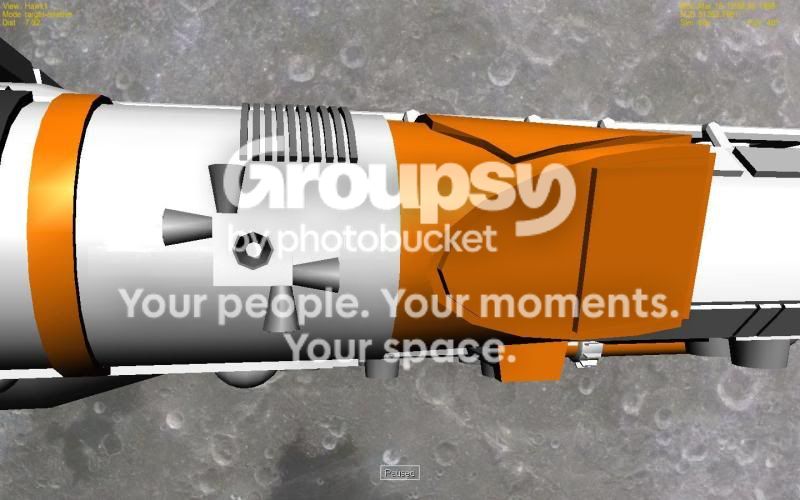
Add another set of RCS thrusters to the CM and aft section of the UltraProbe.
I need to add RCS to the Spacedock. Maybe add 4 docking tube on the bottom hub to allow a total of 8 vessels to dock there.
Here is what the J3 waste area looks like now.


Add another set of RCS thrusters to the CM and aft section of the UltraProbe.
I need to add RCS to the Spacedock. Maybe add 4 docking tube on the bottom hub to allow a total of 8 vessels to dock there.
Here is what the J3 waste area looks like now.
Centuri Space Dock
Ok I have added RCS thrusters but when I go ATT up it wants to pitch.
th_group[0]=th_rcs[1];
th_group[1]=th_rcs[6];
th_group[2]=th_rcs[11];
th_group[3]=th_rcs[16];
CreateThrusterGroup(th_group,4,THGROUP_ATT_UP);
th_rcs[1]=CreateThruster(_V(6,0,10),_V(0,1,0),PB_MAXRCSTH,TANK,PB_ISP);
th_rcs[6]=CreateThruster(_V(-6,0,10),_V(0,1,0),PB_MAXRCSTH,TANK,PB_ISP);
th_rcs[11]=CreateThruster(_V(6,0,-10),_V(0,1,0),PB_MAXRCSTH,TANK,PB_ISP);
th_rcs[16]=CreateThruster(_V(-6,0,-10),_V(0,1,0),PB_MAXRCSTH,TANK,PB_ISP);
Also I think if a vessel is docked on one arm it throws the Cog gravity off and the station starts to spins.
Is there a fix to that?
Ok I have added RCS thrusters but when I go ATT up it wants to pitch.
th_group[0]=th_rcs[1];
th_group[1]=th_rcs[6];
th_group[2]=th_rcs[11];
th_group[3]=th_rcs[16];
CreateThrusterGroup(th_group,4,THGROUP_ATT_UP);
th_rcs[1]=CreateThruster(_V(6,0,10),_V(0,1,0),PB_MAXRCSTH,TANK,PB_ISP);
th_rcs[6]=CreateThruster(_V(-6,0,10),_V(0,1,0),PB_MAXRCSTH,TANK,PB_ISP);
th_rcs[11]=CreateThruster(_V(6,0,-10),_V(0,1,0),PB_MAXRCSTH,TANK,PB_ISP);
th_rcs[16]=CreateThruster(_V(-6,0,-10),_V(0,1,0),PB_MAXRCSTH,TANK,PB_ISP);
Also I think if a vessel is docked on one arm it throws the Cog gravity off and the station starts to spins.
Is there a fix to that?
Similar threads


- Replies
- 156
- Views
- 45K
- Replies
- 1
- Views
- 1K


- Replies
- 3
- Views
- 3K
