Project Space Shuttle Vessel

Is this the first version of SSV you install, or did you manage to run a previous version?

 
It is the first time I install SSV (1.2) in this Orbiter2016 installation.
 
It is the first time I install SSV (1.2) in this Orbiter2016 installation.
Can you try v1.1? If that one also doesn't work, then it would point to your setup or installation or folder permissions, because I don't think anyone complained about v1.1 not working.
 
Runtime libraries maybe?
 
Runtime libraries maybe?
I think that would show up as "msvcp140.dll is missing". I didn't change anything in the projects, same settings, same computer, same VS.... I'm a bit lost on this one, even the "simple" modules, like the MLP, don't load. I get the same log if I delete the dlls, but that's all I know at the moment.
 
Maybe Dependencies (a more modern version of "Dependeny walker") can shed some light...
make sure you add the orbiter root directory to the search path.
 
  • Like
Reactions: GLS
MPS Question: Is implementation of the post-MECO G/LH2 Vacuum Inerting/Manifold Pressurization Checkouts on the list of things to be implemented in the near future? As of now, none of the panel R4 MPS switches are implemented so these two procedures of the Ascent FDF (pages 3-5 and 5-3) can't be done.
 
MPS Question: Is implementation of the post-MECO G/LH2 Vacuum Inerting/Manifold Pressurization Checkouts on the list of things to be implemented in the near future? As of now, none of the panel R4 MPS switches are implemented so these two procedures of the Ascent FDF (pages 3-5 and 5-3) can't be done.
The MPS will get improved during, or just before. the ascent guidance and FCS re-work, which should be the big item after the OMS/RCS re-work, which is currently just getting off the ground.
 
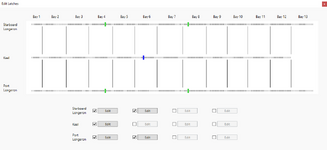
Finally got around to make something I had in mind for quite some time: a visual representation of the location of the payload latches in the Mission Editor.
plblatchdiagram.PNG
The possible PLB latch locations are displayed with gray squares (with their PLID show in tooltips), filtered by usability: dark gray is usable and light gray is not. This does not consider other payloads, upper stages, etc, but only possible locations for that type of latch. The latches used by the current payload will be indicated with coloured rectangles: blue for the latch that has the attachment (this is the one that locates the payload), and green for the rest of the latches. The bays and their boundaries don't really matter for the latches, but I think it might help the user in placing the payload, while also providing a "pretty" indication of what the forward and aft directions are.

I'm not entirely happy with the arrangement of the latch edit controls, but it's a real PITA accessing the data and providing a "pretty" display and edit capability. I didn't find a good way to have those controls "over" the drawing, so they have to stay on their own. Still need to fix the attachment location logic, and maybe indicate in which latch it is by making the text on the button bold. Also, that text could be the PLID of the latch, to make easier for the user to find a particular latch. Again, mostly dependent on data access and display.

Maybe later I'll add an option to display the latches of other payloads, but it might make the display a bit too cluttered. My original idea would have lines connecting the latches, to provide a possible outline of the payload, but again it seems like it will make things messy, especially if other payloads are shown. Plus, I have no idea of the actual size and shape of the payload, so it kinda takes the value out of drawing the outlines.
Anyway, even if this is the final version, I think it is a step forward and should give people an better idea of where their payload will end up in the PLB.
 
Like a lot of users who've been around for the 20 year run of Orbiter, I drift in and out of using the sim. Just now noticed that SSV has been released(insert John McClane saying "Welcome to the party pal"). Guess Orbiter is now going to eat into my flight simming. LOL. Hope to grab v1.2 this weekend, and mess around with it.
 
Got two minor housekeeping things for you:
*The holes in the passive PL retention latches for the trunnion pins are too big. They should fit trunnion pins that are 3.24"(0.082296 m) in diameter. As it is, with properly sized trunnion pins, you can notice the gap between the actual latch block and pin itself.
*The latches for the DFI pallet on STS-1 are located behind the actual pallet so they are not visibly securing it to the orbiter. The PL ID for all three latches should be 261 for them to line up with the pallet.
 
Hi Everyone. I tried to follow this thread, but I think I missed a few things. My question might be a bit off topic, but here it goes: In the old version of Orbiter (pre-2016) I used to land the Shuttle using a third party module called "GPC." // Post-2016, I am fine using Ascent AP (the built in module) to get to the ISS. I can manage to de-orbit, and land at KSC, without GPC, but it involves a series of notes I made on target altitudes and velocities, and is a bit tricky (especially at night!). Is there a version of the GPC module for v. 2016? (Which graphically shows how much power you have left as you are landing.) And if so, does anyone have a link to download? Thanks!
 
Hi there!
I think you are mixing shuttle addons. SSV does not need* any third party module to handle entry and landing, as it contains needed software for that.


*) There is of course FDO MFD, which calculates deorbit opportunities, amongst other things.
 
Wasn't it called "AutoFCS"? But since Orbiter 2016 it does not work. But as GLS wrote, SSV itself has it's own software, and I made successful auto landings. Did not use FDO, but looked for a moment which is 20 mins before half period (~ 2700 secs) of orbit (Orbit MFD gave me T, then in BaseSync MFD, when it showed ~ 3900 secs, I looked at MET indicator, adding those 1200 secs\ 20 mins gave me TiG in MM302) or something like that. Round numbers of minutes is because time unit in MM screens are in MET.
 
Release Tuesday is here and Space Shuttle Vessel v1.3 is now out! :hailprobe:
https://github.com/GLS-SSV/SSV/releases/tag/v1.3

While it contains several internal changes that are (mostly) transparent to the user, there are of course some improvements:
  • in addition to the previously mentioned payload latch diagram in Mission Editor, the payload attachments where improved to close a few "loopholes" and the payload attachment IDs are now clear and detailed in the manual for each payload type;
  • the options file now allows control over "auto-actions", i.e., automatic gear and chute deploy, so you can now disable that and hit those buttons at your convenience;
  • there are still no failures, but if you power off a flight-critical MDM, you will get a fault message, in addition to the sensor data going static and commands to 0 (the ones that are already routed thru them).
 
Release Tuesday is here and Space Shuttle Vessel v1.3 is now out! :hailprobe:
https://github.com/GLS-SSV/SSV/releases/tag/v1.3

While it contains several internal changes that are (mostly) transparent to the user, there are of course some improvements:
  • in addition to the previously mentioned payload latch diagram in Mission Editor, the payload attachments where improved to close a few "loopholes" and the payload attachment IDs are now clear and detailed in the manual for each payload type;
  • the options file now allows control over "auto-actions", i.e., automatic gear and chute deploy, so you can now disable that and hit those buttons at your convenience;
  • there are still no failures, but if you power off a flight-critical MDM, you will get a fault message, in addition to the sensor data going static and commands to 0 (the ones that are already routed thru them).
Hi GLS,

Awesome work on the SSV...;)(y)
Just a question, the SSV has several VC positions, allowing
you to navigate between the main locations and
station of the crew module.

like the Saturn V, can you select and focus on each individual panels?
 
Hi GLS,

Awesome work on the SSV...;)(y)
Just a question, the SSV has several VC positions, allowing
you to navigate between the main locations and
station of the crew module.

like the Saturn V, can you select and focus on each individual panels?
Hi there!

You can't really "focus" individual panels, it is a bit more realistic, the panels that are within reach of the current vc position will be available to interact with. So if you are in one of the forward seats, you will be able to access the forward panels, but you can't change a switch in one of the aft panels from there because in reality you couldn't reach it from the forward seats.
 
Back
Top