

-
ORBITER-FORUM will be temporarily closed at 2026-07-23 18:00 UTC while we complete some OF maintenance tasks. The amount of downtime is expected to take up to one hour, but probably less.
You are using an out of date browser. It may not display this or other websites correctly.
You should upgrade or use an alternative browser.
You should upgrade or use an alternative browser.
Project Space Transportation System 2016
- Thread starter gattispilot
- Start date
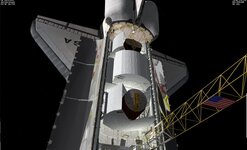
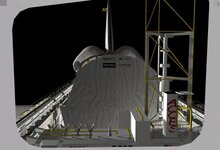
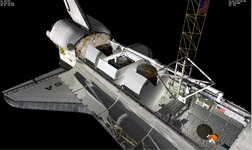
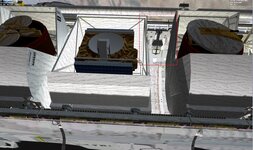
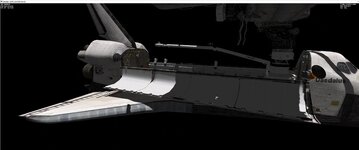
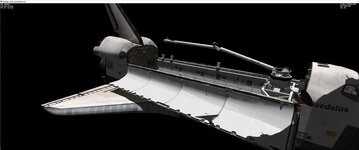
EVa in STS61b. One thing odd is the RMS camera is gold.
Attachments
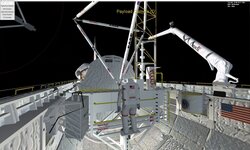
I tried in the open source and the shuttle just sits at the pad with full throttle. It uses MS2015 for launches
Which d3d9 version works for Open source? Also ms2015 works. Not sure why the shuttle just sits there with full thrust? Maybe more thrust is required?

MarkWatney2015
The Desktop Orbinaut
- Joined
- Oct 14, 2016
- Messages
- 1,276
- Reaction score
- 1,632
- Points
- 128
- Location
- San Jose Del Monte, Bulacan
- Preferred Pronouns
- He/him
Haven't tested out OpenOrbiter yet (not even once), but I'd like to test it out in the coming few days
Weird that SLS and STS2016 both have an issue in Open Orbiter. They thrusters fire but the rocket does not move
Working on fixing the late Orbiter the early shuttle seems to work good.
But one question is the body flap.
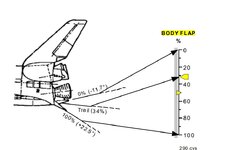
"The body flap scale reads body flap positions from zero to 100 percent of software-allowed travel. Zero percent corresponds to full up (-11.7°) and 100 percent corresponds to full down (+22.5°). The small pointer at 34 percent is fixed and shows the trail position. "
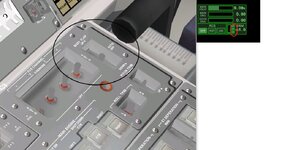
"The BODY FLAP pushbutton indicator is also one pushbutton with separate AUTO and MAN lights, indicating the state of the body flap channel."
Right now I would say the body flap is set at Auto. Where in atmosphere is stays at the trail position. BUT I suppose if in manual you could control the body flap?
So right now I have this for trim/body flap.
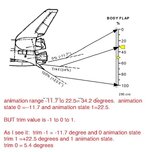
so range of the flap is 34.2 degrees.
status =1 launch
status 3 in orbit.
Do I have this wrong?
But one question is the body flap.
"The body flap scale reads body flap positions from zero to 100 percent of software-allowed travel. Zero percent corresponds to full up (-11.7°) and 100 percent corresponds to full down (+22.5°). The small pointer at 34 percent is fixed and shows the trail position. "
"The BODY FLAP pushbutton indicator is also one pushbutton with separate AUTO and MAN lights, indicating the state of the body flap channel."
Right now I would say the body flap is set at Auto. Where in atmosphere is stays at the trail position. BUT I suppose if in manual you could control the body flap?
So right now I have this for trim/body flap.
    //*******Body flap
    static UINT bfGrp[1] = { GRP_Group2 };
    static MGROUP_ROTATE BodyFlap(midx, bfGrp, 1,
        _V(0, -2.199202, -12.13037), _V(-1, 0, 0), (float)(34.2 * RAD));
    anim_bodyflap = CreateAnimation(0.34);
    AddAnimationComponent(anim_bodyflap, 0, 1, &BodyFlap);
so range of the flap is 34.2 degrees.
if (status == 1)bodyflap = 0;
    if (status == 3)bodyflap = .34;
status =1 launch
status 3 in orbit.
Do I have this wrong?
Attachments
Last edited:

Addon Developer = Media Render
13) (http://orbit.medphys.ucl.ac.uk/mirrors/orbiter_radio/tex_mirror.html) .. Addon scenery packs EDWADRS AFB .... (Antelope_scn.zip)
downloads but doesn't extract what is the issue with this file ?
Can someone please provide me with a copy of # 13
Thank You
downloads but doesn't extract what is the issue with this file ?
Can someone please provide me with a copy of # 13
Thank You
I am trying the moving dock capture.
animation which moves the docking ring
I got to figure out the animation on the ODS ring. But now docked with the HD ISS. when I retract the ring the shuttle moves also
case OAPI_KEY_L:
        {
            RevertDockingRing();
            DoIDARing();
            //case OAPI_KEY_B: // deploy/retract speedbrake
            //    if (!Playback()) RevertSpeedbrake();
            return 1;
        }
void Atlantis::DoIDARing()
{
    VECTOR3 new_dock_pos = SHUTTLE_DOCKPOS;
    new_dock_pos.y += (soft_capture_ring_proc * 0.4);//0.45

    OBJHANDLE v = GetHandle();
    int idx = 0;                                                // dock index
    OBJHANDLE docked_ship = GetDockStatus(GetDockHandle(0));            // object handle of docked vessel
    if (docked_ship != NULL)    // make sure handle is valid, if it is...
    {
        VESSEL* docked = oapiGetVesselInterface(docked_ship);    // get VESSEL interface for docked vessel
        int dcount = docked->DockCount();                        // get number of docking ports

        for (int i = 0; i < dcount; i++)    // Cycle through ports
        {
            if (docked->GetDockStatus(docked->GetDockHandle(i)) == GetHandle())
            {
                idx = i;
                docked->Undock(idx, 0);
                SetDockParams(hDockODS1, new_dock_pos, SHUTTLE_DOCKDIR, SHUTTLE_DOCKROT);
                docked->Dock(v, idx, 0, 0);
            }
        }
    }
    else {
        SetDockParams(hDockODS1, new_dock_pos, SHUTTLE_DOCKDIR, SHUTTLE_DOCKROT);
    }
}
animation which moves the docking ring
//dockring
    if (ODS == 1) {//ODS is  present
        if (DOCKRING_status >= HATCH_RAISING) {
            double da = simdt * .1;
            if (DOCKRING_status == HATCH_RAISING) {
                if (soft_capture_ring_proc > 0.0) soft_capture_ring_proc = max(0.0, soft_capture_ring_proc - da);
                else DOCKRING_status = HATCH_UP;
            }
            else {
                if (soft_capture_ring_proc < 1.0) soft_capture_ring_proc = min(1.0, soft_capture_ring_proc + da);
                else DOCKRING_status = HATCH_DOWN;
            }
            SetAnimation(anim_DOCKRING, soft_capture_ring_proc);
        }
    }
I got to figure out the animation on the ODS ring. But now docked with the HD ISS. when I retract the ring the shuttle moves also
Attachments
Last edited:
I am getting closer on the animation of the rods,.... Following the code of the ODS from SSU. Ths STS2016 Not sur if anyone is interested in the differences. I will use a key to extend the dock ring. Not sure if I want to redo the aft section to get the APAS functions switches,.... to work
Any thoughts,......
Any thoughts,......
I am looking at the SSU ODS and the SF ODS.
@DaveS Did you make the ODS for SSU? If so can I reuse it?
I am seeing differences. I think I am use the the SSU ODS parts for the sts2016 ODS. The STS2016 was built for ease of different missions. So what SF calls the ODS is really the ODS and external airlock. I think most people are not going to see the difference
@DaveS Did you make the ODS for SSU? If so can I reuse it?
I am seeing differences. I think I am use the the SSU ODS parts for the sts2016 ODS. The STS2016 was built for ease of different missions. So what SF calls the ODS is really the ODS and external airlock. I think most people are not going to see the difference
I think I got the mesh correctly. Still working on the rod/base animation. Once I get the ODS and external airlock working. Then I should be able to redo the other ODS configuration.
UUUGGGGHHHHH. This fighting me tooth and nail. I think the easy way to do it Use the SSU ODS as is and magically move the mesh to fit the STS2016 shuttle external lock.

- Joined
- Feb 6, 2008
- Messages
- 38,938
- Reaction score
- 3,937
- Points
- 203
- Location
- Wolfsburg
- Preferred Pronouns
- Sire
UUUGGGGHHHHH. This fighting me tooth and nail. I think the easy way to do it Use the SSU ODS as is and magically move the mesh to fit the STS2016 shuttle external lock.
Might not fit to your Orbiter mesh though, the SSV/SSU payload bay is wider and generally, the dimensions are pretty far apart from the default Orbiter mesh. I believe up to 60 cm difference in some locations, but @DaveS is the nuts and bolts counter and expert on that subject.
Thanks. I can get the mesh to fit. just not the animation. BUt I am thinking just show the ODS mesh and move it to the correct location. Then all the animation should be the same as SSU code.Might not fit to your Orbiter mesh though, the SSV/SSU payload bay is wider and generally, the dimensions are pretty far apart from the default Orbiter mesh. I believe up to 60 cm difference in some locations, but @DaveS is the nuts and bolts counter and expert on that subject.
Similar threads


- Replies
- 21
- Views
- 19K


