- Joined
- Feb 6, 2008
- Messages
- 38,965
- Reaction score
- 3,937
- Points
- 203
- Location
- Wolfsburg
- Preferred Pronouns
- Sire
Since a few days ago, I get some strange rendering errors, not only in Orbiter, but in everything which uses hardware acceleration except Windows itself. I am almost sure, that it must be a software problem, because the problem went away for a day, when I upgraded the Catalyst driver, but returned the next day.
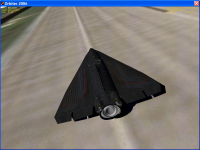
In orbiter, it causes transparent holes in the vessel textures (but not in the planet textures), in Lock-On! It turns the whole screen into a jig-saw puzzle, in Tropico, it caused a regular pattern of mis-colored bars.
I don't know what causes this problem, except that a driver upgrade removed it for a short moment. I can't find any information in the web, as I also don't have any clue how to call that problem, maybe somebody knows the word I am missing?
In orbiter, it causes transparent holes in the vessel textures (but not in the planet textures), in Lock-On! It turns the whole screen into a jig-saw puzzle, in Tropico, it caused a regular pattern of mis-colored bars.
I don't know what causes this problem, except that a driver upgrade removed it for a short moment. I can't find any information in the web, as I also don't have any clue how to call that problem, maybe somebody knows the word I am missing?