- Joined
- Mar 23, 2008
- Messages
- 1,326
- Reaction score
- 1,656
- Points
- 128
- Website
- francisdrakex.deviantart.com
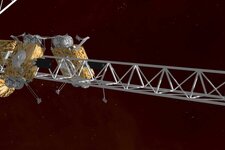
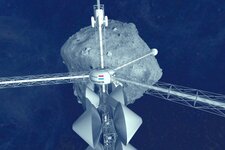
As the question was raised how to make effective pylon structures, I share my method here.
Goal is to a make a realistic-looking truss with a low number of polys.
I suggest to get familiar with the major components of a framework.
It starts with a planning phase:
The worked example is 12 m long, 0.4 m wide, and has a section height of 1 m.
The basic structural member is 3-sided cylinder. This is the closed body with the least number of polygons.
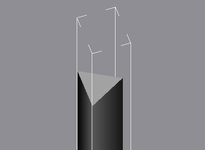
In the worked example, the member used for the longerons (stringers) has a radius of 0.02 m (= a diameter of 4 cm).
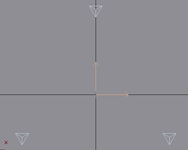
Rotated array of 3 gives an arrangement of 3 longerons.
I orient them with the flat side facing outwards, which gives the viewer a good visual impression.
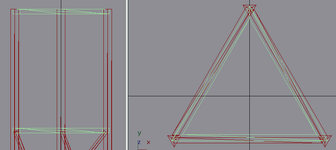
Next are the bulkheads, here in green color. I make the from 3-sided tubes,
with a radius to fit to the longerons, and with the same thickness (4 cm).
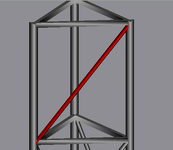
Last are the struts. Here the first strut is marked red.
I use a thinner copy of the longeron, here only 2 cm diameter, move one end to the intersection of
a longeron with a bulkhead, then swivel it sideways until it intersects the upper edge of the section,
then trim the length so it does not protrude over the upper bulkhead.
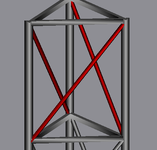
By making again an array of 3, the struts are copied into the other two sides of the truss.
First segment is finished!
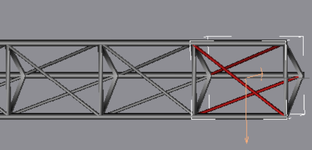
From here it is easy. One bulkhead and the three struts are grouped, and this group is copied downwards along the length of the truss.
Benefits of this method:
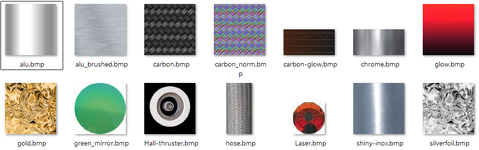
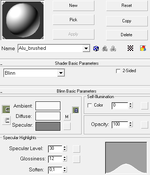
Because the individual members are very narrow, I usually do not texture them, but use plain colors (like a reflective grey).
The automatic smoothing will give them a slight color gradient. Not texturing makes them easy to render.
I add the worked example here as .msh and .gmax file, but really recommend to create a truss in the 3D modelling program you like.
It will give much more freedom to play around.
Goal is to a make a realistic-looking truss with a low number of polys.
I suggest to get familiar with the major components of a framework.
It starts with a planning phase:
- How long will the truss be?
- How wide?
- How many sections? -> Height of a single section is length / n.
The worked example is 12 m long, 0.4 m wide, and has a section height of 1 m.
The basic structural member is 3-sided cylinder. This is the closed body with the least number of polygons.
In the worked example, the member used for the longerons (stringers) has a radius of 0.02 m (= a diameter of 4 cm).
Rotated array of 3 gives an arrangement of 3 longerons.
I orient them with the flat side facing outwards, which gives the viewer a good visual impression.
Next are the bulkheads, here in green color. I make the from 3-sided tubes,
with a radius to fit to the longerons, and with the same thickness (4 cm).
Last are the struts. Here the first strut is marked red.
I use a thinner copy of the longeron, here only 2 cm diameter, move one end to the intersection of
a longeron with a bulkhead, then swivel it sideways until it intersects the upper edge of the section,
then trim the length so it does not protrude over the upper bulkhead.
By making again an array of 3, the struts are copied into the other two sides of the truss.
First segment is finished!
From here it is easy. One bulkhead and the three struts are grouped, and this group is copied downwards along the length of the truss.
Benefits of this method:
- Rather low number of polys.
- The triangular lattice gives the visual impression of struts being criss-crossed in the truss, while actually there is only one strut per side.
Because the individual members are very narrow, I usually do not texture them, but use plain colors (like a reflective grey).
The automatic smoothing will give them a slight color gradient. Not texturing makes them easy to render.
I add the worked example here as .msh and .gmax file, but really recommend to create a truss in the 3D modelling program you like.
It will give much more freedom to play around.
Attachments
Last edited: