Project Universal Astronaut and Cargo System (UACS)

Thanks. I fixed the meshes. not sure about the remove the roles.
this is the setstationmesh in the h.

Code:
void SetStationMesh(size_t stationIdx, std::string_view role, bool show);

in UMMU3 i usually took that line out since I had hard landing:) but here is the ummu3 code

Code:
if (GroundContact() == TRUE)
    {
        // we check vertical speed
        //int I;
        VECTOR3 vHorizonAirspeedVector = { 0 };
        GetHorizonAirspeedVector(vHorizonAirspeedVector);
        double VertSpeed = vHorizonAirspeedVector.y;
        if (VertSpeed < -3)
        {
            // we touched ground with more than -3 m/s, sorry dude, time to kill you all :(
            //for(I=0;I<Crew.GetCrewTotalNumber();I++)
            //{
            //        Crew.SetCrewMemberPulseBySlotNumber(I,0);    // set cardiac pulse to zero
            //    }
            //    strcpy(SendHudMessage(),"Oooh no ! Crash - All crew aboard killed");
        }

        // TIPS: the vertical speed is often reset to zero when there is ground contact
        // this may bug somewhat the death of your crew.
        // to have an accurate VertSpeed at touchdown I recommand to record it at very END 
        // of timestep and use this "old" value. The next frame you'll have the vertspeed value 
        // of *last frame* just before the crash (GroundContact). This ensure an accurate 
        // verticalspeed value. (keep this value in your vessel class and don't forget to 
        // initialize it at zero in setclasscap)
    }
 
Thanks. I fixed the meshes. not sure about the remove the roles.
this is the setstationmesh in the h.

Code:
void SetStationMesh(size_t stationIdx, std::string_view role, bool show);
Remove std::string_view role: void SetStationMesh(size_t stationIdx, bool show);
in UMMU3 i usually took that line out since I had hard landing:) but here is the ummu3 code

Code:
if (GroundContact() == TRUE)
{
// we check vertical speed
//int I;
VECTOR3 vHorizonAirspeedVector = { 0 };
GetHorizonAirspeedVector(vHorizonAirspeedVector);
double VertSpeed = vHorizonAirspeedVector.y;
if (VertSpeed < -3)
{
// we touched ground with more than -3 m/s, sorry dude, time to kill you all :(
//for(I=0;I<Crew.GetCrewTotalNumber();I++)
//{
// Crew.SetCrewMemberPulseBySlotNumber(I,0); // set cardiac pulse to zero
// }
// strcpy(SendHudMessage(),"Oooh no ! Crash - All crew aboard killed");
}

// TIPS: the vertical speed is often reset to zero when there is ground contact
// this may bug somewhat the death of your crew.
// to have an accurate VertSpeed at touchdown I recommand to record it at very END
// of timestep and use this "old" value. The next frame you'll have the vertspeed value
// of *last frame* just before the crash (GroundContact). This ensure an accurate
// verticalspeed value. (keep this value in your vessel class and don't forget to
// initialize it at zero in setclasscap)
}
Thanks! But this code doesn't show the part where the mesh is flattened.
 
Yes. I don't think it flatten the mesh just the crew died.

now I get this:
SetStationMesh(stationIdx, astrInfo.role, false);

Severity Code Description Project Path File Line Suppression State
Error C2660 'MMSEV::SetStationMesh': function does not take 3 arguments LTVUACS D:\Orbiter2016\Orbitersdk\samples\MMSEVUACS2 D:\Orbiter2016\Orbitersdk\samples\MMSEVUACS2\MMSEV.cpp 879
 
but the issue is that you may need a new UV map for the texture (which will necessiate modification to the mesh)
No new UVs
seems too much to have a texture change feature for only a single use case.
Yes I agree, at the moment it's not neccessary and is not a priority
How can you change the mesh X, Y, and Z in code? I can shift for example but modify the mesh itself?
I was thinking a simple scale animation?

I honestly don't remember the mesh being flattened in UMMU. I'll try Orbiter 2010 later to see what happened back then.
Yes. I don't think it flatten the mesh just the crew died.
The reason I asked, is because I remember one of the most "profound" educational experiences with Orbiter was (long ago but I don't think I imagined it:unsure:) with the Tintin addon; I'd set everything up in LaunchMFD and everything looked good, hit the autopilot and... perfect launch, but wait, where's the crew? oh they don't look good and are all dead! It took me a second to realize that LaunchMFD uses full thrust, which on the Tintin rocket is just a little too high for the crew!:D

Little update:
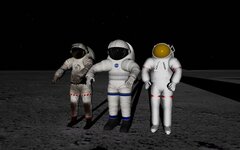
These are the 3 suits in UACS so far. Also been working on the EMU (is this still current tech?), and maybe a flight suit, and another EVA suit?
0567.jpg
 
No new UVs

Yes I agree, at the moment it's not neccessary and is not a priority

I was thinking a simple scale animation?


The reason I asked, is because I remember one of the most "profound" educational experiences with Orbiter was (long ago but I don't think I imagined it:unsure:) with the Tintin addon; I'd set everything up in LaunchMFD and everything looked good, hit the autopilot and... perfect launch, but wait, where's the crew? oh they don't look good and are all dead! It took me a second to realize that LaunchMFD uses full thrust, which on the Tintin rocket is just a little too high for the crew!:D

Little update:
These are the 3 suits in UACS so far. Also been working on the EMU (is this still current tech?), and maybe a flight suit, and another EVA suit?
View attachment 39072
OMG! WOW! Looks awesome!
 
Yes. I don't think it flatten the mesh just the crew died.

now I get this:
SetStationMesh(stationIdx, astrInfo.role, false);

Severity Code Description Project Path File Line Suppression State
Error C2660 'MMSEV::SetStationMesh': function does not take 3 arguments LTVUACS D:\Orbiter2016\Orbitersdk\samples\MMSEVUACS2 D:\Orbiter2016\Orbitersdk\samples\MMSEVUACS2\MMSEV.cpp 879
Remove the role in every call to the method. In the line you provided: SetStationMesh(stationIdx, false);
I was thinking a simple scale animation?
I will look into that.
 
Thanks it compiled.
I had to go back to the mesh handle since the main and Solar panel didn't show.

But I added a guy but no mesh appeared.
 

Attachments

New release! One step closer to the first stable release. Please provide final feedback as the next release is most likely the first stable release.

Download from here: https://github.com/abdullah-radwan/UACS/releases/download/v1.0-prerelease8/v1.0.Pre-release.8.zip

Changelog:

Added​

  • Astronaut generic suit D3D9 texture.
  • NASA Mark III astronaut suit.
  • Scenario editor images for astronauts and cargoes.
  • Astronaut max g-force limit.

Changed​

  • Warning and error messages in Orbiter log.
  • Renamed CargoLamp to CargoLamps.
 
New release! One step closer to the first stable release. Please provide final feedback as the next release is most likely the first stable release.

Download from here: https://github.com/abdullah-radwan/UACS/releases/download/v1.0-prerelease8/v1.0.Pre-release.8.zip

Changelog:

Added​

  • Astronaut generic suit D3D9 texture.
  • NASA Mark III astronaut suit.
  • Scenario editor images for astronauts and cargoes.
  • Astronaut max g-force limit.

Changed​

  • Warning and error messages in Orbiter log.
  • Renamed CargoLamp to CargoLamps.
Thanks @Abdullah Radwan for your work!
I've already made my small contribution, and ported it to Linux.
You can download the Linux version here: https://github.com/MatiasSaibene/UACSforOrbiterLinux/releases
 
Haven't been able to test the g-force limit yet, Not enough UACS ships!
It's fixed at 16g? Might be good to make this configurable (override) for situations where one wants to accelerate faster, pressure suit, sci-fi.
As soon as I've killed an astronaut:( I'll post:)
 
Haven't been able to test the g-force limit yet, Not enough UACS ships!
It's fixed at 16g? Might be good to make this configurable (override) for situations where one wants to accelerate faster, pressure suit, sci-fi.
As soon as I've killed an astronaut:( I'll post:)
You can use the Carrier to egress the astronaut from an elevation above ground. Currently, a fall from ~120m is deadly. As for disabling the option, it's linked to the EnhancedMovements option. I can make it a separate option if you want to.

I am planning to support UACS in G42 and Deepstar following the first stable release.
 
You can use the Carrier to egress the astronaut from an elevation above ground
I was expecting it to affect on board UACS crew members, so I was looking for something that accelerates faster than 16g. Can this be added?
A quick test bailing out at very high speed certainly had a negative outcome💀
As for disabling the option, it's linked to the EnhancedMovements option
This is probably enough, as long as there's an option to override :)
 
I was expecting it to affect on board UACS crew members, so I was looking for something that accelerates faster than 16g. Can this be added?
A quick test bailing out at very high speed certainly had a negative outcome💀

This is probably enough, as long as there's an option to override :)
When the astronauts are inside a vessel, they are merely stored as information in the vessel, not as active Orbiter vessels (unlike cargoes for example), so they can't have their own calculations. Regardless, I think it's better to leave this up to each vessel, as the vessel has complete control over the astronaut and can kill it.
 
One question. Shown meshes. They are seen based on station. Not if you could base off air lock? Also can different meshes been sent based off ini.

here we have 2 meshes loaded:
eva1_mesh = AddMesh("MMSEVUACS/MMSEVsuitleft1"); SetMeshVisibilityMode(eva1_mesh, MESHVIS_NEVER); eva2_mesh = AddMesh("MMSEVUACS/MMSEVsuitright1"); SetMeshVisibilityMode(eva2_mesh, MESHVIS_NEVER);

and then based off the station when they are added or entered a mesh shows.
void MMSEV::SetStationMesh(size_t stationIdx, bool show) { switch (stationIdx) { case 0://left SetMeshVisibilityMode(eva2_mesh, show ? MESHVIS_EXTERNAL : MESHVIS_NEVER); break; case 1://right SetMeshVisibilityMode(eva1_mesh, show ? MESHVIS_EXTERNAL : MESHVIS_NEVER); break; } }

I guess you might need several meshes to be seen. So if we say commander is a "SuitMesh = UACS\Z2Suit " and DefaultRole = commander
and say a pilot is SuitMesh = UACS\Z2Suitb,...... we would need a way to read the suitmesh and then match it to the meshes seen. Not sure if possible
 
Last edited:
One question. Shown meshes. They are seen based on station. Not if you could base off air lock? Also can different meshes been sent based off ini.

here we have 2 meshes loaded:
eva1_mesh = AddMesh("MMSEVUACS/MMSEVsuitleft1"); SetMeshVisibilityMode(eva1_mesh, MESHVIS_NEVER); eva2_mesh = AddMesh("MMSEVUACS/MMSEVsuitright1"); SetMeshVisibilityMode(eva2_mesh, MESHVIS_NEVER);

and then based off the station when they are added or entered a mesh shows.
void MMSEV::SetStationMesh(size_t stationIdx, bool show) { switch (stationIdx) { case 0://left SetMeshVisibilityMode(eva2_mesh, show ? MESHVIS_EXTERNAL : MESHVIS_NEVER); break; case 1://right SetMeshVisibilityMode(eva1_mesh, show ? MESHVIS_EXTERNAL : MESHVIS_NEVER); break; } }

I guess you might need several meshes to be seen. So if we say commander is a "SuitMesh = UACS\Z2Suit " and DefaultRole = commander
and say a pilot is SuitMesh = UACS\Z2Suitb,...... we would need a way to read the suitmesh and then match it to the meshes seen. Not sure if possible
It doesn't make sense to display meshes based on airlocks. Think of people setting in chairs in a building that has several doors in a game. Does it make sense to display people based on the chair they're sitting on or the door they entered through? The chair of course. The same applies here, with chairs being stations and doors being airlocks.

As for exposing the astronaut mesh to vessels, it doesn't make much sense for the majority of cases, since most of the time vessels have seats for astronauts, which means they need a custom mesh to fit the astronaut properly on that seat. Only in cases when the astronaut mesh is displayed as is (like your case) this could become useful, but it may still cause problems with positioning for different meshes since they may have different heights and dimensions. So overall I don't think exposing astronaut mesh to vessels is justified.
 
It doesn't make sense to display meshes based on airlocks. Think of people setting in chairs in a building that has several doors in a game. Does it make sense to display people based on the chair they're sitting on or the door they entered through? The chair of course. The same applies here, with chairs being stations and doors being airlocks.

As for exposing the astronaut mesh to vessels, it doesn't make much sense for the majority of cases, since most of the time vessels have seats for astronauts, which means they need a custom mesh to fit the astronaut properly on that seat. Only in cases when the astronaut mesh is displayed as is (like your case) this could become useful, but it may still cause problems with positioning for different meshes since they may have different heights and dimensions. So overall I don't think exposing astronaut mesh to vessels is justified.
No need to change the main code, and am aware that this is a special case. Updating the code for every unusual situation would not be the idea;), rather how to adapt the vessel code for this circumstance.

As you mentioned the target of the operation is the station, the airlock is just the method. Adding code to track the last/current airlock used or confine airlocks to stations aren't ideal solutions. Without an easy work-around my suggestion would be to simply mention it in the instructions that the suit appears according to the station selected.

The second problem is a bit of an immersion breaker. As I understand the suit type that is selected is stored in AstrInfo className which is passed on to the astronaut on egress, could that not be accessed for the mesh display? (can one mix APIs?). Somehow the vessel code can display a mesh, how does it know what mesh to display (is it just defaulting)?.
A very dirty hack would be to simply swap .cfgs, but it would be nice to have a more elegant solution.
 
For me I have just 2 default meshes. You would have to be able to read the cfg and then set the displayed mesh. But then you would have to have several meshes. The Original/real MMSEV/LER had 1 set of airlock hatch suits for 2 people
 
My perspective is that most vessels can't use the astronaut mesh directly as it needs to be modified. This means vessels will use custom astronaut meshes to display astronauts once inside regardless of the astronaut actual mesh, which negates the need to expose the astronaut mesh to vessels. To make some variety, it's possible for the vessel to have several custom meshes and tie them to the astronaut role (so a pilot has a mesh, a commander has another etc.). This is how XR-2 display astronaut meshes with UMMU in Orbiter 2010.

If you really need to know the astronaut mesh, you can use the class name to access the configuration file and read the mesh from there. However, this will work only for UACS astronauts, not custom astronauts that use the C++ interface.
 
Thanks.

Can you show an example of what the code would look like to get the class name or role.
Then you could have if role is MMSEV pilot it will show this mesh and MMSev explorer this mesh?


Second you have said with UACS i could have a custom vessel but still use UACS, right? How to do that.

For instance if I have a lunar bendable walkable guy but want to load him into a UACS vessel.
 
Back
Top