VC Graphical Issues and Observations

Thespacer

Active member
Joined
Oct 26, 2019
Messages
109
Reaction score
44
Points
43
Hi Team

Just wanted to draw a couple of anomalies to the VC developers' attention. Not sure if this is unique to my system. These observations were made while sitting on the pad pre-launch:

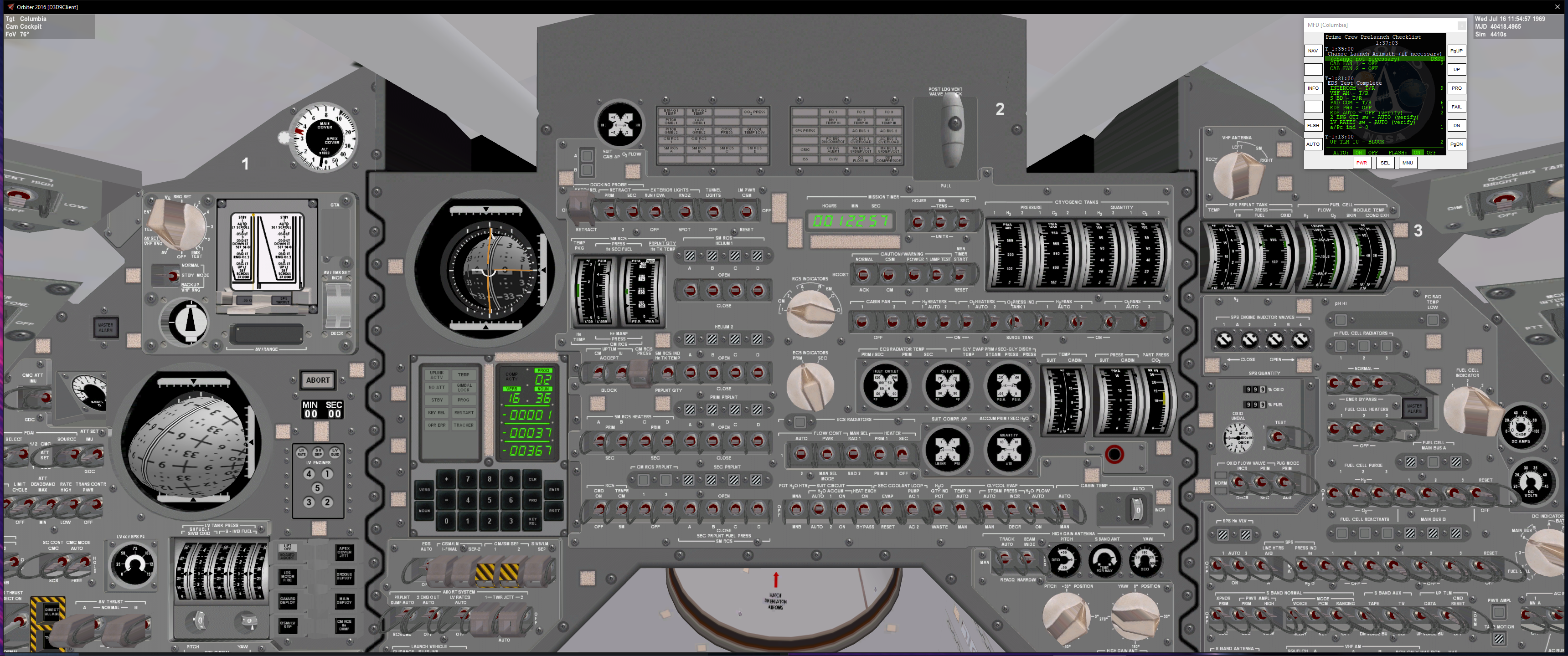
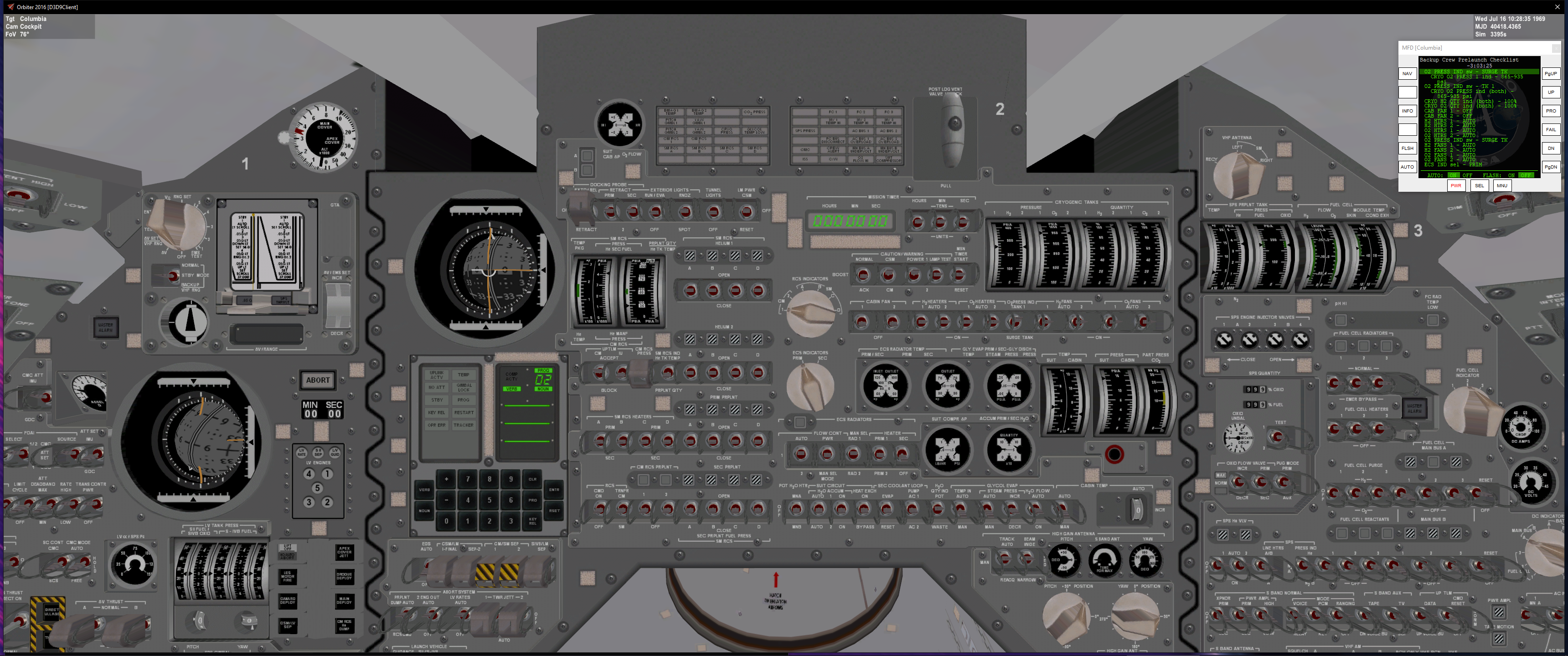
1) FDAI 1 error needles slowly disappeared. After a while it became evident this was because the 8 ball was slowing popping out of its housing. (see pics 1 and 2 below)
2) Perhaps related to the above, sometimes the various pointers/needles for various systems also disappear. For example, in the first pic, the left-most needle on the CM and SM RCS Temp Pkg is gone, same for Cabin pressure indicator
3) Certain sounds that are associated with some switches do not activate while in VC. For example, the Cabin Fan switches do not trigger their associated sounds
4) The EMS DV rocker does not have the right-click slow advance function

The VC is a great addition! Hope this report is useful.
1619992080275.png

1619992164510.png
 
If you check "Enable Absolute Animation Handling", in the D3D9 client advanced settings, it will fix the issue.
 
Hi Team

Just wanted to draw a couple of anomalies to the VC developers' attention. Not sure if this is unique to my system. These observations were made while sitting on the pad pre-launch:

Like n7275 said above, adding that check should fix the VC animations "drift", I have also added this to the installation guide.

As for the sound issue, I think I might know what is happening there, can you tell me what your FPS is in the VC? At very high FPS (over 90 or so) there is a bug that causes this to happen: https://github.com/orbiternassp/NASSP/issues/545. The reason it works fine in the 2D panel is because the frame-rate is always much lower in it then the VC, so this issue doesn't happen. What I do to fix the issue in the VC is keep "disable vertical sync" unchecked to lock to my monitor's refresh rate (85 Hz) so the FPS never goes above 85. Another way to force the sounds to fade on or off is after switching the cabin fans, quickly cycle VC positions over and over and that will force the sound process to transition to the new state, although that way is a bit less then ideal.

As for the EMS DV rocker, yeah there is new handling for the VC version of that switch...I will probably eventually revert it to be the same as the 2D panel, but in the mean time, the way to use it is this: Left/Right click to control positive or negative change and distance from center for the change rate. For example if you want to change at a slow rate, use left/right clicks in the center of the rocker switch, and if you want high rate, use left/right clicks at the extreme top or bottom part of the rocker switch. The SPS gimbal thumbwheels work the same way right now.
 
Thank you both.

@jalexb88 I confirm I have 100+fps standing on the pad in the VC, and the workarounds indeed work so no issues there.

The new clicking method makes sense. (I accidentally noticed it with the SPS gimbal thumbwheels but could not figure out what was going on.)
I’m happy to work with that method, but it also might make sense to keep it consistent with the 2D panel, and indeed the Att Set thumbwheels which appear to be using the “old method” per the 2D panel.

Thanks again for the great work!
 
Hello,

I was practicing a Backup Crew Prelaunch on the VC and noted a few things.
  1. Where to find the panel 227 on the VC? Not yet added?
  2. I noted that the arrow pointers for ECS Radiator temp SEC OUTLET and the CABIN PRESS indicators were missing.
  3. (This one is not VC Related, but I take the opportunity to shoot the question) I attach a scenario on wich the FC alarms just triggered, and I think it´s because of low temps. Maybe I forgot something?
1620997448936.png


Best regards
 

Attachments

Would just add my own observation to this post. My main observation is that my cursor goes missing. Also my mouse isn't hiding behind my external MFD.

Screenshot (114).png
 
Would just add my own observation to this post. My main observation is that my cursor goes missing. Also my mouse isn't hiding behind my external MFD.

View attachment 25177
Regarding the cursor, there is something with orbiter if you click (left or right I cannot remember the trigger) and switch views it will hide the cursor. So as far as I know its not something that can be fixed in NASSP
 
Regarding the cursor, there is something with orbiter if you click (left or right I cannot remember the trigger) and switch views it will hide the cursor. So as far as I know its not something that can be fixed in NASSP
That is actually pretty good to know, never knew that before.
 
(This one is not VC Related, but I take the opportunity to shoot the question) I attach a scenario on wich the FC alarms just triggered, and I think it´s because of low temps.

So I'm not 100% certain what could be causing this at the moment. When I loaded your scenario, there were no alarms, but I was able to get one after a while the FC C/W lights flicked on very briefly. Almost certainly a low temp. You didn't do anything wrong here, and it's not going to cause any issues down the road. The heater duty cycle fir FC1 and FC3 is only ~30% or so, so it isn't having any trouble keeping up. I believe this is due to how we "simulate" the condenser exit temperature. At the moment it's just a scaled version of the FC skin temp, because our systems simulation isn't nearly smart enough to do steam condensation enthalpy changes.

Thanks for letting me know. I'll play around with it and see if I can fix it so it doesn't set off the C/W system.
 
  • Like
Reactions: STS
  1. Where to find the panel 227 on the VC? Not yet added?
  2. I noted that the arrow pointers for ECS Radiator temp SEC OUTLET and the CABIN PRESS indicators were missing
Panel 227 is not added yet in the CM VC, will come eventually. The needle disappearing sounds like you haven't yet added a check on "Enable Absolute Animation Handling", in the D3D9 client advanced settings, you can try that to see if it fixes the issue.
 
  • Like
Reactions: STS
Panel 227 is not added yet in the CM VC, will come eventually. The needle disappearing sounds like you haven't yet added a check on "Enable Absolute Animation Handling", in the D3D9 client advanced settings, you can try that to see if it fixes the issue.
Oh, you have to CHECK it...

Will test tomorrow.

Thanks in advance!
 
@jalexb88 : Since you seem to know what "Absolute Animation Handling" is doing, in comparison to "Incremental Animation Handling" -which is the default-
Could you tell me what's the difference?
I am asking as the documentation on this "feature" is still missing (and from the sourcecode I can see what this does, but not why or what for).
Thanks in advance
 
I'm having an issue in orbiter 64 with nassp VC that the dsky display appears blank until you zoom in, why is this?
 
I'm having an issue in orbiter 64 with nassp VC that the dsky display appears blank until you zoom in, why is this?
 
Change in
D3D9Client Advanced Setup
Texture Mipmaps -> Load as defined
 
Back
Top