misha.physics
Well-known member
- Joined
- Dec 22, 2021
- Messages
- 1,533
- Reaction score
- 2,325
- Points
- 128
- Location
- Lviv
- Preferred Pronouns
- he/him

ORBITER-FORUM will be temporarily closed at 2026-07-23 18:00 UTC while we complete some OF maintenance tasks. The amount of downtime is expected to take up to one hour, but probably less.


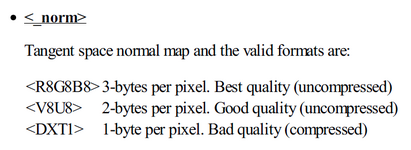
Check the included D3D9 docs.I saw an addon with textures which have "_norm", "_spec", "_refl" prefixes after the main texture name. Can I find it in documentation?
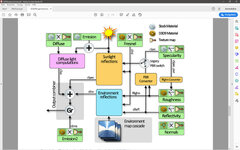
The additional textures override the basic settings, there's a diagram in the doc showing render order.Do the four material parameters like diffuse, ambient, specular, emissive colors located in a MSH file affect only on the main texture, or all the others (like "_norm", "_spec", "_refl") too? Can we use some other parameters except these four (in a MSH file)?
Do you mean material or material+texture? Materials are single colour and look cartoony, but with emmisive make great beacons etc.Could aircraft/spacecraft/building look pretty good in Orbiter if the only main (diffuse/base color) texture is used?
Do you mean this or something else?:there's a diagram in the doc showing render order
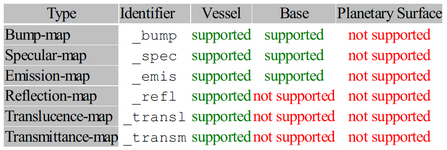
To make things more interesting/confusing

Where can I see that parameter? (It's not presented in the "D3D9Client.cfg" file.)there are also D3D9 cfg settings which also override the others and has additional parameters such as "metalness"
I meant the material + base texture (without any additional ones).Do you mean material or material+texture?
Actually I meant this one:Do you mean this or something else?:
They're accessable through Function/D3D9 debug controls (see D3D9Client.pdf).Where can I see that parameter? (It's not presented in the "D3D9Client.cfg" file.)
Consider the rest as extra fx, a lot can be done with good skinning skills but some fx like metal, translucency can only be done with add. maps/settings.I meant the material + base texture (without any additional ones).
Does that mean that they can be done without additional maps/setting? How, for example? Using only the material and base texture?a lot can be done with good skinning skills
Things like a realistic metal effect (reflections are only done in D3D9+) can't be done with just a normal texture, you can make it shiny (spec) but not reflective (same with translucency etc.)Does that mean that they can be done without additional maps/setting?
Just to note: the Deepstar addon uses this and "calls" a shader, I'm unclear how this works though?additional parameters such as "metalness".

Thanks!
Does that mean that they can be done without additional maps/setting? How, for example? Using only the material and base texture?
First of all you always need a good base texture, the rest you can experiment with bit by bit later.It isn't as daunting as is sounds
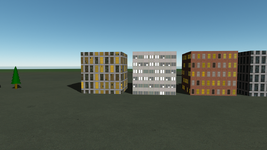
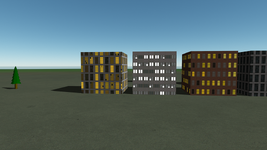
Well, now I understand that we can use the "_emis" texture map for this purpose.Does anyone know if it's possible to make night textures for a mesh? I know that the pre-defined objects (like BLOCK) uses the night texture if it has "_n" in the end of the "day" texture.

WHATWell, now I understand that we can use the "_emis" texture map for this purpose.
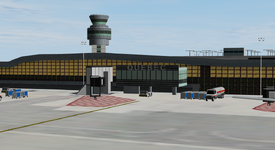
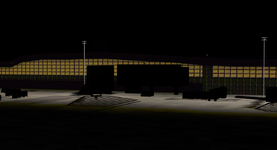


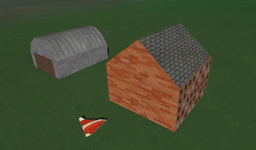
I've been looking through my tex. folder and noticed the wall tex from the wideawake base (good example of tex use) has *_n.dds files for custom meshes?the pre-defined objects (like BLOCK) uses the night texture if it has "_n"
The manual does say that Hangar3 doesn't support textures, but maybe a good time to note that for OO development.HANGAR3 doesn't work correctly with textures and crashes to desktop.