C++ Question FlightDataRecMFD update

gattispilot

Addon Developer
Addon Developer
Joined
Oct 17, 2007
Messages
10,538
Reaction score
4,370
Points
203
Location
Dallas, TX
It has been asked to recompile to 2016 and 2024.

from the docs:
This software is Freeware
This software may be freely modified and distributed.

I really am not the person to do this as I have never made a MFD

#define STRICT
#define ORBITER_MODULE
#include <windows.h>
#include <stdio.h>
#include <math.h>
#include <iostream>
#include <direct.h>
#include "orbitersdk.h"
//#include "MFDAPI.h"
#include "FlightDataRecMFD.h"

it had #include <iostream.h> but edited.

it has alot of this:
TextXY(hDC, 0, 16, YELLOW, BLACK, "Rate: %.3f", (1/sample_dt));
but needs to be converted to sketchup. I can do that.

but this:
void log_data(void)
{
ofstream out_file(logpath,ios::app);
if (out_file)
{
and this:
MFDUpdate(hDC, cw, ch);
 
It has been asked to recompile to 2016 and 2024.

from the docs:
This software is Freeware
This software may be freely modified and distributed.

I really am not the person to do this as I have never made a MFD

#define STRICT
#define ORBITER_MODULE
#include <windows.h>
#include <stdio.h>
#include <math.h>
#include <iostream>
#include <direct.h>
#include "orbitersdk.h"
//#include "MFDAPI.h"
#include "FlightDataRecMFD.h"

it had #include <iostream.h> but edited.

it has alot of this:
TextXY(hDC, 0, 16, YELLOW, BLACK, "Rate: %.3f", (1/sample_dt));
but needs to be converted to sketchup. I can do that.

but this:
void log_data(void)
{
ofstream out_file(logpath,ios::app);
if (out_file)
{
and this:
MFDUpdate(hDC, cw, ch);
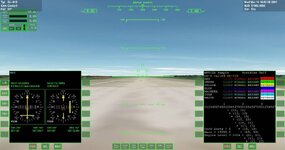
I have no idea how to use sketchpad but right now I'm experimenting with MFDlib code and the MFDSample module:
0000.jpg
 
Well, these are my results for today:

  • I managed to compile MFDlib.lib
  • I managed to compile FlightDataRecorderMFD

Compiling doesn't mean it's working; in fact, the MFD loads, but I don't think it's recording anything. I think I should link it with the most up-to-date FlightData because the one included in FlightDataRecorder is from 2003. Maybe it will work.


In the meantime, two things:

  • I'm posting the updated FlightDataRecorder package here for you to try and confirm whether it works or not (it includes MFDlib and MFDSample, and source code updated!).
  • You can use FlightData and AscentMFD, included in the default Orbiter2024 distribution. You can find information on how to use them in the Orbiter User Manual, located in the Doc folder, on page 231.

I can't promise I'll stick with this project because I'm really indecisive when it comes to choosing which project to program each day. But I'll do my best.


I think the next steps are:

  1. Include FlightDataMFD2024
  2. Use Sketchpad or review the AscentMFD2024 implementation
  3. Implement the C++ STL for data file handling.
 

Attachments

Thanks. for 2016. after adding the MFDlib. I have 62 errors.
They are related to I think the :#include <iostream>

void log_data(void)
{
ofstream out_file(logpath,ios::app);
if (out_file)
{

Severity Code Description Project Path File Line Suppression State
Error C2065 'ofstream': undeclared identifier FlightDataRecMFD D:\Orbiter2016\Orbitersdk\samples\FlightDataRecMFD D:\Orbiter2016\Orbitersdk\samples\FlightDataRecMFD\FlightDataRecMFD.cpp 662

Severity Code Description Project Path File Line Suppression State
Error C2653 'ios': is not a class or namespace name FlightDataRecMFD D:\Orbiter2016\Orbitersdk\samples\FlightDataRecMFD D:\Orbiter2016\Orbitersdk\samples\FlightDataRecMFD\FlightDataRecMFD.cpp 662
 
I'm experimenting with MFDlib code and the MFDSample module
Sorry, do I understand correctly that these MFDlib and MFDSample are general things that could be used for programming any MFD, so it's not only related to the FlightDataRecMFD?

Is the programming on C++ the only way to make custom MFD for now? Culdn't an MFD be made for example in Lua without C++ with followed compilation?
 
Thanks. for 2016. after adding the MFDlib. I have 62 errors.
They are related to I think the :#include <iostream>

void log_data(void)
{
ofstream out_file(logpath,ios::app);
if (out_file)
{

Severity Code Description Project Path File Line Suppression State
Error C2065 'ofstream': undeclared identifier FlightDataRecMFD D:\Orbiter2016\Orbitersdk\samples\FlightDataRecMFD D:\Orbiter2016\Orbitersdk\samples\FlightDataRecMFD\FlightDataRecMFD.cpp 662

Severity Code Description Project Path File Line Suppression State
Error C2653 'ios': is not a class or namespace name FlightDataRecMFD D:\Orbiter2016\Orbitersdk\samples\FlightDataRecMFD D:\Orbiter2016\Orbitersdk\samples\FlightDataRecMFD\FlightDataRecMFD.cpp 662
I think I solved it using std::ios.
Sorry, do I understand correctly that these MFDlib and MFDSample are general things that could be used for programming any MFD, so it's not only related to the FlightDataRecMFD?

Is the programming on C++ the only way to make custom MFD for now? Culdn't an MFD be made for example in Lua without C++ with followed compilation?

As far as I know the MFD API only works with C++. We should check the source code or ask @Gondos to see if there is a LUA MFD implementation.
 
@polaris149Tiberius @gattispilot

Okay, folks, here's some progress I've made:

Now the configuration file is saved.
Now the configuration is read from the configuration file.
Now the FlightData path is created within %OrbiterROOT%.
Now the graphics are drawn, and the .dat file with the flight data is saved.

However, I'm not sure how it should work or if it's completely fixed yet, but it's something.

What's next?

Well, I think it would be a good idea to update MFDlib to use modern Orbiter features and provide compatibility with older MFDs for which the source code is available.
Get FlightDataRecCFD working so the entire add-on is fully operational.
Also, update FlightDataRecMFD to use Sketchpad and port it to Linux.

I'll most likely publish the code on GitHub. And I'd like to express my gratitude to Matt Weidner for making the source code for his MFD public. I also want to thank the authors of MFDlib, and InternetArchive.

:cheers: :hailprobe:
 

Attachments

Ok I have tested it and I get a file (by default) called "flight-log-####.dat" in the root directory for Orbiter. However after renaming it to flight-log-0003.dat.txt, I noticed there is only a small amount of data in the file. I don't think it is getting all the data it is supposed have. It looks as though it's sample rate is incorrect perhaps.

Here is the data in the file:

Code:
364,427.165,108.097,1.8808,179.986,0.810956,-79.9553,3953.2,-2.32312,15.1794,1.55175,-76.8259,24.7714,138.874,569.339,-3.13147,12.1856,-30.5393,17.0842,228.496,0.00924579,0.943429,1.3845e-07,21600,0,100,0

I will import that into a spread sheet and plot the points in a graph to see what it does
 
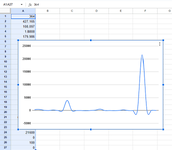
Here is what the data set gives in a graph. I do not know what data goes with each screen of the recorder. The frequency of the data collection is about 1/second so it seems too little amount of data or it only recorded several seconds of data.

The screens in the MFD are (from top to bottom on both pages):
  1. Alt/Range in km x 0.01
  2. Vtan/Range in m/s x 100
  3. Tan acc in m/s^2
  4. Vtan/Alt in km x 10
  5. Vrad/Alt in km x 10
  6. Vert acc in m/s^2

I kept the delimiter the default ' , ' and the data above is just a single line of comma delimited different pieces of some data that I cant make heads or tails of. The range is very large I see.


dataset-0001.png

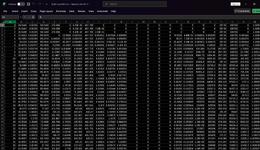
If I separate the data by the number of screens there are in the MFD there would be 6 columns. So I will try that. I know the approximate amount of time that I was recording was about 00:05:58 and that doesn't seem like enough data per second.

On a second run, I noticed about the same amount of data so I don't think it is recording correctly.

Code:
435,455.075,106.513,6.35332,87.0544,7.72267,-127.695,4198.65,-5.1355,16.5498,1.70192,-76.4551,24.3713,130.05,627.521,10.607,13.2263,161.921,40.2762,217.72,0.0112929,1.37074,1.79199e-07,21600,0,100,0
 
In the manual it states that it takes 27 distinct sets of datum samples. I assume one of the sets is supposed to be a function of time (seconds). I counted the number of variables in the second sample I took and there were 33. With the last number being 0. I assume that may be the time. But I could be wrong.


1. 364
2. 427.165
3. 108.097
4. 1.8808
5. 179.986
6. 0.810956
7. -79.9553
8. 3953.2
9. -2.32312
10. 15.1794
11. 1.55175
12. -76.8259
13. 24.7714
14. 138.874
15. 569.339
16. -3.13147
17. 12.1856
18. -30.5393
19. 17.0842
20. 228.496
27. 0.00924579
28. 0.943429
29. 1.3845e-07
30. 21600
31. 0
32. 100
33. 0

I don't know if this helps but I will continue to see what sort of data we are supposed to get via the manual.
 
In the manual it states that it takes 27 distinct sets of datum samples. I assume one of the sets is supposed to be a function of time (seconds). I counted the number of variables in the second sample I took and there were 33. With the last number being 0. I assume that may be the time. But I could be wrong.


1. 364
2. 427.165
3. 108.097
4. 1.8808
5. 179.986
6. 0.810956
7. -79.9553
8. 3953.2
9. -2.32312
10. 15.1794
11. 1.55175
12. -76.8259
13. 24.7714
14. 138.874
15. 569.339
16. -3.13147
17. 12.1856
18. -30.5393
19. 17.0842
20. 228.496
27. 0.00924579
28. 0.943429
29. 1.3845e-07
30. 21600
31. 0
32. 100
33. 0

I don't know if this helps but I will continue to see what sort of data we are supposed to get via the manual.
Thanks so much for trying it out and letting me know!
The same thing happened to me, indeed. There must be some problem in the loop that saves the data, and it stops early. One of the functions I had to update was opcTimestep, changing it to opcPreStep, and that probably requires more work.

I'm going to upload the code to GitHub, respecting Matt Weidner's authorship so you can see the changes I make more easily or suggest solutions.
 
After correcting a single line of code I wrote by mistake, it now writes the entire flight data file.
I will update the GitHub repository very soon. UPDATED
 

Attachments

Last edited:
Thank you so very much Matias. I will implement this new version of the MFD into my test install and report back.
It's so amazing how smart you guys are and so dedicated to helping people learn and enjoy this wonderful simulator.
So now I have to figure out how to make heads or tails out of the data that it records. I will refer to the manual for further information.
 
Last edited:
Back
Top