Aviation365
New member
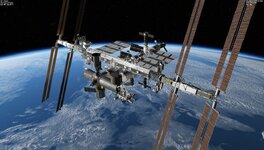
Hello all! Slowly learning how to fly SSV (I had a lot of procedural knowledge but the FDO MFD and rendezvous is black magic that I still struggle to understand). Also need a post to download better ISS so here I am

ORBITER-FORUM will be temporarily closed at 2026-07-23 18:00 UTC while we complete some OF maintenance tasks. The amount of downtime is expected to take up to one hour, but probably less.

About FDO MFD, read the manual and it will get you to where you want to go. It is a really helpful and powerful tool, but one needs to take time to learn how to use it.Hello all! Slowly learning how to fly SSV (I had a lot of procedural knowledge but the FDO MFD and rendezvous is black magic that I still struggle to understand). Also need a post to download better ISS so here I am

I too am just getting used to controlling the SSV, I can get to the station in the default Atlantis.Hello all! Slowly learning how to fly SSV (I had a lot of procedural knowledge but the FDO MFD and rendezvous is black magic that I still struggle to understand). Also need a post to download better ISS so here I am
Hi!I am a little embarrassed to be posting this but I am absolutely in the woods about getting my Shuttle FDO MFD to work. I have D/L the master file from github and I have tried several methods to extract the file. Initially, it puts the ShuttleFDOMFD Folder in the Orbiter root dir. When I did not see it the sim module list, I simply put the appropriate files from the ShuttleFDOMFD folder in their perspective dir. (e.g. Config/MFD/ ShuttleFDOMFD) I've scoured the manual (Doc) for clues, but I'm not much of a veteran to this stuff. I'm sure their is a very easy solution. I tried converting the .txt files associated with it and converting them to .cfg. That didn't work either. Please excuse my ignorance, I'm clearly a novice that is really enjoying the SSV serries, but I believe this addon is essential and I could really use someone's help.
Thank you. So I D/L the zip file from the above link. I extracted into root Orbiter dir and I still have no selection for this MFD in the module list. It does not appear. I wnet in the sim to find in the MFD SEL (both pages) not there. I double checked the extracted files. All files are correctly placed. I have a ShuttleFDOMFD Folder with all the text files in the Config/MFD/. The driver (.dll) for this MFD is in the modules/plugin folder. So everything appears to be in place. Anything else I could be missing. I appreciate the time you're taking to assist me. Thank youHi!
Could you be downloading the code, and not the final product?
Try the release page: https://github.com/indy91/Shuttle-FDO-MFD/releases
Is there any error message in the Orbiter log file?Thank you. So I D/L the zip file from the above link. I extracted into root Orbiter dir and I still have no selection for this MFD in the module list. It does not appear. I wnet in the sim to find in the MFD SEL (both pages) not there. I double checked the extracted files. All files are correctly placed. I have a ShuttleFDOMFD Folder with all the text files in the Config/MFD/. The driver (.dll) for this MFD is in the modules/plugin folder. So everything appears to be in place. Anything else I could be missing. I appreciate the time you're taking to assist me. Thank you
I don't see any issues.... could you disable all the MFDs, exit Orbiter and then open it again to see if FDO MFD shows up?I don't see anything but you're welcome to review it. Thank you.
Ok, so I diabled all the MFD's. I exited the program as you instructed. I went back into Orbiter. Checked the Modules to see if it showed up. It did not, so I did the unthinkable. I went nto the Orbit Directory, removed all the files associated with the ShuttleDOMFD and then I reloaded it again. I went into the Orbiter, checked the modules list and behold! It magically appeared, I checked the box, went into the sim and it seems to be working beautifully. Thank you so much for taking the time to help me. you're a credit to this forum. Cheers!I don't see any issues.... could you disable all the MFDs, exit Orbiter and then open it again to see if FDO MFD shows up?
Did you push in the TV CBs on panel R14?I have a quesion concerning the AFT Mon 1 and Mon 2 aboard Columbia STS-107. I cannot get any power on the two CCTV moniters, Mon1/Mon2. I have double checked the bus panel to make sure their correct. I also checked R1 Panel PL CAB, PRI MNC, AUX, AFT MNB, CCTV powered, all good. I checked moniter brightness etc. But I got no green power lights on the monitors. Anyone else with this issue?
Yes, those are it. Then it should just be turning on the monitors with the switch at their top right.I made sure that all the CB's on R13 including MON 1 and MON 2 are pressed in. Are talking about the bank of busses under the CRT4 Aft monitor? C CAM bus, A Cam, B Cam bus, D Cam bus? I've set the one's I've studied from other videos. I didn't see any other TV busses.
Which version of Orbiter and SSV are you using?Latest update on the D3D9 issue is that I d/l the client again and ran Orbiter as administrator and the D3D9 Client did appear in the module list. I checked the box, but there is still no moniter capability Aft. Am I missing anything?


