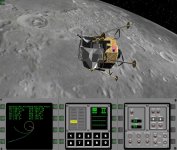
Gaming Addon creators wanted , for an IOS space simulator.

As a curiosity , just the flags and the orbiter's names are 12.000 polys !

But... but... you wouldn't need more than a 128x128 texture for such details. Is the video memory really this limited?

 
But... but... you wouldn't need more than a 128x128 texture for such details. Is the video memory really this limited?

On a mobile phone? Yes (512 MB shared memory for GPU and CPU). It would maybe be even better to invert the logic. Textures of the spacecraft and polygons for the planets. :lol:
 
Last edited:
Ah, it's supposed to run on the phone too? I thought it was for the tablet...
 
Ah, it's supposed to run on the phone too? I thought it was for the tablet...

I thought so, that this is the problem. The 3GS even only has 24 MB of memory for the GPU textures, but this limit does not exist on the later models. Still, 512 MB isn't much, when you have to fit all running programs into it.
 
Although I only have access to a very basic droid phone (thus probably unable to run the sim), I find the idea interesting and I'm extremely curious about the reception.

One thing that might make it a killer app would be functional cockpits... On a touch screen it would be very real. And appropriate for controlling real spacecraft. Perhaps a simplified 2D panel would work. If in the future you consider this possibility, I'm interested in working on panel graphics for it...

About the planet textures vs polygons: the planets need some low poly buildings / rocks / trees. Satellite photos are nice from Orbit but add little when landed..

Just my two cents :)
 
Last edited:
Well , the sim also runs on a iphone4 (25 frames/sec), the problem being the size of the buttons , being quite tricky to press the intended button and not hit other by mistake .
There's an option for phones to use only one MFD , but then It is really difficult to make any meaningfull use , other than "sit and watch" autopilot landings/ launches, etc..

-However- we are also releasing (and free! ) a phone MFD version so you can use your phone as a 4th really large remote MFD connected via wifi with the main app running on a tablet. Indeed you can add as many phone-mfds as desired.
 
<snip>
In other fronts, we have developed what we think a better solution to the problem (i.e. the 3D orbit panel , allows you to spin -by sliding the finger- a 3d-miniplanet with Its orbit in 3D , while in Orbiter , It is not quite clear if an orbit intersects , or not , the planet.

</snip>

ok Sorry off topic but I just couldn't resist pointing out the fact that the map shows intersection points VERY clearly, while the orbit MFD gives you numbers that have far greater precision than a graphic can contain. The orbit graphic is a cartoon to estimate the numbers when precision doesn't matter as much or you generally know what the numbers are anyway. Also IMHO the idea of intersection is somewhat of a debate to begin with when an atmosphere is present. Of course there is a a collision with rocky earth, but for example LEO isn't really even TECHNICALLY out of earths atmosphere. So at what point is there an intersection with a wide and complicated gradient? Or at what point does it matter? Case by case solutions are the only way to answer this question. :hmm: very thought provoking
 
.... a phone MFD version so you can use your phone as a 4th really large remote MFD ...

That would actually be great for Orbiter (and other PC sims). I think people would pay for it (and already do for FSim as far as I know)....

I completely agree that a small screen is complicated for a complex button layout. But mobiles are input devices by definition and people do like to use them. It's better than learning a number of keyboard shortcuts :)

Regarding what you actually have to do during the simulation: in space you plan and navigate using autopilots. Manual control only works well for docking, landing and some system simulation.
That's why I suggested going into panels or even interiors. Manage the crew, watch systems and solve problems. That would enhance the simulation in innovative ways. :)
 
ok Sorry off topic but I just couldn't resist pointing out the fact that the map shows intersection points VERY clearly, while the orbit MFD gives you numbers that have far greater precision than a graphic can contain. The orbit graphic is a cartoon to estimate the numbers when precision doesn't matter as much or you generally know what the numbers are anyway. Also IMHO the idea of intersection is somewhat of a debate to begin with when an atmosphere is present. Of course there is a a collision with rocky earth, but for example LEO isn't really even TECHNICALLY out of earths atmosphere. So at what point is there an intersection with a wide and complicated gradient? Or at what point does it matter? Case by case solutions are the only way to answer this question. :hmm: very thought provoking

Well , of course we also include the "old style" orbit Function Display , with the path and the major orbital parameters.

The thing is that most of our betatesters know very little about orbital coplanarities , apogees , and periapsis , so they found easier to use the 3D-orbit display.

But of course, we let the user choose either the old , full of information, or a new one -rotable- 3D visualitation of the orbit.

Here you have the old , standard style one , for the hardcore spacesim fans.

Pls note that we also finished implementing the AGC and DSKY , and the ultra hi-resolution (up to level 6 !!!! ) supercompressed moon textures.
 

Attachments

  • 20121016101638.jpg
    20121016101638.jpg
    113.5 KB · Views: 42
Hi people .
we just created the first video featuring Space Simulator for iPad.

www.space-simulator.com or [ame="http://www.youtube.com/watch?v=-t8JYKuaCpg"]Space Simulator for iPad - YouTube[/ame]

constructive ( or mildly destructive ) critics welcome :)

Thanks.
 
OK, mildly destructive: Sadly it is for the hardware platform of the evil other empire. :lol:

But it sure looks good, a real temptation to give this evil hardware of the forbidden fruit a try. :)
 
That looks really cool :thumbup:. Will it ever be possible to run that on an ipod touch?

Thanks .
well ,it *would* run on a ipod touch , of course. The only problem would be you being able to tap the buttons/mfd controls etc , as they would be really small.

other than that ... yep , I does run quite well on a iphone4 so I guess It does on the iPodTouch.
 
Thanks .
well ,it *would* run on a ipod touch , of course. The only problem would be you being able to tap the buttons/mfd controls etc , as they would be really small.

other than that ... yep , I does run quite well on a iphone4 so I guess It does on the iPodTouch.

Well, I wouldnt mind small controls if I could run it on my ipod. Good to see this was released :).
 
Well, I wouldnt mind small controls if I could run it on my ipod. Good to see this was released :).

Indeed thanks for mentioning . I just realized that the ipod has not GPS nor connectivity , so the menu option "Above you , 330km today and now" (basicly a quick start mode that places the shuttle above you , and the simulation at the current time ) .... without GPS It would be meaningless ! .

Thanks . I ll get that sorted out. -removed for ipods and non GPS ipads-

cheers
 
1->Basicly , Orbiter would not run on IOS, as It requires nowdays a multi-core , gigaHz level processor.

Nonsense! Orbiter works just fine on single-core Pentium III of 1990's vintage.
 
That's my 3d models of LEM,CM,SM,probably and Saturn V.
They are not for commercial use?!

They are from Nasa's web 3d models page. Free to use for non-comercial projects as far as I can read form their web.

Also , I would say the LM is from google sketch up ... also free for non-comercial

WE are having all the models done (Indeed that was the entire point of this thread ,"your" models -while cool- are unusable in a game as they waste polys ) . . I woudnt use a model requiring 9000 polys just to render the American Flag.

But if it is an issue ,tell us exactly which particular model is yours , and i ll get it removed for the next video

Cheeeeeeeeeeeeeeeeeeeeeeeeeeeeeeeers.
 
They are from Nasa's web 3d models page. Free to use for non-comercial projects as far as I can read form their web.
.

So, technically you shouldnt be using them for a paid app? I havent been able to check itunes yet, but I thought this was going to be a commercial product.
 
So, technically you shouldnt be using them for a paid app? I havent been able to check itunes yet, but I thought this was going to be a commercial product.

I think as long as it is just a video of the thing in development, it is technically no commercial product yet.

Moderator note: if anybody has copyright claims or thinks that an infringement is happening here, please take it up with the OP in private and/or seek support from staff in private. Do NOT do it here in public.
 
Back
Top