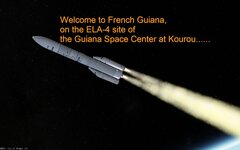
Ariane 6 european rocket

Hi

I'm almost ready to release an update for my Ariane 6 rocket (with quite a few improvements), but I have an issueI can't find how to solve it :

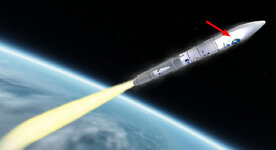
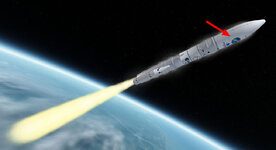
In this screenshot, the visible side of the rocket is facing away from the sun. (The sun is behind it.)
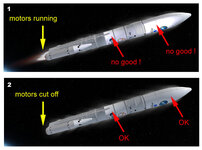
bug_lum.jpg

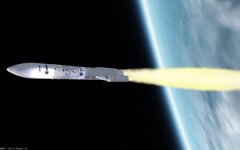
As you can see, when the engines are running, the rocket is illuminated, and it doesn't look very realistic.

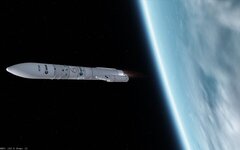
When the engines are off, everything looks fine.

How can I make the rocket body look like the one in image 2, instead of this annoying lighting? ☹️

I haven't found a solution yet.
Thanks in advance.
 
Have you tried Mesh Flag 4 "Do not apply lighting when rendering this group", this does not seem to affect diffuse/direct lighting so maybe it works in this case?
 
ENG : Also I would set the ambient light (Orbiter Launchpad) to a very low level (realistic in space anyway) to make the issue easier to visualize.

FR : Je conseillerais aussi de régler la lumière ambiante (Launchpad Orbiter) à un niveau très bas (de toute façon réaliste dans l'espace) pour que le problème soit plus facile à visualiser.
 
ENG : Also I would set the ambient light (Orbiter Launchpad) to a very low level (realistic in space anyway) to make the issue easier to visualize.

FR : Je conseillerais aussi de régler la lumière ambiante (Launchpad Orbiter) à un niveau très bas (de toute façon réaliste dans l'espace) pour que le problème soit plus facile à visualiser.
Yes, I'll try...
Oui, je vais voir ça... merci du conseil ;)
Have you tried Mesh Flag 4 "Do not apply lighting when rendering this group", this does not seem to affect diffuse/direct lighting so maybe it works in this case?
No, I had thought of that, and it doesn't change the issue

One strange thing: if I exit Orbiter (during flight) and then reload the SCN (Current State), this lighting effect disappears...
 
I'm still trying to understand the origine of this stray light, and the more I try, the less I understand. 🫣

So if anyone understands something and has an idea... 😵‍💫

Here's my problem (as I mentioned before) : the "light" caused by the engine running.

So, I followed these steps (during the flight of my Ariane 6 rocket):
1) Screenshot (image #1) with Orbiter paused
2) I quit Orbiter
3) I restart Orbiter with the "(Current state)" scn in "pause" mode
4) then another screenshot (image #2) with Orbiter paused (start paused enabled in the Server launchpad) : the unwanted light issue is gone....
5) then I press Ctrl+P to disable pause mode , and no more stray light... gone... :unsure:

bug1.jpg
image 1

bug2.jpg
image 2

(Same time, same view, same rocket, same location....)

Why...? 😩
 
Last edited:
Do you have a demo .scn? Is it the same with the current A6 addon? Would be good to know if it's your settings.
A post rendering gfx effect? Maybe something in the DxD9 advanced tab?
 
Do you have a demo .scn? Is it the same with the current A6 addon? Would be good to know if it's your settings.
A post rendering gfx effect? Maybe something in the DxD9 advanced tab?
Hi Buck Rogers

Your idea was good, so I checked : same phenomenon on the current addon (the one on OH). But I'll still test it on a new Orbiter.

Note : Pappy2 (who is my favorite and designated tester) has the same issue on his computer.

And about D3D9, I always leave all the settings by default for testing.

A great enigma :unsure:
 
Well (sadly) I can confirm the issue.
Orbiter2024, it affects the whole vessel and looks like a sun highlight on the wrong side of the mesh and only when leaving the atmosphere? This might be a shader error? Will have to do further tests in O24 with other vessels to see if this is the case.
0031.jpg
And after reloading:
0032.jpg
Also checked your meshes but couldn't find anything. But this also happenned on reload, one booster out! Also is it possible to not have the txt on reload?
0034.jpg
 
Could the light source of the engines somehow be up near the fairing? And starting the scenario places the light in the correct position, at the bottom.
In these last images when the fairing is lit, the bottom of the rocket is not, which points in that direction. 🤷‍♂️

Also, on the last image above, the light doesn't seem correct: the right booster and the core are lit from the left, but the left booster isn't lit at all, at least from this side.
 
Will have to do further tests in O24 with other vessels to see if this is the case.
I can't reproduce this with other addons, including Multistage, they all work fine. I think it must be the meshes? I remember seeing something like this before and it had to do with bad normals. I've tried to "fix" the fairings but it didn't help, maybe it's just one mesh that upsets everything. Suggest testing each mesh individually, if one sticks out check the normals🤷‍♂️
 
I can't reproduce this with other addons, including Multistage, they all work fine. I think it must be the meshes? I remember seeing something like this before and it had to do with bad normals. I've tried to "fix" the fairings but it didn't help, maybe it's just one mesh that upsets everything. Suggest testing each mesh individually, if one sticks out check the normals🤷‍♂️
If it was the normals, then I would expect consistent behavior. This seems like code in the vessel and/or graphics engine.
 
I hate mysteries :alien:
The problem is stage 1 "Deluge" in your .ini. Remove that and the issue is solved. When the first stage fires you get illumination from the igntion as normal, when stage 2 fires the ilumination magnifies and goes crazy! Why this is is another question.:)
 
I hate mysteries :alien:
The problem is stage 1 "Deluge" in your .ini. Remove that and the issue is solved. When the first stage fires you get illumination from the igntion as normal, when stage 2 fires the ilumination magnifies and goes crazy! Why this is is another question.:)
Whouaw... Thank you so much !!!

I will try this this night, and I'll tell you if the issue is fixed.

:hailprobe:
 
It doesn't seem to be the particle effects nor the mesh and the numbers look ok so no idea why it does that and not when other engines are running parrallel too?
But the
light doesn't seem correct: the right booster and the core are lit from the left, but the left booster isn't lit at all, at least from this side.
still doesn't look quite right?
 
Not on this image
Yes, it still looks like that even after eliminating the main lighting problem as in that screenshot, just warning that there's more problems going on.
On the positive side removing the deluge stage solves the engine out on reload issue! :)
 
I confirm : so I'm going to remove the "deluge" effect.

(For Orbiter 2016, I used a ghost booster for this effect, and it worked perfectly.
But with Orbiter 2024, as the main bug in Multistage2015 concerns the boosters, that's why I used "stage" instead of "booster.")

Now I just need to correct my INI files (and also readjust the rocket's height relative to the ground , which isn't the same without the deluge stage.)

Thank you all so much for your help; I hadn't thought of that. :hailprobe: :hailprobe: :hailprobe: :salute:
 
Hi

I'd like to update my Ariane 6 rocket, but I haven't figured out how :

  • I've found how to modify the text and images.
  • But I don't know how to replace the zip file.

I've already gone to "your addons", then select my add-on, then "Edit addon"...
but after I don't understand how to do.... :unsure:

Can you tell me how to do this ?
 
Hi

I'd like to update my Ariane 6 rocket, but I haven't figured out how :

  • I've found how to modify the text and images.
  • But I don't know how to replace the zip file.

I've already gone to "your addons", then select my add-on, then "Edit addon"...
but after I don't understand how to do.... :unsure:

Can you tell me how to do this ?
I've also been a bit confused by the options there... we need a small tutorial on to post an addon, and then how to update it, replace it, post a new version, or other options that might be available. @Xyon
 
Back
Top