• ORBITER-FORUM will be temporarily closed at 2026-07-23 18:00 UTC while we complete some OF maintenance tasks. The amount of downtime is expected to take up to one hour, but probably less.

D3D9 Client lag

Johan Meza 2011

New member
Joined
Jun 20, 2022
Messages
3
Reaction score
0
Points
1
Location
Los Mochis, Sin
I recently installed Orbiter 2016 with D3D9 Client, but the current version is R4.25. I Launched Orbiter, and then Recibed much lag and smaller FPS.

 
Recibed ?

Do you have a GPU ?

If yes, it might be related to MFDs or addons using the legacy display functions.
 
I think he wanted to type "recived"...at least that makes the senence work somehow ;)
On the topic:
@Johan Meza 2011 : Please try a simple stock scenario for both setups and compare (I recommend "Scenarios\Delta-glider\DG Mk4 in orbit.scn")
Also make sure you start with no additional modules (except D3D9Client with Orbiter_ng.exe of course).
 
It's also a good idea to check the "Orbiter.log" file if there's much text printed on it. Lot of messages written on the log will reduce FPS.
 
For Orbiter 2016 just click the big green "download" button found here ;)
which is R4.25 by the way.

Further down that page under "Downloads for Orbiter 2016" there is (at least) one more current version (R4.26 [beta] from October 9th 2021)
and some older releases as well.

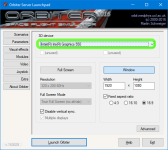
Low framerates might occur when you've selected a "slow" (Software based - maybe) 3D device under the Video Tab
1658086310600.png
 
Last edited:
For Orbiter 2016 just click the big green "download" button found here ;)
which is R4.25 by the way.

Further down that page under "Downloads for Orbiter 2016" there is (at least) one more current version (R4.26 [beta] from October 9th 2021)
and some older releases as well.

Low framerates might occur when you've selected a "slow" (Software based - maybe) 3D device under the Video Tab
View attachment 29521
Hi kuddel,
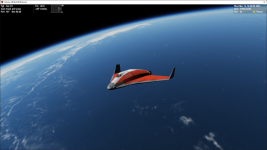
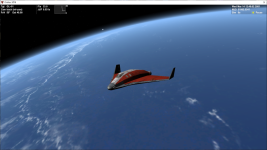
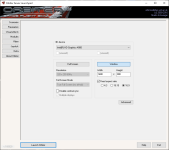
Must say I've been getting slow fps for some time against stock client.
Not the greatest 3D device though. ;)
Thanks for your great work, the render difference is awesome. :cheers:
4.26.pngStock.png3d Device.png
 
I also have HD Graphics 4000 on my laptop. It's a good idea to disable anti-aliashing it should boost the frame-rate. I have used to get 100-200fps but now it's like 50-100fps (depending graphics settings) (Orbiter build Feb-2019). I don't know why the drop.
 
@JMW : Good to hear you make progress.
BTW: The main work was/is done by Jarmo.
 
pleaseusepunctationasitimprovesreadability

Have you installed the Direct X 9 runtimes as well? (see D3D9Client documentation on where to get it)
Have you enabled D3D9Client in the Modules tab?
 
....aaaaand? Did that solve the issue?
 
Back
Top