Update For 3dsMax users - a script for getting your vectors right

Moach

Crazy dude with a rocket
Addon Developer
Joined
Aug 6, 2008
Messages
1,582
Reaction score
63
Points
63
Location
Vancouver, BC
just thought i´d share...

not sure how many addon makers here use the expensive mother of all 3d software... but if someone does, i created a little maxScript that gives you a simple tool to copy vectors straight out of 3ds max and paste them into visual studio with a single ctrl+c, ctrl+v bid...


is anyone interested in this? :P
 
It does sound usefull, just that I don't plan to do any modeling before autumn.
 
Ok, here it is:

Code:
MacroScript get_vector_tool_mcr category:"MOACH_GetVectorTool" buttonText:"Get Vector Tool"
(
	rollout getVectorTool "Get Vector Tool" width:321 height:360
	(
		
		button btn3 ":: get it ::" pos:[8,8] width:305 height:45
		
		global _mode = 1
		dropdownlist mode_dd "Format" pos:[8, 55] width:305 items:#("C++  _V singles",  "DXS Vector singles", \
			"CFG (spaced) single entries", "CFG (commas) single entries", "C++ _V  V3_ named defines *beware of spaces*",\
			"C++ _V V3_TDIR_ defines :: targets delta-vector (normalized)")
		
		on mode_dd selected i do
		(	
			_mode = i
		)
		
		editText vector_out "" pos:[4,110] width:309 height:225 enabled:true bold:true readOnly:true
		on btn3 pressed  do
		(
			
			vector_out.text = ""
			
			for i in selection do
			(
				case _mode of
				(
					----------------------------------------------------------------------------------------------------------------------------------- C++ style single _V (for orbiter)
					1: vector_out.text += i.name + ">> \n\t" + ("_V("+(i.pivot.x as string)+", "+(i.pivot.z as string)+", "+((-i.pivot.y) as string)+")\n\n")
					
					----------------------------------------------------------------------------------------------------------------------------------- DXS javascript style
					2: vector_out.text += i.name + ">> \n\t" + ("new Vector("+(i.pivot.x as string)+", "+(i.pivot.z as string)+", "+((-i.pivot.y) as string)+");\n\n")
					
					----------------------------------------------------------------------------------------------------------------------------------- CFG file entry (space separated)
 					3: vector_out.text += i.name + ">> \n\t" + ((i.pivot.x as string)+" "+(i.pivot.z as string)+" "+((-i.pivot.y) as string)+"\n\n")
					
					----------------------------------------------------------------------------------------------------------------------------------- CFG (with commas)
					4: vector_out.text += i.name + ">> \n\t" + ((i.pivot.x as string)+", "+(i.pivot.z as string)+", "+((-i.pivot.y) as string)+"\n\n")
					
					----------------------------------------------------------------------------------------------------------------------------------- V3_ named defines
					5: vector_out.text += "#define V3_"+i.name + " _V(" +((i.pivot.x as string)+", "+(i.pivot.z as string)+", "+((-i.pivot.y) as string)+")\n")
					
					----------------------------------------------------------------------------------------------------------------------------------- V3_AX targets delta-dir defines
					6: (
						if (i.target != undefined) do (
							axis = normalize (i.target.pivot - i.pivot)
							vector_out.text += "#define V3_TDIR_"+i.name +"_V(" +((axis.x as string)+", "+(axis.z as string)+", "+((-axis.y) as string)+")\n")
						)
					)
				)
				
			)
		)
		
		button toCB ":: Copy-Paste Me! ::" pos:[8, 340] width:305 height:20
		on toCB pressed do
		(
			setclipboardText vector_out.text
		)
	)
	createDialog getVectorTool 325 365
)

just paste this into the MaxScript listener and hit Ctrl+e (evaluate all) - it should add a command in your "customize user interface" list under category "MOACH_GetVectorTool" - you can assign that to a keyboard shortcut or ui button as you please

or, if you remove the very first line, the dialog pops up right after ctrl+e, although it won´t appear as a command if you do it this way...


i did add a few more features now... not only it spits out vectors for VC++, it also can output vectors in CFG-entry format (and others)as well as give you normalized rotation axes for tape helpers or anything that has a "target" property


usage is pretty straightforward... select the object you need vectors for (usually dummies or point helpers) and hit ::get It!:: - vectors will be written in the lower panel according to the selected format, click ::Copy-Paste me!:: to copy all info to the clipboard, then you can ctrl+v as needed

if you select a large amount of objects, some vectors may not appear in the list, don´t worry, they´re there, its just that it doesn´t scroll down on its own (kudos, autodesk!) - click and drag should make it scroll tho...


cheerz
 
Last edited:
What exactly does this tool do? It seems to be it's only getting the location coordinates of the items selected. It would be a little more useful if it got both the position and direction vectors.
 
well... that´s what t´s supposed to do, no?.... :hmm:

if you need direction vectors, you gotta use tape-measure helpers - then select "targets delta-dir" format and you´ll get the normalized direction between the tape and its target :thumbup:

i´m gonna add a format for "local forward".... that could be useful at times
 
What exactly does this tool do? It seems to be it's only getting the location coordinates of the items selected. It would be a little more useful if it got both the position and direction vectors.

You can get vectors from AC3D.
 
Probably better. You still need to swap the x axis in AC3D.
 
I finally got to test this out, very nice little script. It'll save me a ton of time. I did notice one bug though. Sometime the vectors are wrong when you do normalized output. It appears to be off by one sign, i.e. my exhaust would point up and left instead of up and right. It is easy to fix after I paste it, just an fyi.
 
yeah, theres some trial-and-error going on to sort out those signs...

i think the version i have at home is fixed... i'll post that as soon as i get there (at work now)

feel free to customize the script as you please... it's pretty easy to understand

cheerz
 
yeah, theres some trial-and-error going on to sort out those signs...

i think the version i have at home is fixed... i'll post that as soon as i get there (at work now)

feel free to customize the script as you please... it's pretty easy to understand

cheerz
Orbiter has the positive z-axis forward, positive x-axis to the right, and positive y-axis up. Most modelling tools have the positive x-axis to the left.

This was something I had to account for in the Wings exporter.
 
Great job!! This will save me a ton of time! :cheers:
 
glad i can help!

an thanks for the clarification on the axes - i'll recheck those before the next release:thumbup:
 
I have the tool working with the pivot, but I have a quick question here (and sorry if this is a n00bie Max question, but I'm not a modeler :embarrassed:). When grabbing vertex coordinates I like to work in the mode shown below ("editable poly" in vertex mode), which makes it easy to click on the vertex I want. To clarify, here are the settings:
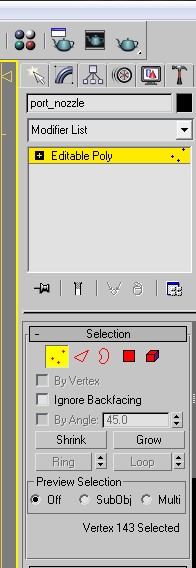
3dsmax_editable_poly.jpg


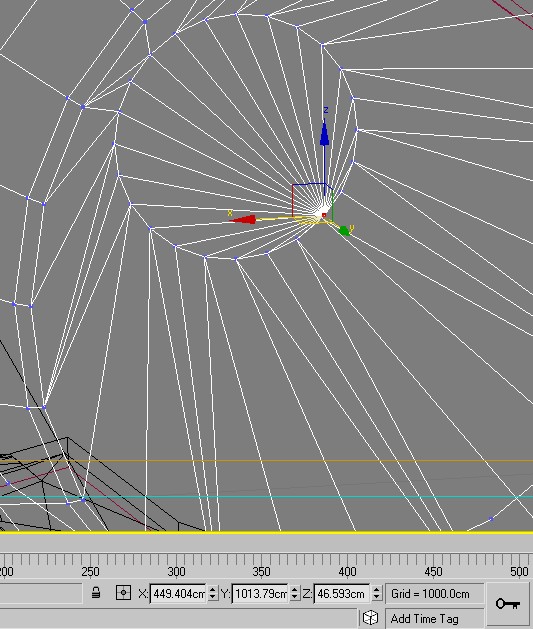
When I click on a vertex I want, it looks like this:

3dsmax_selection.jpg


You can see the coordinates of the selected vertex at the bottom of the screenshot: X=4.49 meters, Y=10.13 meters, Z=.46 meter. And of course, when converted to Orbiter coordinates that would be X=-4.49, Y=0.46, Z=-10.13. However, the script always uses the pivot coordinates, and the pivot does not change as I select different vertices. I see in the script it is doing this:

Code:
for i in selection do
...
vector_out.text += i.name + ">> \n\t" + ("_V("+(i.pivot.x as string) ...

What property would I need to use instead of 'selection.pivot' in order to read the values in the coordinate boxes shown at the bottom of the screen in the screenshot above? (Sorry again if this is a n00b Max question -- this is in 3ds Max 2009 BTW.)
 
uh, probably not... my MaxScript is a little thin, but vertices are not reachable directly by "selection"... this is limited to obect-level selection...

there's a different property to get the selected vertices - tho i can't really remember it now, that's why it isn't working for you...


i'll check into that when i can get my hands on my home rig...
then i'll post up the new version, as well as the improved exporter script i'm using (which automatically assigns material flags and outputs meshgroup id #defines)


and don't sweat it... it's not a n00b question :cheers:
 
just out of interest doug, why do you need coords from that vertex? its not in the centre of rotation for that part. Maybe you've just chosen a quick example and in which case ignore me, but just an FYI the objects pivot point is the centre of rotation for that nozzle. You should find that all parts rotate properly on their pivot point and you can explore each parts rotation with the rotate function and a 'local'* coordinate system and rotate them on their local z-axis.. the nozzle of course has 2 axes of freedom to allow gimballing should be the objects local x and y rotation. most other parts like doors just rotate on their local z axis

*listed in the upper IU, its a drop down set to 'world' or 'view' by default.
 
Last edited:
Thanks for the info, mate, but actually I need vertex coordinates when coding animations or coding RCS/engine thruster exhausts (I grabbed a nozzle vertex above just for an example). For example, in order to animate a door I need the vertex coordinates of both ends of the hinged side, which I then use to calculate a vector from one vertex to the other. Overall a vessel requires quite a lot of vertex coordinate gathering for all its animations, thrusters, and engines, so rather than having to copy/paste each X/Y/Z coordinate into a utility I wrote to convert max coordinates to Orbiter coordinates (lots of manual copy/paste labor), I'd like to just copy the line generated by Moach's uber-cool script utility here. It will save me a lot of work! :cheers:

Alternatively, if it's tricky to get the coordinates of the X/Y/Z from maxscript, is there an easy way to get the pivot to "snap" to a vertex? If I can snap the pivot to a vertex (which I assume is what everyone else is doing??) I can grab the coordinates using Moach's utility here. Thanks, guys, for your help!
 
well most do have at least 2 vertexs on the pivot line, for all the doors at least.. the nozzles are a special case.... would it help you if there were at least 2 vertexes on the pivot vector.. because for a few parts like the new elevons and so on, that vector might be off slightly otherwise. in order to use the pivots i've set up, you need for the most part to use the local coordinate system instead of world, so the translation axes are aligned to that part and you can move things as if they were on proper hinges, have you tried that?

it's a shame you can't just bake them in somehow, i was able to simply export to .dx format a very complicated landing gear animation for FFED3D. once i'd put the ship in the game everything animated properly at the touch of a button.. i was a little shocked it actually worked, first time too.
 
Last edited:
it's a shame you can't just bake them in somehow, i was able to simply export to .dx format a very complicated landing gear animation for FFED3D.

Yes, that would be nice. :) But unfortunately there is no way to read the pivot data from Orbiter -- each animated piece requires code to define its pivot coordinates and movement vector (and Orbiter's .msh format has no way to store the animation info, either). Add to that all the RCS/engine thrust coordinates that are necessary, and you end up with a lot of coordinate gathering for each vessel. That's where this utility will make it so nice! :thumbup:

But, all that animation you set up in the mesh is still helpful to me in seeing exactly how the pieces are designed to move (from inside 3ds max), so that does provide me with a good reference while coding the animations. :cheers:
 
Back
Top