Music Player MFD

OHM Music Player MFD 1.0

dgatsoulis

ele2png user
Donator
Joined
Dec 2, 2009
Messages
2,021
Reaction score
623
Points
128
Location
Sparta
dgatsoulis submitted a new addon:

Music Player MFD - an independent Music player MFD with visualizations and lyrics support.

View attachment 42737

After installing Read the MusicPlayerMFD.pdf located in the Doc\MusicPlayerMFD folder.

Music Player MFD is an advanced audio player for Orbiter Space Flight Simulator
that transforms your space journeys with rich audio experiences. Beyond basic playback functionality, this
MFD features sophisticated audio visualizations, beat-reactive animations, track management, and lyric display
capabilities.
This MFD uses pre-analyzed audio...

Read more about this addon...
 
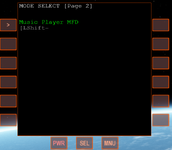
Hi, I just tried the Music Player MFD with Orbiter 2024. It looks the Shift + M command cannot choose the MFD, since the "M" key is assigned for the default Map MFD, look at the absent shortcut:

Без імені.png

Also, isn't there an option to pause a track and then play it from the same moment?
 
I am so used to opening the MFD from the button instead of the shortcut, that I hadn't noticed that it didn't work.
As you know, this MFD is a Lua Script MFD located in the Config\MFD folder.
You can edit the MusicPlayer.cfg and change the shortcut to any key you want, so it doesn't conflict with existing MFDs
At the start of the file, you will see this section:
--[[
Name = Music Player MFD
Script = MusicPlayer.cfg
Key = 0x4D ; 'M'
Persist = vessel
END_PARSE
--]]
You can change the Key = 0x4D ; 'M' line to something else. Here is a (non-exhaustive) list:
Key = 0x41 ; 'A'Key = 0x42 ; 'B'Key = 0x43 ; 'C'Key = 0x44 ; 'D'Key = 0x45 ; 'E'Key = 0x46 ; 'F'Key = 0x47 ; 'G'Key = 0x48 ; 'H'Key = 0x49 ; 'I'Key = 0x4A ; 'J'Key = 0x4B ; 'K'Key = 0x4C ; 'L'Key = 0x4D ; 'M'Key = 0x4E ; 'N'Key = 0x4F ; 'O'Key = 0x50 ; 'P'Key = 0x51 ; 'Q'Key = 0x52 ; 'R'Key = 0x53 ; 'S'Key = 0x54 ; 'T'Key = 0x55 ; 'U'Key = 0x56 ; 'V'Key = 0x57 ; 'W'Key = 0x58 ; 'X'Key = 0x59 ; 'Y'Key = 0x5A ; 'Z'

About not implementing the pause. I can't recall if this was a limitation of the library I was using to play the sound files, or a genuine omission on my part. In any case, when I finish with the remaining bugs of my VideoPlayerMFD, I may port the MusicPlayer to C++ and use more advanced features.
Better yet, would be to have a full MediaPlayerMFD, that handles both music and videos.
The current MusicPlayerMFD loads the whole sound file before playing it, so you get a pause which can be rather long when you play large sound files (for example audiobooks).
The VideoPlayerMFD architecture is actually "streaming" the audio and video, without loading the whole thing at once, so it is much better in resource consumption.
 
I tried Key = 0x49 ; 'I' and Key = 0x51 ; 'Q', but a scortcut is still not displayed (the same as on my screenshot above). Also, commads with Shift key don't set the Music Player MFD from the MFD list. It looks changing Key = 0x4D ; 'M' line doesn't affect anything for me. But yes, the following could be better:
Better yet, would be to have a full MediaPlayerMFD, that handles both music and videos.
 
Back
Top