Mr. Residuals
50 18
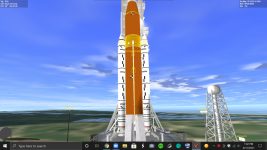
Hi there, so I have a question on how you could change your booster so it can look like this (see attachment). If you can please let me know, thanks.
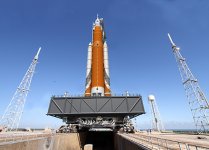



I think we made some textures. I will need to have them. Who knows what it will look like til it flies. Orange Et or white Et?,......


Hi there, so I have a question on how you could change your booster so it can look like this (see attachment). If you can please let me know, thanks.
The only problem is I don’t know what the existing texture is.Simply edit the existing one (search in Orbiter/Texture or /Texture2 folders), and edit them with something like Paint.NET or Gimp 2.0 (all free). Careful to save as .dds
Doing such spiral patterns on a cylinder should be straightfoward, you just to have to paint some diagonal lines, maybe with a fade out on each end.
The only problem is I don’t know what the existing texture is.
The booster does have textures, but I'm not sure if it's supposed to look like in the attachment bellow. Note the scn is a random scn of mine.First : does the booster appears textured at all in Orbiter (if not, it will look plain white) ? If no texture at all you'll have to add one in the .msh (mesh) file (that you can open with Notepad, search at the end of the raw data block and compare to other meshes like Deltaglider etc..).
Then, associate dds (Direct Draw Surface) files to one of the aforementionned free image editors above and browse the folders. Should be pretty easy to find out, usually a texture is a streched image (wrapped to a 3D model) of an object.