Things that others do on the computer, that make you rage.

When I'm told google is my friend. No it is not, for a number of reasons

1- it is a lifeless corporate construct
2- it has no will of its own, therefore cannot befriend anyone
3- its main purpose is to return search results and push advertisements
4- the results returned often require more searching, and are not what you're looking for
 
Oh yes...

"To convert .lit files to .txt you just need to get a program called clit. Google s your friend."
Just give me the damn link, that "friend" is a pervert!
 
Maybe I said this before, maybe not, but people that always have to "set-up" their computer prior to using it. By that I mean connecting peripherals like speakers and mice and keyboards. OR better yet, folks that have only ONE computer and not designated area (not because they are poor and can't afford 2 or 3 and the desks and chairs) and it is a laptop, and they methodically put it away at night and take it right back out the next day. Every single day! In and out, in and out! For chrissakes!! Get a desk or work area and make it a permanent installation.

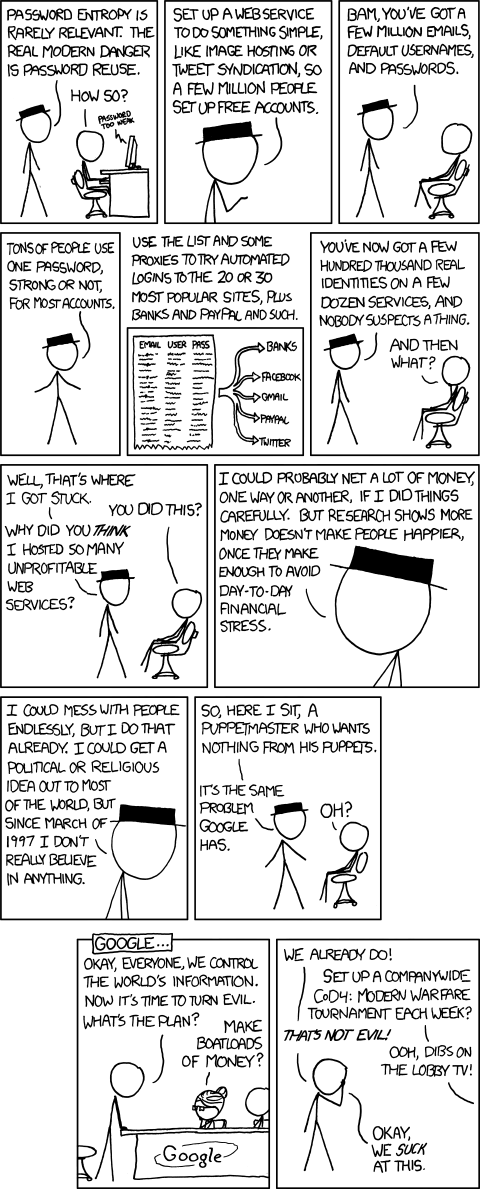
In today's day and age, with all the websites, we need a way to store our passwords. So the best solution is a simple text file, put into a .zip or .rar container, with one good password. This way I have access to ALL my passwords and only need to remember one. If you need to crack my .zip or .rar file, go ahead and try. I'm sure you'll spend more money and time than what you would reap from using my accounts! hehehe.

Concerned about security there? Put a zip inside-a zip!! And avoid the plaintext attack.

Oh yeh that "let me google that for you" thing.
 
Last edited:
In today's day and age, with all the websites, we need a way to store our passwords. So the best solution is a simple text file, put into a .zip or .rar container, with one good password. This way I have access to ALL my passwords and only need to remember one. If you need to crack my .zip or .rar file, go ahead and try. I'm sure you'll spend more money and time than what you would reap from using my accounts! hehehe.

password_reuse.png


Seriously, If you're having trouble remembering all passwords and some of them are actually important, use a password manager like KeyPass. Then you can put your master-password inside a zip inside a zip ;)
 
Part of my "computing philosophy" is to not make things overly complex. The simpler the better. And sometimes that means I use 1 program for many things. Like using Notepad for my journal, as well as professional correspondence, and password 'database', among other things!

I find a simple text file much better and easier to update, maintain, transfer, and work with.
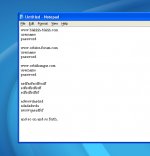
note1.jpg
Nothing beats a single click and an ALT-E F "website" name to find a password. And you can add in other info like credit card numbers and verification codes at a whim. Notes too! No reconfiguring or looking through help files or navigating many different fields. All without installing a whole different program. Worrying about installation rights, blahh blahh. AND the plus side is I know exactly where my 'database' is stored. I can bring it with me easily. View it on any device, convert it to a billion other formats if needed. And if and when I upgrade computers, the file can come along with 100% compatibility assured, no installing, no updating. No fuss! You get the idea.

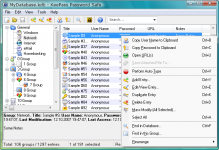
As opposed to something like this.
main_big.png
..which is way way overkill and busy and time consuming. Or so it seems; to *ME* anyways. Looking at that *I* would not know where to begin.

The same philosophy applies to file management and general computer ops. By keeping things simple, I am able to work quickly and freely without distractions and other issues. Focusing on great content that is concise, to the point, aesthetically beautiful, and a pleasure to gaze upon.

 
Last edited:
I think a lot of the problem is when simplicity and complexity try to mix.

Take my aforementioned college-mates. On Twitter/Facebook etc. they are absoloutely A-OK and adept, with smooth, nicely worked GUIs and buttons. In MS Excel, they're OK, as you get a similar, "user friendly" look.

But as soon as something slightly different comes up - e.g. a gibberish-looking "run-time error" - they whole ka-boodle goes ker-splat and they think, "yeah whatever, computer rubbish, I hate you, I hate you" ***bashbashbash on the mouse*** and give up.

For them, this complexity is a waste of their's and the computer's time. However, for people with, say, a knowledge of programming, this information is an invaluble tool for problem-solving.

Over-complex or over-simple? You can't do both Mr Gates... :lol:
Oh no! I've been got by the OS-War bug... :uhh:
 
I believe it is simply a laziness and lack of will to learn anything. And that has only become worse over the years. Which is another annoyance. Complete laziness when it comes time to RTFM. At least get the basics!
 
Seriously, If you're having trouble remembering all passwords and some of them are actually important, use a password manager like KeyPass. Then you can put your master-password inside a zip inside a zip ;)
Or... http://www.thinkgeek.com/gadgets/security/99f1/
 
O-F Staff Note: Two off-topic OS wars posts moved to the OS Wars Mega Thread here. Let's keep the OS wars posts over there, please. Thanks.
 
People who correct/criticize my pronunciation. I had a friend at school who was terrible for this. When I told her I had Ubuntu (I pronounce it "you-BUN-too") she interrupts me mid-sentence and says "oo-BOON-too". I just brushed it off and went on with the conversation. But the second time really got on my nerves: I told her I was looking into OpenSUSE, and when I pronouced it "Open Susie" she jumps in and says "open soos."

For the love of the probe, call it Open Dog Poop if you want. But let me have my own preferences, please.:rolleyes:
 
Actually, it's pronounced Open Sooz-uh. ;)
 
@n122vu; Oh, a pronunciation-battle, bring it! :lol: Software und System Entwicklung. The last part, entwicklung, if you cut the 'ntwicklung' away, sounds like the beginning of the word 'elder' without the 'lder' part. So SOOS, or maybe better yet SOOZ (except that the Z (zee) could confuse americans here), as opposed to ZEUS, which ends more abruptly, would probably be the closest way to spell the pronunciation. Maybe SOOSeh, if you really want to over-emphasize the ending.
Nah, I'm treading water here :P I thought it was SOOS (ending on a soft S sound)
This just proves that linux is for true geeks haha :lol:
I'll leave it to Urwumpe to clear out how the pronunciation really goes :)
 
-using IE
-not using "ctlr-c" etc.
-always clicking the "Apply" button and then "OK"
-typing "www" in the adress bar
-shuting down the computer when not using it for 10 minutes
-install useless toolbars ICQ etc.
-not using the mouse wheel
-typing .de instead of .com (youtube.de) :rofl:
-touching the screen
:facepalm:
makes me insane
 
Back
Top