

misha.physics
Well-known member
- Joined
- Dec 22, 2021
- Messages
- 1,534
- Reaction score
- 2,326
- Points
- 128
- Location
- Lviv
- Preferred Pronouns
- he/him
I thought the animation of throttle in VC on Lua will be as simple as animations of control surfaces and yokes, but looking at DG Lua scripts I see many unfamiliar things. I suppose the following parts of DG may be related with my goal:
I just would like to animate these two separated meshroups to make them rotate in accordance with the throttle level of main engines (THGROUP.MAIN) without controling them by mouse and so on:
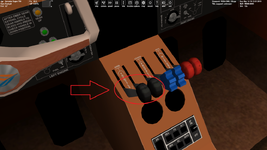
Maybe anyone familiar with this could help me with a simple template without anything extra.
Code:
function MainRetroThrottleLevers:RedrawVC (hMesh, hSurf)
    local dg = self.component:DG()
    for i=1, 2 do
        local level = dg:GetMainThrusterLevel(i)
        local pos
        if level > 0 then
            pos = 150 + level*300.0
        else
            level = dg:GetRetroThrusterLevel(i)
            pos = 150 - level*150.0
        end
        if pos ~= self.sliderpos[i] then
            self.sliderpos[i] = pos
            dg:set_animation (self.component.anim_lever[i], pos/450.0)
        end
    end
    return true
end
Code:
function MainRetroThrottle:new(_subsys)
    DGSubsystem.new(self, _subsys)

    self.ELID_LEVERS, self.levers = self:AddElement (MainRetroThrottleLevers (self))

    -- VC animation: Left main engine throttle
    local MainThrottleLGrp = {GRP_VC.THROTTLE_MAIN_L1,GRP_VC.THROTTLE_MAIN_L2}
    local MainThrottleL = MGROUP_ROTATE (1, MainThrottleLGrp, _V(0,0.72,6.9856), _V(1,0,0), 50*RAD)
    self.anim_lever = {}
    self.anim_lever[1] = self:DG():create_animation (0.4)
    self:DG():add_animationcomponent (self.anim_lever[1], 0, 1, MainThrottleL)

    -- VC animation: Right main engine throttle
    local MainThrottleRGrp = {GRP_VC.THROTTLE_MAIN_R1,GRP_VC.THROTTLE_MAIN_R2}
    local MainThrottleR = MGROUP_ROTATE (1, MainThrottleRGrp, _V(0,0.72,6.9856), _V(1,0,0), 50*RAD)
    self.anim_lever[2] = self:DG():create_animation (0.4)
    self:DG():add_animationcomponent (self.anim_lever[2], 0, 1, MainThrottleR)
end

function MainRetroThrottle:clbkLoadVC (vcid)
    if vcid ~= 0 then return false end

    -- Throttle lever animations
    oapi.VC_register_area (self.ELID_LEVERS, PANEL_REDRAW.ALWAYS, PANEL_MOUSE.LBDOWN + PANEL_MOUSE.LBPRESSED)
    oapi.VC_set_areaclickmode_quadrilateral (self.ELID_LEVERS, _V(-0.372,0.918,6.905), _V(-0.279,0.918,6.905), _V(-0.372,0.885,7.11), _V(-0.279,0.885,7.11))

    return true
endMaybe anyone familiar with this could help me with a simple template without anything extra.


