Discussion Trying to render a functional VC (starting small)

At this point, if someone could guide me in the right direction (of displaying the labels on the buttons), it would massively save time. Thanks.

Make a texture where every button has its tiny square, mark it "D" for dynamic, paint the button labels on the texture.... I don't know now which callback was the right one for that, need sleep. Maybe it was clbkMFDMode, maybe clbkAnimate.
 
OK, I found this, but sadly the most useful links (to tutorial from @martins) are lost :( Writing a new tutorial is indeed a priority, but that's walking in the steps of a giant...


Make a texture where every button has its tiny square, mark it "D" for dynamic, paint the button labels on the texture.... I don't know now which callback was the right one for that, need sleep. Maybe it was clbkMFDMode, maybe clbkAnimate.

I get that I need to make a texture where the alphabet is displayed, yes (or reuse one from the DG or Shuttle A). But I don't get how to implement that in code. Have to sleep too, we'll see that tomorrow. Almost there.

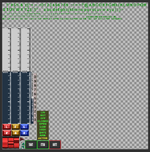
This is 'panel_el.dds' from the ShuttleA, there is such a 'little alphabet' in there. True the resolution could get an upgrade, but I only need it to work as a proof of concept. Once I get it, improving it will be easy.

1763779527625.png
 
OK, I found this, but sadly the most useful links (to tutorial from @martins) are lost :( Writing a new tutorial is indeed a priority, but that's walking in the steps of a giant...


I get that I need to make a texture where the alphabet is displayed, yes (or reuse one from the DG or Shuttle A). But I don't get how to implement that in code. Have to sleep too, we'll see that tomorrow. Almost there.

This is 'panel_el.dds' from the ShuttleA, there is such a 'little alphabet' in there. True the resolution could get an upgrade, but I only need it to work as a proof of concept. Once I get it, improving it will be easy.

View attachment 45724

In the ASCII rogue-like community you can also find many such textures with characters to use. Maybe thats quicker.
 
I saw the corresponding code in the default Atlantis Lua script. It changes labels for side buttons relative to MFD mode. I suppose it must be presented in a C++ code for Atlantis as well.
 
There is this in Atlantis.cpp :

void Atlantis::RedrawPanel_MFDButton (SURFHANDLE surf, int mfd)
{
using namespace oapi;

Sketchpad *pSkp = oapiGetSketchpad(surf);

// D. Beachy: BUGFIX: if MFD powered off, cover separator lines and do not paint buttons
if (oapiGetMFDMode(mfd) == MFD_NONE) {
RECT r = { 0,0,255,13 };
pSkp->SetPen(NULL);
pSkp->SetBrush(g_Param.brush[0]);
pSkp->Rectangle(r.left, r.top, r.right, r.bottom);
} else { // MFD powered on
auto pOld = pSkp->SetFont(g_Param.font[0]);
pSkp->SetTextColor (RGB(0,255,216));
pSkp->SetTextAlign (Sketchpad::CENTER, Sketchpad::TOP);
pSkp->SetBackgroundMode(Sketchpad::BK_TRANSPARENT);

const char *label;
int x = 24;

for (int bt = 0; bt < 5; bt++) {
if (label = oapiMFDButtonLabel (mfd, bt)) {
pSkp->Text (x, 1, label, strlen(label));
x += 42;
} else break;
}
pSkp->Text (234, 1, "PG", 2);
pSkp->SetFont(pOld);
}
oapiReleaseSketchpad(pSkp);
}

... but the labels are kinda printed on the MFD itself :( :

1763811275812.png
 
MAybe this:
void T_Rover::PaintMFDButtons(SURFHANDLE surf)
{
HDC hDC = oapiGetDC(surf);
for (int mfd = 0; mfd < 3; mfd++) {
// D. Beachy: BUGFIX: if MFD powered off, do not paint buttons
if (oapiGetMFDMode(mfd) == MFD_NONE) {
}
else
{ // MFD powered on
//sprintf(oapiDebugString(), "MFD MODE %d MFD %d ", oapiGetMFDMode(mfd), mfd);
HFONT pFont = (HFONT)SelectObject(hDC, g_Param.font[0]);
SetTextColor(hDC, RGB(255, 255, 255));
SetTextAlign(hDC, TA_CENTER);
SetBkMode(hDC, TRANSPARENT);
const char* label;
int y = 16;
for (int bt = 0; bt < 6; bt++) {
if (label = oapiMFDButtonLabel(mfd, bt)) {
TextOut(hDC, mfd_buttons_ypos[mfd], y, label, strlen(label));
y += 64;
}
else break;
}
int y2 = 16;
for (int bt = 6; bt < 12; bt++) {
if (label = oapiMFDButtonLabel(mfd, bt)) {
TextOut(hDC, mfd_buttons_ypos[mfd] + 128, y2, label, strlen(label));
y2 += 64;
}
else break;
}
//TextOut (hDC, 234, 1, "PG", 2);
SelectObject(hDC, pFont);
}
}
oapiReleaseDC(surf, hDC);
}
 
It gives me that. Also it looks completely different from the 'alphabet' approach. I'm quite lost. :(

I declared mfd_buttons_ypos as 'const int'

1763822759360.png
 
... but the labels are kinda printed on the MFD itself :( :

1763811275812.png
Oh, yes.
 
Last edited:
H:
typedef struct {
HINSTANCE hDLL;
SURFHANDLE tkbk_label;
HFONT font[1];
} GDIParams;

//vc
#define ALL_MFD_BUTTONS 999999
#define CDR1_PWR 10199
#define CDR1_SEL 10299
#define CDR1_MNU 10399
#define PLT1_PWR 20199
#define PLT1_SEL 20299
#define PLT1_MNU 20399
#define CNTR1_PWR 30199
#define CNTR1_SEL 30299
#define CNTR1_MNU 30399
#define CDR1_LBUTTONS 101999
#define CDR1_RBUTTONS 102999
#define PLT1_LBUTTONS 201999
#define PLT1_RBUTTONS 202999
#define AID_CDR1_BRT 203999
#define AID_CDR1_DIM 204999

int mfd_buttons_ypos[3] = {
64,
320,
576
};
cpp:
// Global (class-wide) parameters

GDIParams g_Param;
//
VISHANDLE MainExternalMeshVisual = 0;
 
Alright, it compiles but still no joy.

Where should I get the value for int_mfd_buttons_ypos here ? Are they the Y coordinates of each buttons meshgroups (left, right, bottom) ? Also has my texture have to be transparent or something ?

void ShuttlePB::RedrawPanel_MFDButton(SURFHANDLE surf)
{

int mfd_buttons_ypos[3] = {0,0,0};

HDC hDC = oapiGetDC(surf);
for (int mfd = 0; mfd < 3; mfd++) {
...
}
 
I think it is the y value of the texture?

void T_Rover::DefineMFDButtons()
{
SURFHANDLE mfd_buttons_surf;
mfd_buttons_surf = oapiGetTextureHandle(VCMesh, 4);

oapiVCRegisterArea(CDR1_PWR, PANEL_REDRAW_NEVER, PANEL_MOUSE_LBDOWN | PANEL_MOUSE_ONREPLAY);
oapiVCRegisterArea(CDR1_SEL, PANEL_REDRAW_NEVER, PANEL_MOUSE_LBDOWN | PANEL_MOUSE_ONREPLAY);
oapiVCRegisterArea(CDR1_MNU, PANEL_REDRAW_NEVER, PANEL_MOUSE_LBDOWN | PANEL_MOUSE_ONREPLAY);
oapiVCSetAreaClickmode_Quadrilateral(CDR1_PWR, CDR1_PWR_AREA.pt1, CDR1_PWR_AREA.pt2, CDR1_PWR_AREA.pt3, CDR1_PWR_AREA.pt4);
oapiVCSetAreaClickmode_Quadrilateral(CDR1_SEL, CDR1_SEL_AREA.pt1, CDR1_SEL_AREA.pt2, CDR1_SEL_AREA.pt3, CDR1_SEL_AREA.pt4);
oapiVCSetAreaClickmode_Quadrilateral(CDR1_MNU, CDR1_MNU_AREA.pt1, CDR1_MNU_AREA.pt2, CDR1_MNU_AREA.pt3, CDR1_MNU_AREA.pt4);

oapiVCRegisterArea(PLT1_PWR, PANEL_REDRAW_NEVER, PANEL_MOUSE_LBDOWN | PANEL_MOUSE_ONREPLAY);
oapiVCRegisterArea(PLT1_SEL, PANEL_REDRAW_NEVER, PANEL_MOUSE_LBDOWN | PANEL_MOUSE_ONREPLAY);
oapiVCRegisterArea(PLT1_MNU, PANEL_REDRAW_NEVER, PANEL_MOUSE_LBDOWN | PANEL_MOUSE_ONREPLAY);
oapiVCSetAreaClickmode_Quadrilateral(PLT1_PWR, PLT1_PWR_AREA.pt1, PLT1_PWR_AREA.pt2, PLT1_PWR_AREA.pt3, PLT1_PWR_AREA.pt4);
oapiVCSetAreaClickmode_Quadrilateral(PLT1_SEL, PLT1_SEL_AREA.pt1, PLT1_SEL_AREA.pt2, PLT1_SEL_AREA.pt3, PLT1_SEL_AREA.pt4);
oapiVCSetAreaClickmode_Quadrilateral(PLT1_MNU, PLT1_MNU_AREA.pt1, PLT1_MNU_AREA.pt2, PLT1_MNU_AREA.pt3, PLT1_MNU_AREA.pt4);


oapiVCRegisterArea(CDR1_LBUTTONS, PANEL_REDRAW_NEVER, PANEL_MOUSE_LBDOWN | PANEL_MOUSE_LBUP | PANEL_MOUSE_LBPRESSED | PANEL_MOUSE_ONREPLAY);
oapiVCRegisterArea(CDR1_RBUTTONS, PANEL_REDRAW_NEVER, PANEL_MOUSE_LBDOWN | PANEL_MOUSE_LBUP | PANEL_MOUSE_LBPRESSED | PANEL_MOUSE_ONREPLAY);
oapiVCSetAreaClickmode_Quadrilateral(CDR1_LBUTTONS, CDR1_LBUTTONS_AREA.pt1, CDR1_LBUTTONS_AREA.pt2, CDR1_LBUTTONS_AREA.pt3, CDR1_LBUTTONS_AREA.pt4);
oapiVCSetAreaClickmode_Quadrilateral(CDR1_RBUTTONS, CDR1_RBUTTONS_AREA.pt1, CDR1_RBUTTONS_AREA.pt2, CDR1_RBUTTONS_AREA.pt3, CDR1_RBUTTONS_AREA.pt4);

oapiVCRegisterArea(PLT1_LBUTTONS, PANEL_REDRAW_NEVER, PANEL_MOUSE_LBDOWN | PANEL_MOUSE_LBUP | PANEL_MOUSE_LBPRESSED | PANEL_MOUSE_ONREPLAY);
oapiVCRegisterArea(PLT1_RBUTTONS, PANEL_REDRAW_NEVER, PANEL_MOUSE_LBDOWN | PANEL_MOUSE_LBUP | PANEL_MOUSE_LBPRESSED | PANEL_MOUSE_ONREPLAY);
oapiVCSetAreaClickmode_Quadrilateral(PLT1_LBUTTONS, PLT1_LBUTTONS_AREA.pt1, PLT1_LBUTTONS_AREA.pt2, PLT1_LBUTTONS_AREA.pt3, PLT1_LBUTTONS_AREA.pt4);
oapiVCSetAreaClickmode_Quadrilateral(PLT1_RBUTTONS, PLT1_RBUTTONS_AREA.pt1, PLT1_RBUTTONS_AREA.pt2, PLT1_RBUTTONS_AREA.pt3, PLT1_RBUTTONS_AREA.pt4);


oapiVCRegisterArea(ALL_MFD_BUTTONS, _R(0, 0, 1536, 384), PANEL_REDRAW_USER, PANEL_MOUSE_IGNORE, PANEL_MAP_BACKGROUND, mfd_buttons_surf);

 
OK, but you call RedrawPanel_MFDButton(SURFHANDLE surf) somewhere else, right ? Else the function never runs.
 
bool T_Rover::clbkVCRedrawEvent(int id, int event, SURFHANDLE surf)
{
bool return_value = false;
if (id == ALL_MFD_BUTTONS) {

PaintMFDButtons(surf);
return_value = true;
}


return return_value;
}
 
Crap, I still get this :

1>------ Rebuild All started: Project: ShuttlePB, Configuration: Release Win32 ------
1>ShuttlePB.cpp
1>H:\Jeux\Orbiter 2024 Debug\Orbitersdk\samples\ShuttlePB\ShuttlePB.cpp(599,25): error C2275: 'SURFHANDLE': expected an expression instead of a type
1>H:\Jeux\Orbiter 2024 Debug\Orbitersdk\samples\ShuttlePB\ShuttlePB.cpp(599,36): error C2146: syntax error: missing ')' before identifier 'surf'
1>H:\Jeux\Orbiter 2024 Debug\Orbitersdk\samples\ShuttlePB\ShuttlePB.cpp(599,36): error C2146: syntax error: missing ';' before identifier 'surf'
1>H:\Jeux\Orbiter 2024 Debug\Orbitersdk\samples\ShuttlePB\ShuttlePB.cpp(599,40): error C2059: syntax error: ')'
1>Done building project "ShuttlePB.vcxproj" -- FAILED.
========== Rebuild All: 0 succeeded, 1 failed, 0 skipped ==========
========== Rebuild completed at 18:08 and took 01,368 seconds ==========


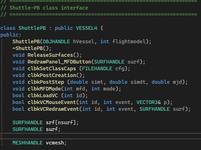
Do you define 'surf' as a SURFHANDLE in the header file ?
 
Looks like you don't. Is that addon working with Orbiter 2024 ?

Thank you a huge lot for your cooperation. :cheers:
 
Not sure. It was for 2010 and then rebuilt for 2024. But it should. I might make it UACS and for 2024

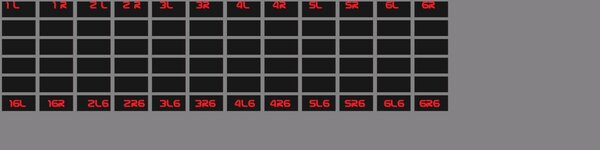
Making MFD can be a task. I used a texture mfdbutton2 as a guide. and then the texture for the buttons had the red lettering removed
 

Attachments

  • mfd_buttons2b.jpg
    mfd_buttons2b.jpg
    26 KB · Views: 1
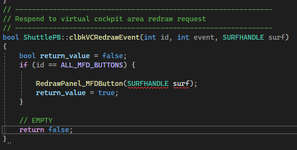
What are the reasons that can cause this ? SURFHANDLE is valid the first time, but gets flagged the second time...

1763852305036.png

1763852646739.png

in my header file I have :

1763852567868.png
 
Back
Top