
-
ORBITER-FORUM will be temporarily closed at 2026-07-23 18:00 UTC while we complete some OF maintenance tasks. The amount of downtime is expected to take up to one hour, but probably less.
You are using an out of date browser. It may not display this or other websites correctly.
You should upgrade or use an alternative browser.
You should upgrade or use an alternative browser.
New Release D3D9Client Development
- Thread starter jarmonik
- Start date


- Joined
- Apr 13, 2011
- Messages
- 2,215
- Reaction score
- 0
- Points
- 36
- Location
- Los Angeles
- Website
- www.youtube.com
Wow. Finally got the chance to give the new version a try with the Earth glow, and it is beautiful. The default setting might be a bit over powered....or it is still in discriminated implemented, I am not sure. Seems too much glow was happening during launch. What setting are you guys using for the Earth glow at the moment? Or have you just been leaving it at the default 0.5? The look of it seems very close to all those Shuttle pictures I have been looking at all these many years.
Awesome work. Cheers!
---------- Post added at 05:57 PM ---------- Previous post was at 05:23 PM ----------
Found something strange.
When I go into my station's cupola, which is from Project Wetworkshops, the station cuts in and out of view. And I am very much certain this is something new, that I did not see this in R7.
Here is me looking out and seeing it.

I look up a little bit, and station disappears.

Look another direction:

Look up a little bit, and it disappears

I fiddled with the various new settings to see if that would correct it, but alas, nothing did. And so I have no idea what is going on.
Awesome work. Cheers!
---------- Post added at 05:57 PM ---------- Previous post was at 05:23 PM ----------
Found something strange.
When I go into my station's cupola, which is from Project Wetworkshops, the station cuts in and out of view. And I am very much certain this is something new, that I did not see this in R7.
Here is me looking out and seeing it.
I look up a little bit, and station disappears.
Look another direction:
Look up a little bit, and it disappears
I fiddled with the various new settings to see if that would correct it, but alas, nothing did. And so I have no idea what is going on.
- Joined
- Mar 28, 2008
- Messages
- 2,707
- Reaction score
- 881
- Points
- 128
When I go into my station's cupola, which is from Project Wetworkshops, the station cuts in and out of view. And I am very much certain this is something new, that I did not see this in R7.
It looks like a geometry clipping issue. It will think that the station is outside the camera view and doesn't draw it. There is a major change in the animation transformation matrices in R10 RC1 and some betas that could cause it. I need to find a way to reproduce this on my own computer, can't fix it based on some screen shots. What add-ons do I need ?
---------- Post added at 01:35 ---------- Previous post was at 01:31 ----------
There are no default configuration file for apollo CM in the client, yet. You can apply the effects using the material editor in the D3D9Client debug controls.I ran over posts and I canot find how to get that nice mirror like effect on apollo CM in orbiter..I have r10 rc1 instaled..
- Check "pick" checkbox.
- Click the CM (will be highlighted with green)
- Select Reflect material property
- Select "Link Channels"
- Adjust the slider
- Save Material setup

4throck
Enthusiast !
- Joined
- Jun 19, 2008
- Messages
- 3,489
- Reaction score
- 1,012
- Points
- 153
- Location
- Lisbon
- Website
- orbiterspaceport.blogspot.com
Just some general feedback about the client:
The new planetary glow effect adds realism, and when coupled with normalmaps brings "industry standard" graphics to Orbiter.
Here's my first try at adding some normal maps to one of my own add-ons:

Looks really good as it is: looks like metal as it should, all the small grooves are there, all the knobs and metal joints are visible.
Keep up the good work!
The new planetary glow effect adds realism, and when coupled with normalmaps brings "industry standard" graphics to Orbiter.
Here's my first try at adding some normal maps to one of my own add-ons:
Looks really good as it is: looks like metal as it should, all the small grooves are there, all the knobs and metal joints are visible.
Keep up the good work!
- Joined
- Mar 28, 2008
- Messages
- 2,707
- Reaction score
- 881
- Points
- 128
When I go into my station's cupola, which is from Project Wetworkshops, the station cuts in and out of view. And I am very much certain this is something new, that I did not see this in R7.
Does it work in R9 ?
Has anyone else detected any clipping issues ?
The planet-shine effect looks brilliant. Here's an image showing the reddish reflection from Mars.
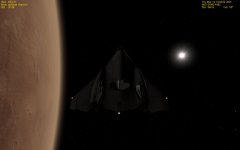
The only thing is, I think the glow should be visible almost immediately after lift-off - once the vessel is clear of its own ground shadow.
The only thing is, I think the glow should be visible almost immediately after lift-off - once the vessel is clear of its own ground shadow.

- Joined
- Apr 14, 2012
- Messages
- 2,584
- Reaction score
- 0
- Points
- 36
Nice work so far, although my add-ons dont play well with reflections. The Phoenix capsule looks like a blob of mercury when I turn it on.
I just wanted to post an issue I encountered. kulches space elevator appears to be incompatible with this. Can anyone else confirm that?
I just wanted to post an issue I encountered. kulches space elevator appears to be incompatible with this. Can anyone else confirm that?


- Joined
- Apr 13, 2011
- Messages
- 2,215
- Reaction score
- 0
- Points
- 36
- Location
- Los Angeles
- Website
- www.youtube.com
Does it work in R9 ?
Has anyone else detected any clipping issues ?
I will try R9. See what happens.
This happened on my VSA space station so it is a bunch of add-ons needed to reconstruction that thing. River Crab's MAL (dont build a station without it), Project Outposts Wetshops, Eranda, Nebulus, URMS, ITS/MRR, Pulsar, ISS 3.2 for the Destiny lab, Wells PMAs, ESA Star, Jarvis for the ASV, Quest Airlock.
I know I am probably missing something...
- Joined
- Mar 28, 2008
- Messages
- 2,707
- Reaction score
- 881
- Points
- 128
I will try R9. See what happens.
This happened on my VSA space station so it is a bunch of add-ons needed to reconstruction that thing. River Crab's MAL (dont build a station without it), Project Outposts Wetshops, Eranda, Nebulus, URMS, ITS/MRR, Pulsar, ISS 3.2 for the Destiny lab, Wells PMAs, ESA Star, Jarvis for the ASV, Quest Airlock.
Oh no, that's a lot of add-ons.
Does the problem occur only in virtual cockpit view or also in the exterior view ?
Could you take a screen shot from the problem with bounding boxes and spheres turned on from the debug controls. Does the bounding geometry match the actual visible model ? (With the R10 RC1)
Last edited:
- Joined
- Apr 13, 2011
- Messages
- 2,215
- Reaction score
- 0
- Points
- 36
- Location
- Los Angeles
- Website
- www.youtube.com
Oh no, that's a lot of add-ons.
Does the problem occur only in virtual cockpit view or also in the exterior view ?
Could you take a screen shot from the problem with bounding boxes and spheres turned on from the debug controls. Does the bounding geometry match the actual visible model ? (With the R10 RC1)
It occurs in the glass cockpit mode and the VC mode. When looking through the cupola's windows via the exterior, it will show up every vessel that is listed BEFORE the cupola in the scenario. Any vessel that is listed AFTER the cupola in the scenario file, does not render.
I will try and see if it is reproduced after shrinking the station down to like...a few modules. Something small and easy to make sure you get the same thing I am.
And sure, I will take some shots with the debug options on. Should have them up shortly.
---------- Post added at 11:33 PM ---------- Previous post was at 10:35 PM ----------
It didn't reproduce in the same manner as before. Before I just had to pan up a bit and the station would disappear. This time, it was more about rotation that caused it to vanish. Station was in the same attitude as before, not sure what is going on.
Anyway, here are the screen shots. I got 2 sets with the bounding markers up as requested.
Set 1:
Set 2:

SpaceShuttleFan
Inflatable Module
- Joined
- Jul 3, 2012
- Messages
- 62
- Reaction score
- 0
- Points
- 0
Is anybody else having issues with symbolic link creation? Link Shell Extension doesn't show the right menu, just Cancel Link Selection. The Config line in the advanced window says "FAIL. Could not create link". Seems like all I do is fight my computer. :beathead:
Last edited:

Astronut25
New member
Is anybody else having issues with symbolic link creation? Link Shell Extension doesn't show the right menu, just Cancel Link Selection. The Config line in the advanced window says "FAIL. Could not create link". Seems like all I do is fight my computer. :beathead:
Did you make sure you're using NTFS file format, not FAT. The external drive I have Orbiter on had been formatted in FAT32 and I didn't notice until I tried to create a symbolic link. (Why would any HD company ship their product with an obsolete format:facepalm

Last edited:
SpaceShuttleFan
Inflatable Module
- Joined
- Jul 3, 2012
- Messages
- 62
- Reaction score
- 0
- Points
- 0
Did you make sure you're using NTFS file format, not FAT. The external drive I have Orbiter on had been formatted in FAT32 and I didn't notice until I tried to create a symbolic link. (Why would any HD company ship their product with an obsolete format:facepalm
Well, that would be it then. Now to figure out how to preserve the Orbiter installation, FSX installation, and everything else on there before I format... :stirpot:
Astronut25
New member
Well, that would be it then. Now to figure out how to preserve the Orbiter installation, FSX installation, and everything else on there before I format... :stirpot:
Don't reformat, it is possible to use cmd to convert it. But remember, ALWAYS backup just in case.
[ame="http://www.youtube.com/watch?v=hHDu-w8dqvE"]http://www.youtube.com/watch?v=hHDu-w8dqvE[/ame]
Also, just in case, did you check it? right-click on the drive its on and hit Properties and it will be right there.
Last edited:

...(Why would any HD company ship their product with an obsolete format:facepalm
Because NTFS is windows specific partition format. For example some Unix/Linux systems or Win98 and WinMe couldn't read it. It's less valid in HDD case as it usually sits inside PC but all my USB flash disks are formatted in Fat32
- Joined
- Mar 28, 2008
- Messages
- 2,707
- Reaction score
- 881
- Points
- 128
It occurs in the glass cockpit mode and the VC mode. When looking through the cupola's windows via the exterior, it will show up every vessel that is listed BEFORE the cupola in the scenario. Any vessel that is listed AFTER the cupola in the scenario file, does not render.
That will make it to sound like a transparency problem. But vessels aren't distance sorted so the rendering order of the vessels won't change even if the camera is moved.
Anyway, here are the screen shots. I got 2 sets with the bounding markers up as requested.
It looks like it's the mesh culling that has a problem not a mesh group cull. That should narrow down the problem..... I'll need to check something...
---------- Post added at 14:27 ---------- Previous post was at 13:21 ----------
It might be better that I'll try to reproduce the problem on my computer there are just too many variables here that need to be checked.
If you can reduce it down to a few add-ons then it should be easy enough to reproduce.
- Joined
- Mar 28, 2008
- Messages
- 2,707
- Reaction score
- 881
- Points
- 128
If it has been working before then something must have changed. I compared the R10 RC1 code to R9 code and there is only one line that has changed that has something to do with mesh culling. But it won't explain the problem.
Is this a post R7 issue or post R9 issue ?
Does the option "enable advanced texture maps" have any effect to the problem in R7 or R9 ?
Is this a post R7 issue or post R9 issue ?
Does the option "enable advanced texture maps" have any effect to the problem in R7 or R9 ?
- Joined
- Mar 28, 2008
- Messages
- 2,707
- Reaction score
- 881
- Points
- 128
RC2
Here is a new build. I have disabled the mesh cull algorithm. If it was resposible for the failure then it should work now. It shouldn't have any major effect in the framerate.
R10 will be probably the final version of D3D9Client. I don't have any motivation to continue my work with the client, it's a lost cause. There are just too many severe unsolved problems with the orbiter it self and older addons. It might be better to create a new open sourced space flight simulator project, such project might actually have a future.
Here is a new build. I have disabled the mesh cull algorithm. If it was resposible for the failure then it should work now. It shouldn't have any major effect in the framerate.
R10 will be probably the final version of D3D9Client. I don't have any motivation to continue my work with the client, it's a lost cause. There are just too many severe unsolved problems with the orbiter it self and older addons. It might be better to create a new open sourced space flight simulator project, such project might actually have a future.
Attachments
Similar threads

- Sticky
- Replies
- 6
- Views
- 10K

- Replies
- 10
- Views
- 4K


- Replies
- 1
- Views
- 4K


- Replies
- 7
- Views
- 4K