SSU Development Thread (2.0 to 3.0)

Status
Not open for further replies.
That has now been dealt with (ticket#63).

It seems you closed the ticket prematurely as: 1) the problem persists and got worse in panel C3 (the forward panel covers are good now) and, 2) even if the problem I just reported didn't exist, the ticket was not just about the D3D9 looks, but the overall look (which is still not "fixed", and like I said before, it can wait).
 
It seems you closed the ticket prematurely as: 1) the problem persists and got worse in panel C3 (the forward panel covers are good now) and, 2) even if the problem I just reported didn't exist, the ticket was not just about the D3D9 looks, but the overall look (which is still not "fixed", and like I said before, it can wait).

If it is no bug, but a CR, it should wait. There will also be a following release, and we can never have enough good features to release then.

We should just have some understanding, when we want to do the next release and how much tested and "low bug"-work we can do until then.
 
If it is no bug, but a CR, it should wait. There will also be a following release, and we can never have enough good features to release then.

That's not a CR but a DR (Discrepancy Report). :P
 
I spent the first half of today working on getting runway 05/23 (and the compass rose) correct, and now I see r2036 thought "well, half day down the drain" :facepalm:. But apparently not so, as the position/heading is still way off. So I posted my numbers in the ticket and if there are not complaints it goes in the trunk. I'm guessing those numbers put the runway (well) within 100m of the actual location, and with the correct heading. I also posted a better map of the lakebed.

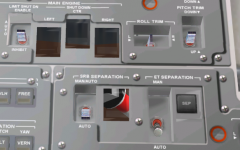
FYI, all the C3 pushbutton covers (with exception of the ET SEP PB) are still fully transparent in D3D9, i.e., whatever is below the orbiter is visible.

Also a question about the mass of the OBSS: currently it's at 1627Kg and that just seems a little too much, especially when all the numbers I found are around 400Kg. I don't know if that mass already includes the MPMs. If so, then the mass of the MPMs should be moved to the MPM subsystem, so the OBSS boom has the correct mass.
 
FYI, all the C3 pushbutton covers (with exception of the ET SEP PB) are still fully transparent in D3D9, i.e., whatever is below the orbiter is visible.
Did you update your Config folder to get the latest SpaceShuttleUltra.cfg in the GC subfolder? This is how my C3 covers look like:

PanelC3.jpg
 
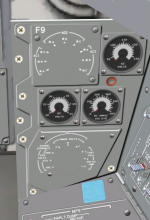
Just updated from r2040 to r2041 and did the mandatory full compilation, and it is still the same in D3D9, as visible in the screenshot below. While I was getting the image of panel C3, I noticed that the rotary switches in panel F9 are missing. Went back to the default client and there are no problems there.
Current contents of SpaceShuttleUltra.cfg
Code:
; =============================================
MESH SSU/Ku_band_DA
; ---------------------------------------------
MATERIAL 1
REFLECT 0.600000 0.600000 0.600000
; =============================================
MESH SSU/VC
; ---------------------------------------------
MATERIAL 0
SPECULAR 1.000000 1.000000 1.000000 204.800003
; ---------------------------------------------
MATERIAL 1
SPECULAR 1.000000 1.000000 1.000000 29.000000
; ---------------------------------------------
MESH SSU/ODS
; ---------------------------------------------
MATERIAL 3
REFLECT 0.200000 0.200000 0.200000
; ---------------------------------------------
MATERIAL 1
REFLECT 0.500000 0.500000 0.500000
; =============================================
MESH SSU/RMSVC
; ---------------------------------------------
MATERIAL 1
AMBIENT 1.000000 1.000000 1.000000
DIFFUSE 1.000000 1.000000 1.000000 1.000000
SPECULAR 1.000000 1.000000 1.000000 26.101961
and SpaceShuttleUltra_ecam.cfg
Code:
BEGIN_CAMERA 0
LPOS 0.0 0 8.75289
DO_NOT_OMIT_FOCUS
END_CAMERA
I never touched those.
Also, I updated D3D9 since the covers got transparent and it did not change anything.
 

Attachments

  • d3d9_a.PNG
    d3d9_a.PNG
    249.1 KB · Views: 436
  • d3d9_b.PNG
    d3d9_b.PNG
    210.7 KB · Views: 571
OK, your files look good. Either it's something specific to your computer or some of the .fx files for D3D9 has been corrupted. Have tried overwriting your existing D3D9 files with fresh ones from the zip? Everything looks good here with D3D9Client R15, Jan. 11 2015.
 
Like I said, I've updated D3D9 since this problem started (I think from R12 to R15), and it didn't change anything.
Pardon my ignorance on the subject, but to me it looks like the ET SEP cover is from a different material or has different properties from the others.
 
Like I said, I've updated D3D9 since this problem started (I think from R12 to R15), and it didn't change anything.
Pardon my ignorance on the subject, but to me it looks like the ET SEP cover is from a different material or has different properties from the others.
That shouldn't be affecting anything, especially something on F9. The only thing I can suggest, is to do a clean install and check things there. This is not a SSU problem. Just to eliminate the off-chance that it is, delete the SSU files in the GC subfolder. Then we'll know for sure.
 
Deleted both SSU files in the GC folder and... no change.
Reinstalled all the D3D9 files and... no change.
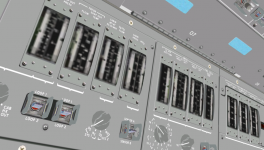
Attached a screenshot with another difference, and the PLT side landing gear talkback look "cheap". Everything else looks good.
My settings in D3D9:
Load on demand 20 Hz
Anti-aliasing 4x
Anisotropic filtering 8x
Planet glow 0.7
Enable advanced texture maps
Enable improved glass
Enable geometry instancing
GDI/DirectX
Proof Quality
Debug level 2
Enable mesh debugger
0.2m
65%
Planet Only
Enable
Light

I'm going to go back in the revisions to see if it makes a difference.
 

Attachments

  • d3d9_c.PNG
    d3d9_c.PNG
    475 KB · Views: 440
DaveS: can you move the "Textures/Sources" folder into the "OrbiterSDK/SpaceShuttleUltra" folder? This way, we have a better separation between distribution files and development files.

---------- Post added at 04:55 PM ---------- Previous post was at 04:30 PM ----------

I can also confirm, that the PB-guards on panel C3 are still transparent on my system as well - the fully opaque parts of them are less than 25% opaque.
 
Went back to previous revisions, and other than the remaining covers not being visible (as they were), there's no change.
So if nobody else has this issue, I guess it's my problem and I'll have to deal with it. Thank you for your time.
 
DaveS: can you move the "Textures/Sources" folder into the "OrbiterSDK/SpaceShuttleUltra" folder? This way, we have a better separation between distribution files and development files.
Done.

I can also confirm, that the PB-guards on panel C3 are still transparent on my system as well - the fully opaque parts of them are less than 25% opaque.
What level should they be at? This is a photo of a real orbiter PB guard cover. Notice how it is very transparent except for the metal frame.

Orbiter_PB_guard.jpg


---------- Post added at 05:07 PM ---------- Previous post was at 05:06 PM ----------

Went back to previous revisions, and other than the remaining covers not being visible (as they were), there's no change.
So if nobody else has this issue, I guess it's my problem and I'll have to deal with it. Thank you for your time.
Have you updated your video drivers recently? Maybe that broke a few things.
 
Have you updated your video drivers recently? Maybe that broke a few things.

Nop. Can't tell about the F9 and O1/O2/O3 panels because I don't know if they had problems before, but the C3 covers only got like that when you did your magic to correct the D3D9 issues last week or so. But I went back and it's the same, so it looks like a coincidence.
 
What level should they be at? This is a photo of a real orbiter PB guard cover. Notice how it is very transparent except for the metal frame.

Maybe reduce it to the metal frame and then leave this as 100% opaque. The 100% transparent parts can be ignored.
 
Maybe reduce it to the metal frame and then leave this as 100% opaque. The 100% transparent parts can be ignored.
The current ones that we have now doesn't have the metal frames. It's just essentially the glass and nothing else. So that's why things are the way it is.
 
The current ones that we have now doesn't have the metal frames. It's just essentially the glass and nothing else. So that's why things are the way it is.

Yes, and even if it looks like intended to you - to the casual player it will look like a bug.
 
Yes, and even if it looks like intended to you - to the casual player it will look like a bug.
So what is your proposed course of action? The metal frames aren't just there.
 
So what is your proposed course of action? The metal frames aren't just there.

Change mesh, use only the metal frames?

Otherwise, we will not only get into trouble with the users, but also with the rendering engines. If the transparent covers are not the last mesh groups in the rendering pipeline, they will cause rendering errors - that is why it is better to be careful with transparency.
 
Status
Not open for further replies.
Back
Top