
You are using an out of date browser. It may not display this or other websites correctly.
You should upgrade or use an alternative browser.
You should upgrade or use an alternative browser.
SSU Development Thread (2.0 to 3.0)
- Thread starter Urwumpe
- Start date
- Status
- Not open for further replies.
- Joined
- Feb 4, 2008
- Messages
- 9,759
- Reaction score
- 1,028
- Points
- 203
That's the plan. May I ask what kind of troubles you have with compiling SSU?Will we have a release that doesn't require compiling ?

- Joined
- Feb 6, 2008
- Messages
- 38,938
- Reaction score
- 3,937
- Points
- 203
- Location
- Wolfsburg
- Preferred Pronouns
- Sire
That's the plan. May I ask what kind of troubles you have with compiling SSU?
The question is not, what kind of troubles he has. We have no finished product again, which makes the project look like almost dead despite all the activity in the development hell.
That's the plan. May I ask what kind of troubles you have with compiling SSU?
It's a PITA
- Joined
- Feb 4, 2008
- Messages
- 9,759
- Reaction score
- 1,028
- Points
- 203
How is that a PITA compared to downloading/extracting compiled modules?It's a PITA
- Joined
- Feb 6, 2008
- Messages
- 38,938
- Reaction score
- 3,937
- Points
- 203
- Location
- Wolfsburg
- Preferred Pronouns
- Sire
How is that a PITA compared to downloading/extracting compiled modules?
We have no public release!
That's what really matters.
Also, if everything works, compiling is easy. When it does not work, it is extremely hard to solve if you have no knowledge about the process at all.
I can understand why non-developers prefer to have nightly builds instead.
Also, we can only properly test SSU as it is deployed. What works on our development instance does not mean it also works on somebody elses Orbiter folder.
---------- Post added at 08:32 PM ---------- Previous post was at 06:26 PM ----------
DaveS: Since you are fixing some mesh issues, can you take a look at this small VC ticket?
https://sourceforge.net/p/shuttleultra/tickets/67/
The primary problem is the position and the shape of the rectangle that we paint on, I am sure you could do something quick there.
- Joined
- Feb 4, 2008
- Messages
- 9,759
- Reaction score
- 1,028
- Points
- 203
The aft MDU is the one by the aft PLT station right and not the one called CRT4?We have no public release!
That's what really matters.
Also, if everything works, compiling is easy. When it does not work, it is extremely hard to solve if you have no knowledge about the process at all.
I can understand why non-developers prefer to have nightly builds instead.
Also, we can only properly test SSU as it is deployed. What works on our development instance does not mean it also works on somebody elses Orbiter folder.
---------- Post added at 08:32 PM ---------- Previous post was at 06:26 PM ----------
DaveS: Since you are fixing some mesh issues, can you take a look at this small VC ticket?
https://sourceforge.net/p/shuttleultra/tickets/67/
The primary problem is the position and the shape of the rectangle that we paint on, I am sure you could do something quick there.
- Joined
- Feb 6, 2008
- Messages
- 38,938
- Reaction score
- 3,937
- Points
- 203
- Location
- Wolfsburg
- Preferred Pronouns
- Sire
The aft MDU is the one by the aft PLT station right and not the one called CRT4?
Exactly that one. The CRT4 looks OK here, but the aft PLT station has some minor distortions.
- Joined
- Feb 4, 2008
- Messages
- 9,759
- Reaction score
- 1,028
- Points
- 203
The entire unit is off compared to the real one. Seen from the front looking aft ours is angled in an up/down orientation along with the left/right angle. The real unit is only angled in the left/right orientation.Exactly that one. The CRT4 looks OK here, but the aft PLT station has some minor distortions.
- Joined
- Feb 6, 2008
- Messages
- 38,938
- Reaction score
- 3,937
- Points
- 203
- Location
- Wolfsburg
- Preferred Pronouns
- Sire
The entire unit is off compared to the real one. Seen from the front looking aft ours is angled in an up/down orientation along with the left/right angle. The real unit is only angled in the left/right orientation.
Well, that's a new ticket then for me, because it not only involves corrected meshes, but also new coordinates for the action regions of the MDU. Maybe better pushed to the following release, I had hoped we can fix this small glitch around the Aft MDU quickly.
Can you get me accurate positions for the ODS rod animations? It looks like the ODS rod rotate around a point that is too low. The motors that rotate on the fixed end of the ODS also appear to be slightly off.
---------- Post added at 09:24 PM ---------- Previous post was at 09:06 PM ----------
After ending an Orbiter session with the new orbiter mesh, I get the following exception:
Code:
Exception Code=0xC0000005, Address=0x042B9C7F
EAX=0x009F4CE0 EBX=0x00000000 ECX=0x00000000 EDX=0x04286ED0 ESI=0x00000000 EDI=0x004A080E EBP=0x009F4C60 ESP=0x009F4BC0 EIP=0x042B9C7F
D:\orbiter-ssu-dev\Modules\Plugin\D3D9Client.dll EntryPoint=0x042E1DBB, Base=0x04280000, Size=1449984
GraphicsClient::RenderWndProc(hWnd=0x4A080E, uMsg=2, wParam=0, lParam=0)
Any relation to the new Orbiter mesh?
- Joined
- Feb 4, 2008
- Messages
- 9,759
- Reaction score
- 1,028
- Points
- 203
Well, not sure. Everything works OK here. You did remember to rebuild the sources right?Well, that's a new ticket then for me, because it not only involves corrected meshes, but also new coordinates for the action regions of the MDU. Maybe better pushed to the following release, I had hoped we can fix this small glitch around the Aft MDU quickly.
Can you get me accurate positions for the ODS rod animations? It looks like the ODS rod rotate around a point that is too low. The motors that rotate on the fixed end of the ODS also appear to be slightly off.
---------- Post added at 09:24 PM ---------- Previous post was at 09:06 PM ----------
After ending an Orbiter session with the new orbiter mesh, I get the following exception:
Code:Exception Code=0xC0000005, Address=0x042B9C7F EAX=0x009F4CE0 EBX=0x00000000 ECX=0x00000000 EDX=0x04286ED0 ESI=0x00000000 EDI=0x004A080E EBP=0x009F4C60 ESP=0x009F4BC0 EIP=0x042B9C7F D:\orbiter-ssu-dev\Modules\Plugin\D3D9Client.dll EntryPoint=0x042E1DBB, Base=0x04280000, Size=1449984 GraphicsClient::RenderWndProc(hWnd=0x4A080E, uMsg=2, wParam=0, lParam=0)
Any relation to the new Orbiter mesh?
---------- Post added at 09:35 PM ---------- Previous post was at 09:30 PM ----------
I'm not even sure what the correct should be.Can you get me accurate positions for the ODS rod animations? It looks like the ODS rod rotate around a point that is too low. The motors that rotate on the fixed end of the ODS also appear to be slightly off.
- Joined
- Feb 6, 2008
- Messages
- 38,938
- Reaction score
- 3,937
- Points
- 203
- Location
- Wolfsburg
- Preferred Pronouns
- Sire
Well, not sure. Everything works OK here. You did remember to rebuild the sources right?
Of course, I recompile before every launch of Orbiter right now
I'm not even sure what the correct should be.
Well, I wish I could help you there.
What I need is essentially:
- Where each of the six rods connects to the ring
- Where each of the six actuator module rotates around
- The rotation axis between each actuator and ODS base.
Bonus if you get me the number of rod rotations needed for 10 cm extension.
---------- Post added at 09:57 PM ---------- Previous post was at 09:41 PM ----------
Problem persists with full recompile of SSU. There is something defect.
- Joined
- Feb 4, 2008
- Messages
- 9,759
- Reaction score
- 1,028
- Points
- 203
Could you go back to the previous revision and see if the problem persists?Of course, I recompile before every launch of Orbiter right now
Well, I wish I could help you there.
What I need is essentially:
- Where each of the six rods connects to the ring
- Where each of the six actuator module rotates around
- The rotation axis between each actuator and ODS base.
Bonus if you get me the number of rod rotations needed for 10 cm extension.
---------- Post added at 09:57 PM ---------- Previous post was at 09:41 PM ----------
Problem persists with full recompile of SSU. There is something defect.
- Joined
- Feb 6, 2008
- Messages
- 38,938
- Reaction score
- 3,937
- Points
- 203
- Location
- Wolfsburg
- Preferred Pronouns
- Sire
Could you go back to the previous revision and see if the problem persists?
Checked. Problem persisted, problem was the clean up code in the ODS. I removed one animation per rod, but there was a still cleanup code above.
Now everything is fine again. The deleting of the additional animations and the new meshes happened at the same time.
---------- Post added 08-03-15 at 12:35 AM ---------- Previous post was 08-02-15 at 10:29 PM ----------
Checked in a new version with changed ODS rod animation calculations. The data in the debug string fits the data, so the behaviour seems to work. But the animations are badly off, the rotation references do not fit the mesh and need to be edited.
for making it easier to change the animations, I extracted the constants from the animation components and placed them at the beginning of ODS.cpp.

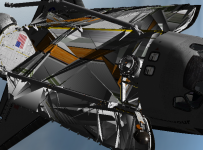
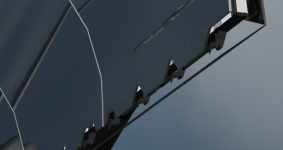
New mesh problems both in MOGE and D3D9 (see attached images).
Ticket 92 is (almost certainly) an orbiter issue, so the only thing we can do is "lobby" for it being fixed. SiameseCat had already posted a bug report against a similar issue a while back, and I just added new data to it.
Tickets 38, 41, 42, 81 (and now) 104 should be fixed and are just waiting to be closed (I don't close tickets I didn't open as IMO it is the responsibility of who created the ticket to verify that the problem/request was fixed/fulfilled).
More data for ticket 99 coming soon.
Ticket 92 is (almost certainly) an orbiter issue, so the only thing we can do is "lobby" for it being fixed. SiameseCat had already posted a bug report against a similar issue a while back, and I just added new data to it.
Tickets 38, 41, 42, 81 (and now) 104 should be fixed and are just waiting to be closed (I don't close tickets I didn't open as IMO it is the responsibility of who created the ticket to verify that the problem/request was fixed/fulfilled).
More data for ticket 99 coming soon.
Attachments
- Joined
- Feb 6, 2008
- Messages
- 38,938
- Reaction score
- 3,937
- Points
- 203
- Location
- Wolfsburg
- Preferred Pronouns
- Sire
Tickets 38, 41, 42, 81 (and now) 104 should be fixed and are just waiting to be closed (I don't close tickets I didn't open as IMO it is the responsibility of who created the ticket to verify that the problem/request was fixed/fulfilled).
More data for ticket 99 coming soon.
Well, then the person who filed the tickets should also do this - we have quite many tickets with the comment "should be fixed in rev xyz", but we have no confirmation by the ticket creator or a comment in the ticket about continued discrepancies.
Maybe we should assign finished tickets to the ticket creator again.
- Joined
- Feb 4, 2008
- Messages
- 9,759
- Reaction score
- 1,028
- Points
- 203
Mesh problem is being investigated. I have found the troublesome mesh group but not the cause of it being troublesome.New mesh problems both in MOGE and D3D9 (see attached images).
Ticket 92 is (almost certainly) an orbiter issue, so the only thing we can do is "lobby" for it being fixed. SiameseCat had already posted a bug report against a similar issue a while back, and I just added new data to it.
Tickets 38, 41, 42, 81 (and now) 104 should be fixed and are just waiting to be closed (I don't close tickets I didn't open as IMO it is the responsibility of who created the ticket to verify that the problem/request was fixed/fulfilled).
More data for ticket 99 coming soon.
- Joined
- Feb 6, 2008
- Messages
- 38,938
- Reaction score
- 3,937
- Points
- 203
- Location
- Wolfsburg
- Preferred Pronouns
- Sire
Mesh problem is being investigated. I have found the troublesome mesh group but not the cause of it being troublesome.
Looks to me like there is a parsing error in the edge data, maybe that helps finding it. The vertex information appears to be correct, but the edges are shifted. Did you maybe duplicate a vertex line somewhere or delete one by accident?
- Joined
- Feb 4, 2008
- Messages
- 9,759
- Reaction score
- 1,028
- Points
- 203
Checked that and no extra vertices has been found. The problem stemmed from the brackets/equipment on the port side sill longeron of the PLB. Removed that side and made a mirror copy of the working starboard side and the problem is gone. Revision 2195.Those problems are usually caused by unwelded or extra vertices.
- Status
- Not open for further replies.
Similar threads

- Replies
- 12
- Views
- 4K

- Replies
- 21
- Views
- 19K

- Replies
- 374
- Views
- 89K


- Replies
- 7
- Views
- 4K
- Replies
- 143
- Views
- 25K
