Discussion How to create DLL for selfdesigned launchpad

As Kuddel wrote before, you need to be careful with your working directory. You invoked the call from the Scenarios directory, you should do it from the Orbiter root instead.

 
...and (sorry about not making that clear): the curly braces in the parameter must not be entered; they were just there to mark scenarioPath as being a variable.
So your command line would be: C:\Orbiter2016\Modules\Server\orbiter.exe -s "C:\Orbiter2016\Scenarios\$CH-5%.scn".

If this is executed in your working directory (C:\Orbiter2016), it should start Orbiter as expected.
In "batch-file" style this would be:

Code:
cd C:\Orbiter2016
C:\Orbiter2016\Modules\Server\orbiter.exe -s "C:\Orbiter2016\Scenarios\$CH-5%.scn"
 
...and (sorry about not making that clear): the curly braces in the parameter must not be entered; they were just there to mark scenarioPath as being a variable.
So your command line would be: C:\Orbiter2016\Modules\Server\orbiter.exe -s "C:\Orbiter2016\Scenarios\$CH-5%.scn".

If this is executed in your working directory (C:\Orbiter2016), it should start Orbiter as expected.
In "batch-file" style this would be:

Code:
cd C:\Orbiter2016
C:\Orbiter2016\Modules\Server\orbiter.exe -s "C:\Orbiter2016\Scenarios\$CH-5%.scn"
Thank you very much for your patience and guidance, I can already complete the scene simulation I want to carry out.
 
As Kuddel wrote before, you need to be careful with your working directory. You invoked the call from the Scenarios directory, you should do it from the Orbiter root instead.
Yes, I can complete related operations now, and now I am making a program for this function to wake up. Thank you very much for your patience and guidance.
 
...and (sorry about not making that clear): the curly braces in the parameter must not be entered; they were just there to mark scenarioPath as being a variable.
So your command line would be: C:\Orbiter2016\Modules\Server\orbiter.exe -s "C:\Orbiter2016\Scenarios\$CH-5%.scn".

If this is executed in your working directory (C:\Orbiter2016), it should start Orbiter as expected.
In "batch-file" style this would be:

Code:
cd C:\Orbiter2016
C:\Orbiter2016\Modules\Server\orbiter.exe -s "C:\Orbiter2016\Scenarios\$CH-5%.scn"
0f6c9e79ab5f5649fefcd7ae0f26120.jpg
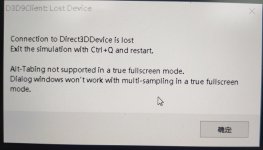
I’m sorry that something seems to have happened again. First of all, the aircraft cannot be controlled normally after entering the scene smoothly. The aircraft’s response is slow, and the simulation cannot be exited by clicking exit. Secondly, D3D9Client issues a warning in the background as shown above.
 
I would test it running in windowed mode instead of full-screen -- anytime Orbiter loses focus (e.g., via alt-TAB) when in full-screen mode, it breaks with the message shown above, in my experience, at least. But you can run Orbiter in windowed mode instead of full-screen, and then the focus loss is not an issue.
 
I would test it running in windowed mode instead of full-screen -- anytime Orbiter loses focus (e.g., via alt-TAB) when in full-screen mode, it breaks with the message shown above, in my experience, at least. But you can run Orbiter in windowed mode instead of full-screen, and then the focus loss is not an issue.
thanks for your advice
 
Rather than true full screen, I typically run a 1920 window, which is almost full screen. I have an older 4x3 external monitor I plug in. If I plug it in while Orbiter is running, I get the same message, I have to quit and restart. If I plug in first, it works fine.
 
Back
Top