
General Question github question - This branch is 7 commits ahead of orbitersim:main.

kuddel

Donator
Donator
Joined
Apr 1, 2008
Messages
2,163
Reaction score
658
Points
113
Hi there,
I am a bit puzzeled by this "This branch is 7 commits ahead of orbitersim:main." message at my github-fork:

1687889583872.png

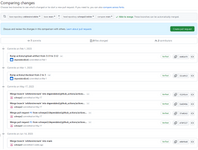
clicking on the link leads me to this set of change:
1687889904602.png

Can someone with knowledge tell me what's that all about?

I would like to have my main-branch exactly like orbitersim/orbiter main-branch.

Thanks in advance,
Kuddel
 
A branch ahead of another means it has commits the other doesn't. Looking at the image, you have done 5 commits + the 2 from the bot, thus the "ahead" indication.
Not sure why the bots are working on your fork... maybe there's an option when creating the fork? (I don't know much about the bots)
To sync the fork, I just click on the "Sync fork" option (first image, right-side).
 
I don't know why GitHub does this some times. The "sync fork" button some times merges and some times fast-forwards.

Here's how you fix it.

First:
Make sure you have remotes set up properly. "Origin" should be your fork on GH, "upstream" is Orbitersim/Orbiter (the main repo"

Make sure you've checked out the your main branch.

git fetch upstream
git reset --hard upstream/main
git push --force

Double check everything and make a local copy of your Orbiter repo if you have any doubt about losing work.
 
Also, you can be both some commits behind a branch and be some commits ahead of the branch. Sync essentially does the following: It generates a pull request for your branch, so the changes from the other repository are integrated in your branch (So you are no long behind) and creates a pull request at the other branch so somebody can review your changes and integrate them there.

@n72.75 What is the problem with fast-forwards? Usually they mean a healthy branch at my work, and not being able to make a fast-forward merge is a sign that you broke it....
 
After a little digging I think I found how to disable the bots/auto-actions on forks: repo page > Settings > Actions > General > Disable Actions.
Also, the last checkbox might enable more (unneeded) stuff.
 
@n72.75 What is the problem with fast-forwards? Usually they mean a healthy branch at my work, and not being able to make a fast-forward merge is a sign that you broke it....

There's nothing at all wrong with fast-forwards.

git pull upstream/main --ff-only
git push origin

Would be the cleanest way to keep things updated. I wasn't saying otherwise. I was just remarking on why GitHub sometimes seems to mess it up a bit and add merge commits where no one wants them.
 
There's nothing at all wrong with fast-forwards.

git pull upstream/main --ff-only
git push origin

Would be the cleanest way to keep things updated. I wasn't saying otherwise. I was just remarking on why GitHub sometimes seems to mess it up a bit and add merge commits where no one wants them.

Well, github is no bitbucket :D But for a free (TANSTAAFL) tool, its fine.
 
1687904134806.png
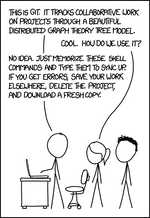
"If that doesn't fix it, git.txt contains the phone number of a friend of mine who understands git. Just wait through a few minutes of 'It's really pretty simple, just think of branches as...' and eventually you'll learn the commands that will fix everything."
 
Thanks to all your answers!
As all "my" commits were not done by "me", I must have turned on the robots somehow :unsure:
I'll post my resolution - once I find time.
 
After a little digging I think I found how to disable the bots/auto-actions on forks: repo page > Settings > Actions > General > Disable Actions.[...]
I've disabled actions, now.
Will this also disable the "automatic build" process whenever I commit changes? That would be a pitty if that action is disabled now.

I also just rejected (github-lingo) all changes that were ahead of orbitersim:main, as they were all bot-generated.
I wonder what would be if there was one single change that I would have wanted to be kept :unsure: (let's hope I never have to find out)

Thanks again for all the clarification.
 
Back
Top