Problem My vessel DLL crashes on launch, but only sometimes

So
I've updated to 4.5, less painfull than I thought and good to be up to date.
The good news: 4.5 and the latest Orbiter tools work great! thanks @Blake !
The bad news: when I export your mesh Orbiter and Shipedit CTD.
Good news: when I export only your fusalage it works great in Orbiter and Shipedit.

So one of your many objects is causing a problem. I did notice you have a lot of cameras and other stuff that I tried to eliminate before export but can't be sure I got them all
 
The model is really nice by the way! Please do continue development!:)
I'll test the console and see if it's that.
 
I've checked the mesh in Orbiter and I can't replicate the problem! Have reloaded several times. Can't find any errors (some overlapping meshes cause some flickering).
But Shipedit crashes! (haven't seen that before!) Can't re-import (might just be missing textures?). And opening the file CTDs, but that's with Blender 3.1 so probably incompatible.
I was almost going to say that (worst case) your gfx card might be on the way out, but better confirmation that the mesh is ok would be good.
Maybe someone has a working updated Blender and can check it.
If you would like to post a beta that can be better tested, I could also try to re-import with textures.
But as said the mesh looks fine in Orbiter otherwise.
View attachment 45279
Edit: Got the blend file to open in Blender 4.2 (your on 4.5?), but no export and "apply all modifiers" won't work (probably the version again).

Might be worth trying to export a "clean" mesh with all modifiers and transforms applied.
Could also combine some mshgrps looks ok, got confused with all the sub groups, some mshgrps have multiple materials though, and your sort-order needs "sorting", windows should be last, you have individual sort numbers, 3 for the windows but other objects have far higher numbers.
Edit2: Keep getting no atribute for "calc normals split" on export, will have to install Blender 4.5 to test further.
Missed in the original reply: why does sort order matter? Does it affect actual rendering order? I thought it was just for animation targeting.

Also good thought on cameras. I'll look into that. The problem did start shortly after I laid the groundwork for the cockpit, which is when I'd have put the cameras in because I was trying to nail down sight picture from a few locations.

To be sure I follow: when you use my version of the msh, you don't CTD, but when you build it yourself you do?
 
Last edited:
Missed in the original reply: why does sort order matter? Does it affect actual rendering order? I thought it was just for animation targeting.
Sort order does affects rendering order. Practically this means that your transparent meshgroups (like window and gauge glasses) should have large sord order, than other opaque meshgroups.
 
Missed in the original reply: why does sort order matter? Does it affect actual rendering order? I thought it was just for animation targeting.
It's important for transparency as @misha.physics says, they need to be rendered last, if your using numbers just make sure see-through things have the highest number.
To be sure I follow: when you use my version of the msh, you don't CTD, but when you build it yourself you do?
YES! Don't ask me why (computers!?), but both versions crash Shipedit. If you export another mesh you think is ok I can test it with Shipedit. There was a lot of markers and other things that "might" be causing problems, not sure if Orbiter Tools automatically removes everything? Could also be one of the other mshgrps not tested yet but try a "clean" export first.
 
Cool model. I have not had a chance to look too deeply, but I don't see anything that jumps out as a problem. I'll see if I can get a chance to load it into Orbiter sometime this weekend.

Orbiter Tools will only output objects of type MESH, so other objects in your scene should not be an issue. Empties, in fact, can be very useful and I use quite a lot of them.
 
Cool model. I have not had a chance to look too deeply, but I don't see anything that jumps out as a problem. I'll see if I can get a chance to load it into Orbiter sometime this weekend.

Orbiter Tools will only output objects of type MESH, so other objects in your scene should not be an issue. Empties, in fact, can be very useful and I use quite a lot of them.
Definitely let me know if you get a chance. I'm hesitant to push forward not knowing how deep a pit I'm digging myself. It doesn't make a lick of sense to me that my mesh, which crashes for me, would run for Buck while Buck's own export of the msh from the same source file would fail exactly the way mine does.
 
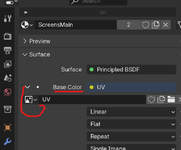
Well, first, you have a texture file UV.PNG that does not exist in the textures you provided. This crashes Orbiter2024, I'm surprised it does not provide a better error, but if I replace that with an existing file I can load the mesh.

What version of Blender are you using? The materials are not listing an image file when I expect them to, which tells me it may be an older version.
 
Well, first, you have a texture file UV.PNG that does not exist in the textures you provided. This crashes Orbiter2024, I'm surprised it does not provide a better error, but if I replace that with an existing file I can load the mesh.

What version of Blender are you using? The materials are not listing an image file when I expect them to, which tells me it may be an older version.
4.5.3.
UV.PNG isn't actually used anymore. I switched to DDSs in the process of chasing a different problem (IIRC it turned out PNGs worked fine after all). I thought I had scrubbed that pesky PNG but it must still be buried in the project file somehow. I actually do still have a UV.png lurking in my texture folder though so it can't be the reason I'm crashing. It's totally stable for you otherwise?
 
4.5.3.
UV.PNG isn't actually used anymore. I switched to DDSs in the process of chasing a different problem (IIRC it turned out PNGs worked fine after all). I thought I had scrubbed that pesky PNG but it must still be buried in the project file somehow. I actually do still have a UV.png lurking in my texture folder though so it can't be the reason I'm crashing. It's totally stable for you otherwise?
It loads if I replace UV.png with another DDS, but if I switch the VC [F8] it crashes. I assume you are doing something in the clbkloadVC handler it doesn't like.

1761164881433.png
It gets the texture file for the mesh from here in the Materials tab.
 
It loads if I replace UV.png with another DDS, but if I switch the VC [F8] it crashes. I assume you are doing something in the clbkloadVC handler it doesn't like.

View attachment 45334
It gets the texture file for the mesh from here in the Materials tab.
Weird. That part is an easy enough fix. Mine crashes whether the VC is loaded or not, but it's somewhere to start. Thanks for all your help, folks.
 
Update: changing the window sort order, completely commenting out the contents of clbkloadVC, and removing the texture associations for the panel are all still producing the same result: crashes roughly 50% of the time, with crashes and successful loads grouped together and visible mesh errors if a load succeeds shortly after failing. This is driving me crazy; I'm going to do some tests with a clean install of Orbiter, but I'm suspicious that this is still somehow a variable initialization problem. Memory addresses belonging to the mesh ending up in variables and vice versa is the best explanation I can think of for the behavior we see.
 
As I get a crash with the mesh using different code I don't think it's a code problem, nor an Orbiter issue. I've also successfuly exported two mshgrps without problems in Orbiter or Shipedit, and the non mesh elements are not an issue, then I can only presume that it must be one or more of the other mshgrps?
Suggest exporting and testing each individual mshgrp till one finds the culprit/s (unfortunate that you can't use Shipedit). I got a bit "lost" (lack of time to get familiar) with your Blend file, I don't think there's actually that many mshgrps. If you can supply a "cleaned up" .blend (with only essential mshgrps) I can take another look and make some export tests.
 
I think my recommendation at this point would be to compile and test against a debug build of Orbiter 2024. That's how I do all development these days, and its how I spotted the missing file above. Nothing beats being able to debug down into the Orbiter code itself, something I have wished for years I could do, and now can with 2024.

Doesn't mean you cannot compile a version for 2016 if you want, but it does give you the visibility into what Orbiter is trying to do with your code and help you spot problems.
 
Back
Top