Problem My vessel DLL crashes on launch, but only sometimes

DecoFox

Member
Joined
Apr 24, 2012
Messages
21
Reaction score
33
Points
13
Location
Anchorage
I have been knee deep in a project the past couple of weeks and am looking forward to finally bringing a vessel to orbiter after two decades of playing it. I have a little bit of Orbiter development experience coming from an earlier push I made to understand it about two years ago, but for the most part I've been relying on general programming knowledge to carry me through this and not specific knowledge of C++ or Orbiter, so I may be missing something fairly obvious.

The main problem:
Whenever I compile my vessel and launch orbiter, there is a chance any scenario containing my vessel will crash to desktop on load. This is a silent crash, with the last thing in the orbiter log being the vessel DLL beginning loading. If the vessel does crash, it will usually crash anywhere between 5 and 15 more times before eventually loading. Once it's loaded successfully once, it seems to work continually until I recompile the DLL, at which point I roll the dice on crashes again. Sometimes rebuilding with no changes seems to help, but I'm pretty sure it's a fluke since I've also had it recover without doing any additional builds of the DLL.

Another symptom I'm not completely sure is related but seems to be:
After the vessel has crashed several times, when it does successfully load, sometimes random triangles are torn in the msh. Eg. A triangle somewhere on the left of my virtual cockpit will try to connect to a vertex on the right side or the ceiling. A vessel in this condition will usually eventually crash but there is no telling when. This is also a silent crash. Regardless of whether it crashes, a restart of Orbiter usually fixes the problem, though in rare cases it simply changes which triangles are torn. Again, once this works once, it seems to work forever until a new build is made. Unfortunately I do not have any screenshots of the phenomenon on hand and the symptom appears very rarely, but I will post a screenshot here when I next see it happen. The triangle gore looks a little bit like exceeding the 65k rule, but while the whole vessel is at 75k, no single group is over about 40k. Also the severity of the gore is different every time it happens, and always relatively minor (3-6 triangles).

I'm at a bit of a loss here. This happens on both of my machines, and also happened once for someone on the discord whom I shared the DLL with. It doesn't make any sense to me that a compiled DLL could fail upwards of 15 times, suddenly start working, and then continue to work forever. And the torn-triangle vertex gore is something I have never seen in Orbiter before.

I'm running into this with Orbiter 2016 running the dx9 client on Windows 11. Anyone have an inkling of what I might be dealing with? I don't think it's my installation, given other vessels always work, including other projects of mine. The blender msh solution I'm using is this one: https://github.com/BMCDad/orbiter-blender, in case the msh is somehow the guilty party. Other spacecraft I've done this way don't seem to have the problem, but I also haven't done them to nearly the detail and extent.
 
Last edited:
Nice to hear you haven't given up! (was close to posting a bump!) ;)
Unfortuneately compiling is a bit of an arcane art for me. The gfx issue sounds a bit like a vertex problem. Does it look a bit like this?
There is a limit to the number of vertexs per mshgrp, either reduce vertex count or split into more groups.
Wishing you courage to continue, look forward to seeing your creation.:)
 
I would check your build paths, maybe your DLL doesn't get updated on every build. Especially check if you create x86 and x64 at the same time. Also, I would check if you have the compiler flags set correctly.
 
Nice to hear you haven't given up! (was close to posting a bump!) ;)
Unfortuneately compiling is a bit of an arcane art for me. The gfx issue sounds a bit like a vertex problem. Does it look a bit like this?
There is a limit to the number of vertexs per mshgrp, either reduce vertex count or split into more groups.
Wishing you courage to continue, look forward to seeing your creation.:)
It looks similar but there is much less of it. I would expect that behavior from a model that may be just barely exceeded the limit in one group, but my largest group is about 40k tris. Also I would think it would produce a mesh that always fails in exactly the same way due to missing triangle indicies rather than working most of the time and failing in random places and to random degrees when it does fail.
I would check your build paths, maybe your DLL doesn't get updated on every build. Especially check if you create x86 and x64 at the same time. Also, I would check if you have the compiler flags set correctly.
This sounds promising. For awhile I had been working with the theory I was maybe opening orbiter too quickly before the compiled DLL actually deployed, but eventually even long waits produced the problem so there must be more to it. It still doesn't make a ton of sense to me that it would work after sufficient retries and then keep working, but I bet I've got something wrong in there.

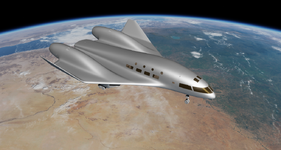
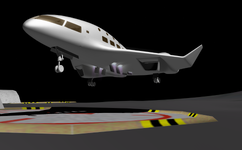
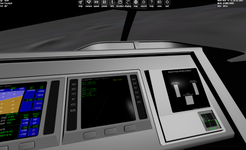
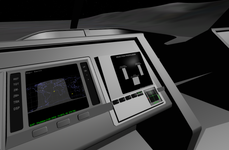
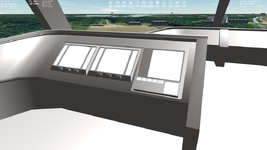
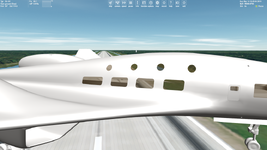
Appreciate the help. Won't actually be able to test for a few days (figured I'd get the question in before I got on the airplane) but I'll update when I do. Have some work in progress shots in the meantime.
 

Attachments

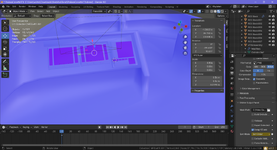
  • Screenshot_2025-09-27_153353.png
    Screenshot_2025-09-27_153353.png
    959.1 KB · Views: 11
  • Screenshot_2025-09-29_152440.png
    Screenshot_2025-09-29_152440.png
    272.6 KB · Views: 12
  • Screenshot_2025-10-08_211154.png
    Screenshot_2025-10-08_211154.png
    431.2 KB · Views: 11
Try to initialize all variables in clbkSetClassCaps ().
Leave none un-intitalized.
It could be sometimes uninitialized variables are 0, sometimes some random value is stored at this place in memory.

If that does not help, replace your mesh with a simple one, like the ShuttlePB.msh.
If this runs successful several times in a row, it could be your mesh has an error.
 
Try to initialize all variables in clbkSetClassCaps ().
Leave none un-intitalized.
It could be sometimes uninitialized variables are 0, sometimes some random value is stored at this place in memory.

If that does not help, replace your mesh with a simple one, like the ShuttlePB.msh.
If this runs successful several times in a row, it could be your mesh has an error.
Ooh I bet this is it. I only bothered to initialize variables that didn't get assigned in realtime on PostStep/redraw, which leaves out quite a few. That might even explain the transient mesh errors if the mesh and some of those variables managed to step on each other in memory.
 
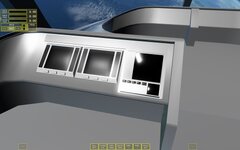
Back in town now so I've been able to look at it in that light. Turns out it's not as bad as I thought; I only found one variable that went uninitialized in the constructor. I have been doing a lot of defining variables outside the vessel class though, which the PB does but other vessels do not. I've been porting them in what little time I have to tinker tonight but no difference so far. It could be I'm just missing something since I haven't had the time to really look closely yet. I did learn a few things though: for one, I've reproduced the mesh tearing issue:

Screenshot 2025-10-12 230044.png

It's not always this polygon. Which one seems fairly random on startup, but it always seems to be inside the VC. The same mesh is being used in and out of the VC (I just keep it rendering the whole time). I have not yet determined if it can be seen through the windows from outside.

For another, I've now had the vessel crash on launch after working several times, rather than immediately after a build. To my intuition, that should rule out a problem with the build itself. Am I wrong about that?

And last: doing tests with an older mesh but otherwise the same cpp file, I'm noticing no problems. There's got to be something wrong with the msh but I'm not sure what. Very strange to me that it would work sometimes but not all the time, itself being nothing more than a list of indicies and positions. As for the vertex indexing limit, I'm only at 40,063 verts in all groups total let alone any single group.

This sounds like it might be the same problem:
I haven't found any errant mesh groups and all of my animations seem to be in order, but I also haven't switched to using a .h file yet and am still using indices. I'll make the switch and see if that clears it up.
 
Last edited:
Does look strangely minimal?
I'm using Blender 3.1 and Orbiter Mesh Tools 2.0.12. Did try 4.2 a while back and had a bit of a scare (wouldn't import at all) and haven't tried any of the recent updates.
You could try Shipedit to see if it finds any errors.
 
Hi,
There's got to be something wrong with the msh but I'm not sure what. Very strange to me that it would work sometimes but not all the time, itself being nothing more than a list of indicies and positions. As for the vertex indexing limit, I'm only at 40,063 verts in all groups total let alone any single group.
Have you checked for (and removed) any "isolated vertices" (vertices that don't form part of any poly) ?
There's a facility for that in Gmax, maybe Blender has the same?
Cheers,
BrianJ
 
Hi,

Have you checked for (and removed) any "isolated vertices" (vertices that don't form part of any poly) ?
There's a facility for that in Gmax, maybe Blender has the same?
Cheers,
BrianJ
Blender has a "Delete Loose" command/option/feature, that does that.
 
Hi,

Have you checked for (and removed) any "isolated vertices" (vertices that don't form part of any poly) ?
There's a facility for that in Gmax, maybe Blender has the same?
Cheers,
BrianJ

Blender has a "Delete Loose" command/option/feature, that does that.
Thanks for the replies; back in town now so doing some testing. I was able to remove 11 isolated verticies (no idea where they came from) but that doesn't seem to have changed the behavior of the mesh. I was also suspicious of an unapplied mirror modifier, but same result. Does Orbiter perhaps not really support N-Gons? I do have a handful that aren't manually triangulated.

Does look strangely minimal?
I'm using Blender 3.1 and Orbiter Mesh Tools 2.0.12. Did try 4.2 a while back and had a bit of a scare (wouldn't import at all) and haven't tried any of the recent updates.
You could try Shipedit to see if it finds any errors.
What do you mean by minimal? When the mesh loads, it looks perfectly normal or occasionally has 1-5 torn polygons. Most of the time it works, it works flawlessly. Overall it fails about half the time.

I can't seem to get ShipEdit to run on my machine. Would someone with a working shipedit mind taking a look at my mesh to see if it elucidates the matter at all?
 
Last edited:
If you have a problem with displaying your mesh in game and you modelled it in Blender, then I could take a look at your Blender file and mesh in game, namely you can send it to me.
 
Orbiter itself does not support n-gons. Blender will convert them to triangles as part of creating the mesh file. Modifiers should not have to be applied, but I know Blender sometimes has issues with the order, so if in doubt I will apply them. There is benefit to leaving modifiers un-applied, especially the mirror modifier, so if you are having an issue with that, its something I would not mind looking at.

If you are willing to share your blend file I would also be happy to take a look.
 
What do you mean by minimal? When the mesh loads, it looks perfectly normal or occasionally has 1-5 torn polygons. Most of the time it works, it works flawlessly. Overall it fails about half the time.
That's what I meant with minimal, examples of an excess vertex count look far worse! (your model looks very good btw).
I can't seem to get ShipEdit to run on my machine. Would someone with a working shipedit mind taking a look at my mesh to see if it elucidates the matter at all?
Also very happy to take a look at the mesh (PM if you prefer).
 
Orbiter itself does not support n-gons. Blender will convert them to triangles as part of creating the mesh file. Modifiers should not have to be applied, but I know Blender sometimes has issues with the order, so if in doubt I will apply them. There is benefit to leaving modifiers un-applied, especially the mirror modifier, so if you are having an issue with that, its something I would not mind looking at.

If you are willing to share your blend file I would also be happy to take a look.
Hmm, that's what I figured was happening. I wonder if blender is doing some really stupid triangulation and that's to blame. Msh and blend attached. This is the version of the blend without doing any cleanup of stray verts or modifier application.
 

Attachments

I've checked the mesh in Orbiter and I can't replicate the problem! Have reloaded several times. Can't find any errors (some overlapping meshes cause some flickering).
But Shipedit crashes! (haven't seen that before!) Can't re-import (might just be missing textures?). And opening the file CTDs, but that's with Blender 3.1 so probably incompatible.
I was almost going to say that (worst case) your gfx card might be on the way out, but better confirmation that the mesh is ok would be good.
Maybe someone has a working updated Blender and can check it.
If you would like to post a beta that can be better tested, I could also try to re-import with textures.
But as said the mesh looks fine in Orbiter otherwise.
0751.jpg
Edit: Got the blend file to open in Blender 4.2 (your on 4.5?), but no export and "apply all modifiers" won't work (probably the version again).
I was also suspicious of an unapplied mirror modifier
Might be worth trying to export a "clean" mesh with all modifiers and transforms applied.
Could also combine some mshgrps looks ok, got confused with all the sub groups, some mshgrps have multiple materials though, and your sort-order needs "sorting", windows should be last, you have individual sort numbers, 3 for the windows but other objects have far higher numbers.
Edit2: Keep getting no atribute for "calc normals split" on export, will have to install Blender 4.5 to test further.
 
Last edited:
I opened the BLEND file with my Blender 4.0.2 without problems (but the Blender says it was saved by Blender 4.5, so data may be lost):

Без імені.png

I didn't built the mesh in Blender, but I just loaded the attached *.msh file into my Orbiter and I don't see any issues with the dashboard:

Без імені2.png

I'm noticing an issue with windows, because your mesh haven't interior side:

Без імені3.png
 
I've checked the mesh in Orbiter and I can't replicate the problem! Have reloaded several times. Can't find any errors (some overlapping meshes cause some flickering).
But Shipedit crashes! (haven't seen that before!) Can't re-import (might just be missing textures?). And opening the file CTDs, but that's with Blender 3.1 so probably incompatible.
I was almost going to say that (worst case) your gfx card might be on the way out, but better confirmation that the mesh is ok would be good.
Maybe someone has a working updated Blender and can check it.
If you would like to post a beta that can be better tested, I could also try to re-import with textures.
But as said the mesh looks fine in Orbiter otherwise.

Edit: Got the blend file to open in Blender 4.2 (your on 4.5?), but no export and "apply all modifiers" won't work (probably the version again).

Might be worth trying to export a "clean" mesh with all modifiers and transforms applied.
Could also combine some mshgrps looks ok, got confused with all the sub groups, some mshgrps have multiple materials though, and your sort-order needs "sorting", windows should be last, you have individual sort numbers, 3 for the windows but other objects have far higher numbers.
Edit2: Keep getting no atribute for "calc normals split" on export, will have to install Blender 4.5 to test further.

I opened the BLEND file with my Blender 4.0.2 without problems (but the Blender says it was saved by Blender 4.5, so data may be lost):


I didn't built the mesh in Blender, but I just loaded the attached *.msh file into my Orbiter and I don't see any issues with the dashboard:


I'm noticing an issue with windows, because your mesh haven't interior side:
Okay, I guess I must have a bad install of Orbiter, lol. Either that or it's a problem that only appears when the DLL and msh are used together, which would imply a bad animation, maybe. And yeah I totally forgot to distribute the textures. The windows I'm aware of. A friend wanted to do the main interior and I did not want to do the main interior, so for now the windows are voids to nothing, as are the inside of the landing gear bays.

I've attached the full package as it is now. It's not exactly capital-F flyable, but the hover thrusters work, as does the VTOL display and the background for the engine display. Presently H actuates the hover doors and numrow 1-4 controls the VTOL fbw modes (killrot, hlvl, vertical speed hold [does nothing rn], kill translational velocity).
 

Attachments

Last edited:
Back
Top