SDK Question Why my DLL is so big ?

jacquesmomo

Addon Developer
Addon Developer
Joined
Jun 14, 2008
Messages
811
Reaction score
860
Points
108
Location
FRANCE
Website
francophone.dansteph.com
Hi

I have a small problem that I can't solve.
Let me explain (and sorry if my english is not perfect...) :

Still not knowing how to make DLL files for Orbiter, BrianJ made me a DLL so that the jaws and umbilicus of the Ariane 6 rocket launch tower can retract automatically when the rocket takes off.

For my new version (in progress, planned for Orbiter 2024) I have to redo this mast which is very ugly and especially not conform with reality.
So I have to make a new DLL.

Thanks to BrianJ, he explained and helped me how to configure Visual Studio 2017, and with his cpp file I was able to make the same dll that he made for me.
Now, I just have to understand how to write C++ to modify the animations.

But here's the problem (or issue ?) :
BrianJ's DLL size is 84 KB
Mine is 358 KB

Both work identically, but why this size difference ?
BianJ sent me few screenshots to verify that my configuration is the same as his.
I should point out that I'm not in "debug" mode.

Thanks in advance if you can help me....
 
Did you compile with static linked runtime libraries ( = The basic C++ functions are all linked into your DLL) or dynamic linked runtime-libraries ( = The basic C++ functions are linked on runtime from a common DLL)? The size difference sounds like it.
 
Did you compile with static linked runtime libraries ( = The basic C++ functions are all linked into your DLL) or dynamic linked runtime-libraries ( = The basic C++ functions are linked on runtime from a common DLL)? The size difference sounds like it.
Hello Urwumpe
Thanks for your answer

As I am a beginner, I don't know how to check this... can you explain it to me ? 🤭

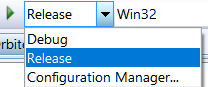
Could it be that in the Release menu the Debug option is active?
If Debug is active, additional debugging information is included in the dll.
Hi Francisdrake

So I'm sure, it is set to "relase" and not "debug" mode....
 
As I am a beginner, I don't know how to check this... can you explain it to me ? 🤭

Just check into your project settings for "Configuration Properties > C/C++ > Code Generation > Runtime Library".


Default is /MD, but in the past, using /MT became more popular for Orbiter modules. You can use both options.


/***************************************************************************************/

Everything that follows here isn't really important for you, if you are a beginner, but provides some explanations for the differences. More details on how the runtime is structured can be found here. There are some differences in the runtime behavior but those are usually not relevant for Orbiter modules and can be ignored unless you want to write some really nasty low-level code. Since you say, you are a beginner, I assume you won't even know that these things are possible.


Also interesting but not important to know, this blog article is about the big changes to VC++ runtime since Orbiter 2016 was released:


A DLL compiled with an older version of VC++ will of course look different to a version compiled with a new version.
 
Hi Urwumpe

Thank you for your advice and clarifications, thank you for taking the time to send me this message.

Yes, I am a very beginner, but I want to learn... ;)
A lot of things for me... 🥵
It's as if I were asked to calculate a vector when I'm at the level of learning the multiplication table by 5... :ROFLMAO:


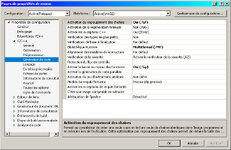
So I went as you suggest in:
"Configuration Properties > C/C++ > Code Generation > Runtime Library".

And this is what I had : (/MT)
(note than my VC++ is in french) 🙃

vc00.jpg

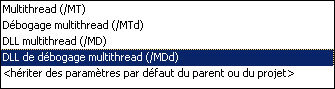
In the drop-down list I have these different options:

vc01b.jpg

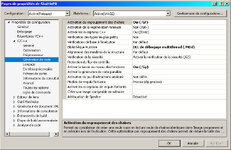
I tried them all, but the only one that works (except /MT of course) is /MDd

vc01.jpg

And so my DLL instead of being the size of 366 ko is now only 24 ko.
(The one made by BrianJ is 84 ko.)
As you say, depending on the version of VC++ the size can be different.

I tested this "new" DLL and it seems to work well.
I will read the links you sent me. :hailprobe:


Just for (one more!) question... Here is what I have after the (successful) generation of my DLL:

1>------ Début de la génération : Projet : ShuttlePB, Configuration : Release Win32 ------
1>ela4_tower.cpp
1>d:\orbiter\orbiter 2016\orbitersdk\samples\ela4\ela4_tower.cpp(196): warning C4996: 'strnicmp': The POSIX name for this item is deprecated. Instead, use the ISO C and C++ conformant name: _strnicmp. See online help for details.
1>c:\program files (x86)\windows kits\10\include\10.0.17763.0\ucrt\string.h(560): note: voir la déclaration de 'strnicmp'
1> Création de la bibliothèque .\..\..\..\Modules/ShuttlePB.lib et de l'objet .\..\..\..\Modules/ShuttlePB.exp
1>ShuttlePB.vcxproj -> D:\ORBITER\Orbiter 2016\Modules\test.dll
1>Génération du projet "ShuttlePB.vcxproj" terminée.
========== Génération : 1 a réussi, 0 a échoué, 0 mis à jour, 0 a été ignoré ==========


The last line traduction :
========== Generation: 1 succeeded, 0 failed, 0 updated, 0 ignored ==========


(Concerning the different names, I started (with the help of Brianj) on the example "ShuttlePB"
My DLL is called "test.dll" and then I rename it to "ela4_tower.dll")

Does the "creation" text seems ok ? :unsure:
In any case it works...

Once again, thank you very much for your help. :hailprobe:

Cheers
 
So I (still) have Window 7… ;)
But I really liked the look of Windows XP, that's why I chose this look... 😋

Considering that even Windows 7 is now 15 years old, its really old-school. 😉

(Personally, I like the look of Haiku more, but its not really ready for Orbiter or Gaming yet - maybe I'll fix that after I retired)
 
Last edited:
Back
Top