Request Trajectory Tool for use outside Orbiter

GodAtum

Active member
Joined
Jun 1, 2014
Messages
170
Reaction score
48
Points
28
Website
godatum.blogspot.com
I was thinking it'll be really useful to get something like this for use in Orbiter 2024. I should be able to calculate the values I need to enter for TransX or IMFD using the tool, rather than clicking about inside the MFD. Even better if the tool made a plan to import into TransX or IMFD. I'm guessing it could connect to Orbiter if it's running to get the most accurate values.
 
Try this one:
It exports a plan for TransX, you can also enter the data into IMFD DeltaV Program.
 
Try this one:
It exports a plan for TransX, you can also enter the data into IMFD DeltaV Program.

I did try that once but the values it gave didn't get me near where I wanted to go at all. Maybe I'm using it wrong.
 
Last edited:
Well, you can use General Mission Analysis Tool, if you want some more advanced solution.
But this won't give you exact values for any of Orbiter's MFD tools as it's not a tool designed specifically for Orbiter.
However, if you make a plan using GMAT, it definitely may serve as a base for further fine-tuning inside Orbiter.
 
Well, you can use General Mission Analysis Tool, if you want some more advanced solution.
But this won't give you exact values for any of Orbiter's MFD tools as it's not a tool designed specifically for Orbiter.
However, if you make a plan using GMAT, it definitely may serve as a base for further fine-tuning inside Orbiter.

Do you know if anyone has made a tutorial on using that with orbiter, or using the Trajectory Planner with orbiter?
 
No, unfortunately.
But if you learn any of those tools (without Orbiter), you'll get an approximate launch date and arrival date, and some trajectory specification (shape, sling-shots, etc.)...which is pretty good information you can work with in IMFD/TransX.
 
I did try that once but the values it gave didn't get me near where I wanted to go at all. Maybe I'm using it wrong.
Do you know if anyone has made a tutorial on using that with orbiter, or using the Trajectory Planner with orbiter?
I can give you a quick walk-through how I use it:

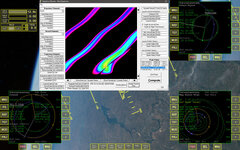
Earth-Mars, todays date. Trajectory Planner result, best (only) low Dv opportunity Ocktober '26.
TPorbiter.jpg
In Orbiter using IMFD (a little quicker/easier). Enter launch date and arrival date in the Course Program, fine tuning the arrival date saves even more Dv.
Switch to Orbit Eject and adust eject time, use Map to verify.
Note the very bad Eject Plan, the incorrect Inc. adds an extra 5.5k Dv to the burn (this is best corrected at surface launch), it's also set to "realtime" (i.e. calculated for an instant burn), but the burn (DG) takes 10 min so this will cost extra Dv too.
Map says PeA 1.1G, ok for an eject burn (PeA, Hed and EqI could be fine-tuned with Offset enabled or using the DeltaV program).
Hope this helps, good journeys!:)
 
Now I realized that we also have LambertSolver that directly calculates TransX vectors (Prograde, Outward and Change Plane)....so maybe this helps, if you like TransX.
Honestly, since I learned IMFD, I very rarely use TransX.
But again, LambertSolver calculates Departure/Arrival dates and DeltaVs, so that's enough to start planning even with IMFD, imho.
 
Thanks both for the helpful info. It looks like the Trajectory Planner and LambertSolver don't take into account spacecraft mass or it's orbital parameters (inclination etc). I see in GMAT it does. After watching some tutorials I have found that GMAT maps to IMFD like so:

GMATIMFD
Element1dVf
Element2dVp
Element3dVo
Julian TimeGET

I ran through a quick scenario using the Crew Dragon 2 doing a lunar transfer. In GMAT I added the spacecraft with a dry mass of 7700kg. The result gave me

TOI
Delta V Vector:
Element 1: 0.1460773241606 km/s
Element 2: 0.0460426758920 km/s
Element 3: 0.1169432432629 km/s

LOI
Delta V Vector:
Element 1: -0.5530344516253 km/s
Element 2: 0.0000000000000 km/s
Element 3: 0.0000000000000 km/s

These seem very low numbers as usually in IMFD it's > 1.0
 
Back
Top