
-
ORBITER-FORUM will be temporarily closed at 2026-07-23 18:00 UTC while we complete some OF maintenance tasks. The amount of downtime is expected to take up to one hour, but probably less.
You are using an out of date browser. It may not display this or other websites correctly.
You should upgrade or use an alternative browser.
You should upgrade or use an alternative browser.
New Release D3D9Client Development
- Thread starter jarmonik
- Start date

- Joined
- Apr 1, 2008
- Messages
- 2,167
- Reaction score
- 663
- Points
- 113
I still can not get Orbiter to start working with the 'D3D9 atmosphere remake PR' 
Still the same exception (see my post above) at start of rendering.
No luck on any Scenario (Exceptions thrown on different places, but still nothing ot run).
Is there something I have to tweak on my side?
Still the same exception (see my post above) at start of rendering.
No luck on any Scenario (Exceptions thrown on different places, but still nothing ot run).
Is there something I have to tweak on my side?
I did get crashes before Jarmo's latest commits, but only in the Release builds (both x86 and x64), so I couldn't debug it. This was unrelated to my shader cache issue. In any case it hasn't happened yet with the latest sources.
- Joined
- Apr 1, 2008
- Messages
- 2,167
- Reaction score
- 663
- Points
- 113
Thanks for the info.
I am pretty sure I messed up with git - again
A clean checkout of "main" does run however.
I'll stop for a while as I'm getting too frustrated and it might be just a matter of "getting a little distance to it".
I am pretty sure I messed up with git - again
A clean checkout of "main" does run however.
I'll stop for a while as I'm getting too frustrated and it might be just a matter of "getting a little distance to it".
If you are talking about the D3D9 atmosphere remake branch (which was the topic of the last few posts here), the only way to test it yourself is to check out the sources from github and compile it yourself.
If you are talking about the main branch: just get the installation package from the assets in the Orbiter development build pre-release (the "latest" tag) here: https://github.com/orbitersim/orbiter/releases
If you are talking about the main branch: just get the installation package from the assets in the Orbiter development build pre-release (the "latest" tag) here: https://github.com/orbitersim/orbiter/releases
- Joined
- Apr 1, 2008
- Messages
- 2,167
- Reaction score
- 663
- Points
- 113
Hi again,
tried on a completely different machine the following things to get a "clean checkout" of the d3d9_atmosphere_remake PR:
Then build that with Visual Studio 2019 and still only a crash when trying to run/start "DG Mk4 in orbit.scn"
Attached the configurations (just selected D3D9Client on video-tab, then tried to run the scenario...to minimize 'local mistakes')
I'm more and more confused what could be the issue...A DirectX feature, that both machines don't support?
tried on a completely different machine the following things to get a "clean checkout" of the d3d9_atmosphere_remake PR:
Bash:
/d/Programme/Orbiter/> $ git clone https://github.com/orbitersim/orbiter.git ./WTF/
/d/Programme/Orbiter/> $ cd WTF/
/d/Programme/Orbiter/WTF/> $ git checkout --track origin/d3d9_atmosphere_remake
Then build that with Visual Studio 2019 and still only a crash when trying to run/start "DG Mk4 in orbit.scn"
Attached the configurations (just selected D3D9Client on video-tab, then tried to run the scenario...to minimize 'local mistakes')
I'm more and more confused what could be the issue...A DirectX feature, that both machines don't support?
Attachments
- Joined
- Mar 28, 2008
- Messages
- 2,707
- Reaction score
- 881
- Points
- 128
Yesterday, I tested the client on my Intel HD graphics 4000 laptop and I also experienced a crash (x86 release). It works if I disable "sun glare" from the setup dialog. So, something there it doesn't like. It seems that you have tried x64 build ? It's been working fine in a past but I'll test it again.
- Joined
- Apr 1, 2008
- Messages
- 2,167
- Reaction score
- 663
- Points
- 113
Thanks a million Jarmo! 
Turning off "sun glare" did the trick!
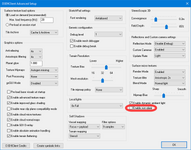
Could this part from
EDIT:
When looking at the internet it seems this is undefined behavior, but nothing fatal.
Turning off "sun glare" did the trick!
Could this part from
Glare.hlsl result in a division by zero? And what would the GPU do then?
C-like:
float ilerp(float a, float b, float x)
{
    return saturate((x - a) / (b - a));
}
EDIT:
When looking at the internet it seems this is undefined behavior, but nothing fatal.
- Joined
- Mar 28, 2008
- Messages
- 2,707
- Reaction score
- 881
- Points
- 128
Fix for the problem above have been uploaded. This is the first time we are using a texture lookup in vertex shader and the CTD was due to incorrectly configured texture sampler. Also tested the "noise flicker/flashes" issue and doesn't seem to occur on Intel HD Graphics 4000
- Joined
- Apr 1, 2008
- Messages
- 2,167
- Reaction score
- 663
- Points
- 113
I can confirm, I can now run with "sun glare" enabled!Fix for the problem above have been uploaded. This is the first time we are using a texture lookup in vertex shader and the CTD was due to incorrectly configured texture sampler.
(on d3d9_atmosphere_remake that is)The flickering is still present here (onAlso tested the "noise flicker/flashes" issue and doesn't seem to occur on Intel HD Graphics 4000
d3d9_atmosphere_remake), but that is nothing I would have expected to be fixed Thanks again,
Good Night
- Joined
- Mar 28, 2008
- Messages
- 2,707
- Reaction score
- 881
- Points
- 128
That problem is really a mystery. But anyway you can disable "dynamic ambient light" feature and it should remove the problem.The flickering is still present here (ond3d9_atmosphere_remake), but that is nothing I would have expected to be fixed
Are there any major issues with the
d3d9_atmosphere_remake that should be addressed before merge ? I have no more issues on my list.
- Joined
- Apr 1, 2008
- Messages
- 2,167
- Reaction score
- 663
- Points
- 113
Indeed, it does!That problem is really a mystery. But anyway you can disable "dynamic ambient light" feature and it should remove the problem.
I've run a few scenarios and it seems to be pretty fine!Are there any major issues with thed3d9_atmosphere_remakethat should be addressed before merge ? I have no more issues on my list.
Although I think the micro-textures on the moon do not show up here.
All needed .dds files are in Textures folder[*], so that should be O.K. Have I missed a switch in the options dialog?
Apart from that, "you are GO for the merge!" - from my console here

[*]
D3D9Mars_A.dds, D3D9Mars_B.dds, D3D9Moon_A.dds, D3D9Moon_B.dds, D3D9Moon_C.dds & D3D9Moon_C2.ddsThe branch looks pretty good to me too.
There is one small glitch I noticed: The D3D9 Atmospheric Controls dialog doesn't allow me to switch between Surface / Low orbit / High orbit configurations on the Moon (scenario Delta-glider | Brighton beach). It always shows the Surface configuration. It works fine for Earth and Mars.
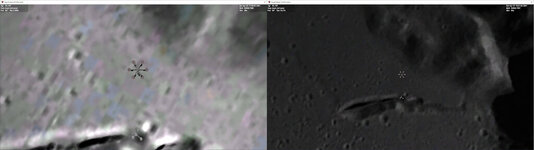
I noticed this because I wanted to edit my configurations for the Moon. Similar to what I reported earlier for Earth, there seems to be a very pronounced and very rapid change in albedo for the Moon, from very brightly lit with the camera close to the surface, to very dark at about 10km altitude and above.
Edit: I should note that I don't have the Moon microtextures installed, in case this is relevant for the albedo issue.
There is one small glitch I noticed: The D3D9 Atmospheric Controls dialog doesn't allow me to switch between Surface / Low orbit / High orbit configurations on the Moon (scenario Delta-glider | Brighton beach). It always shows the Surface configuration. It works fine for Earth and Mars.
I noticed this because I wanted to edit my configurations for the Moon. Similar to what I reported earlier for Earth, there seems to be a very pronounced and very rapid change in albedo for the Moon, from very brightly lit with the camera close to the surface, to very dark at about 10km altitude and above.
Edit: I should note that I don't have the Moon microtextures installed, in case this is relevant for the albedo issue.
- Joined
- Mar 28, 2008
- Messages
- 2,707
- Reaction score
- 881
- Points
- 128
Did you forget MicroTex.cfg file ?Although I think the micro-textures on the moon do not show up here.
All needed .dds files are in Textures folder[*], so that should be O.K. Have I missed a switch in the options dialog?

n72.75
Seize the means of computation
Orbiter Contributor
Addon Developer
Tutorial Publisher
Donator
- Joined
- Mar 21, 2008
- Messages
- 2,874
- Reaction score
- 1,718
- Points
- 128
- Location
- Saco, ME
- Website
- mwhume.space
- Preferred Pronouns
- he/him
Pardon my ignorance, but what was the impetus behind the atmosphere remake initiative?
- Joined
- Mar 28, 2008
- Messages
- 2,707
- Reaction score
- 881
- Points
- 128
There is one small glitch I noticed: The D3D9 Atmospheric Controls dialog doesn't allow me to switch between Surface / Low orbit / High orbit configurations on the Moon (scenario Delta-glider | Brighton beach). It always shows the Surface configuration. It works fine for Earth and Mars.
I noticed this because I wanted to edit my configurations for the Moon. Similar to what I reported earlier for Earth, there seems to be a very pronounced and very rapid change in albedo for the Moon, from very brightly lit with the camera close to the surface, to very dark at about 10km altitude and above.
The "surface / low orbit / high orbit" configuration is available only if there's atmosphere. I thought that non atmospheric planets/moons wouldn't benefit from it.
I haven't seen that kind of albedo change on any non-atmospheric planet or moon. It remains very much constant with and without micro textures. If micro textures are not installed and the shader uses them anyway then it might create near white surface at low proximity. That could explain it, I'll have to check that....
In case it helps, this is what I am seeing (left at 3.5km altitude, right at 10km):
- Joined
- Mar 28, 2008
- Messages
- 2,707
- Reaction score
- 881
- Points
- 128
This issue should be fixed now. It was a micro texture problem.In case it helps, this is what I am seeing (left at 3.5km altitude, right at 10km):
Thanks for the quick fix! I can confirm that with the latest sources the albedo is now consistent across all altitudes.
Similar threads

- Sticky
- Replies
- 6
- Views
- 10K

- Replies
- 10
- Views
- 4K


- Replies
- 1
- Views
- 4K


- Replies
- 7
- Views
- 4K