Object textures making

misha.physics

Well-known member
Joined
Dec 22, 2021
Messages
1,480
Reaction score
2,211
Points
128
Location
Lviv
Preferred Pronouns
he/him
So I got to the textures.

Does anyone know if it's possible to make night textures for a mesh? I know that the pre-defined objects (like BLOCK) uses the night texture if it has "_n" in the end of the "day" texture.

Do I understand correctly that the only way for a vessel texturing is creating the so-called UV maps, which look like (it's an example from the Cessna by @jacquesmomo):
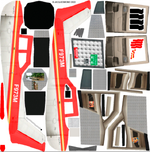
uv.png

Any advice on how you make your ship textures and what tools you use would be very appreciated. I've just never done it, and it looks very hard. Once I used the UVMapper Classic following one tutorial, but it was for a cylindrical rocket.

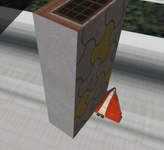
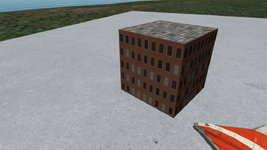
For now I can only apply textures to the cube mesh using the integrated "Texture UV" tool in Anim8or. Also I used the pre-defined "RUNWAY" object to make this concrete slab (it has 4K resolution, whereas the building has 2K textures):
s.png
 
Night textures unfortunately only work with vanilla buildings, as far as am I aware. I tried to make night textures when I was working on my Quebec add-on. It didn't work :(

As for UV maps, they are used by Orbiter (and any other software that handle 3D) to map a texture to a 3D model. In short, it's like a guide used by the software to know which part of the texture goes on what part of the model.

For texturing, there is a lot of experimentation, and it depend on what painting software you use. Personally, I use Photoshop, but GIMP is a good free and (i think) open source alternative that can do a lot of the same thing.

The Youtuber Nerrel did two video guides on how to make textures with GIMP for games. In his videos, he is making textures for Zelda: Majora's Mask and Metroid: Prime, but the concept applies to Orbiter too. I suggest giving them a look, they might help you in your endeavour!

And no, you don't need a drawing tablet to make textures (even though it would look muuuuuuuuch better and be simpler to make than with a mouse).


Thank you, I'll watch the videos.
Night textures unfortunately only work with vanilla buildings, as far as am I aware. I tried to make night textures when I was working on my Quebec add-on. It didn't work :(
That's sad. Hope it could be realized in OpenOrbiter.
And no, you don't need a drawing tablet to make textures (even though it would look muuuuuuuuch better and be simpler to make than with a mouse).
Fortunately I have a drawing tablet (I'm using it for writing, but also for edidding tiles for Orbiter).
 
Using these videos as a guide while remaking the default building textures in high res (like with your example earlier) seem like a good way to learn how to make textures. You don't have to worry about the UV mapping at all, it's just a blank canvas to experiment upon, and it's easy to see how it look in game. It's also close to the examples from the videos, so easier to follow along.
 
I am by no means a coder or mesh builder, but, since there are two files for a structure that have day and night views, I assumed that one would build the day and night meshes, give them the appropriate files names, then tell Orbiter when to switch them out.
 
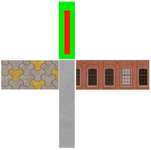
It seems I learned that a little. I made a UV map for a parallelepiped mesh (some textures cover two faces, that's because you don't see 6 faces on a map) using UVMapper Classic and Anim8or:

uv.pnguv2.png

For now I don't know how to texture a complicated vessel, but maybe I could divide a complex mesh into separate parts, export them one by one to UVMapper, create a UV map for them, then export the mapped meshes back to Anim8or and assemble one vessel from the parts...
 
Thank you.

Yes, of course, the texture is upside down, although I oriented it correctrly in Anim8or, so I should rotate it 180 degrees in Anim8or.

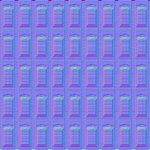
It seems like we should use the DirectX normal maps for Orbiter, not OpenGL.

Also, I should use a lower resolution texture, since it flicker (with a normal map).

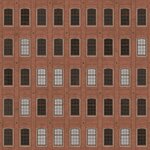
By the way, I took this texture from texturecan.com. It says that all the textures provided on this site are free and can be used for any purposes.

And I have a question regarding normal maps. I have the texture and its normal map in the same resolution:

red_facade.jpgothers_0026_normal_directx_2k.jpg

What is the point of using the normal map with the color texture if they have the same resolution? Can't we make a color texture with details presented on its normal map and get the same result as with the normal map?
 
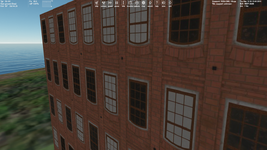
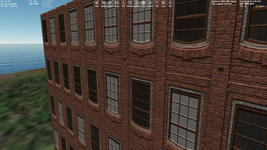
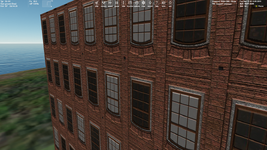
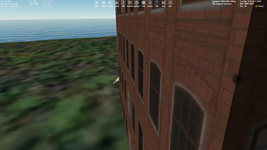
Several comparative screenshots.

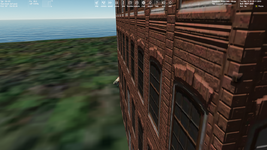
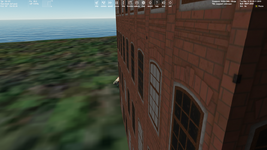
1024 resolution (without and with a normal map):

1.png2.png

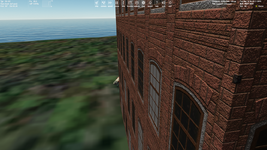
4096 resolution (without and with a normal map):

3.png4.png

Looks like the best is the 4096 resolution texture without a normal map (because it flickers with it). I'll try using a normal map for a vessel texture later, hope it will be better.
 
Or maybe could we make and use MIP maps for object textures?
 
Thanks. The only question is whether the Orbiter uses these MIP maps which will be stored in the same DDS. Although this could be verified experimentally.
 
It seems there's no sense to use the 4096 texture resolution.
For buildings. It was just a test. But nevertheless it could make sense for runways, concrete pads for buildings, etc. They have large size and there aren't many of them.
 
based on these few pics and to my untrained eyes 1024 resolution with a normal map looks just good enough - for an Orbiter
this is not first person shooter after all
4K is waste of resources but normal map is for sure way to go
 
based on these few pics and to my untrained eyes 1024 resolution with a normal map looks just good enough - for an Orbiter
this is not first person shooter after all
4K is waste of resources but normal map is for sure way to go
Very true. Unless it's meant to be seen from up close (like an airport terminal, for instance), then it's unnecessary to have big textures.
 
Back
Top