
SSU Development Thread (2.0 to 3.0)

Status
Not open for further replies.
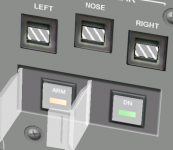
CDR ARM cover: -0.92, 1.99996, 14.68735
CDR DN cover: -0.87370, 1.99996, 14.68735

Dir vectors for both covers: 0, 0.965408, 0.260745

PLT is identical except for mirrored X axis.

Could you check the dir vectors again? That only works for the CDR DN cover, and I've tried all +/- combinations with no sucess.
 
Could you check the dir vectors again? That only works for the CDR DN cover, and I've tried all +/- combinations with no sucess.
Try these:

CDR ARM Cover: 0, 0.965408, 0.260745
CDR DN Cover: 0 -0.965408 -0.260745
 
Try these:

CDR ARM Cover: 0, 0.965408, 0.260745
CDR DN Cover: 0 -0.965408 -0.260745

The CDR ARM still goes away when opening, and the CDR DN does the same (this one works perfectly with 0, 0.965408, 0.260745).

---------- Post added at 06:25 PM ---------- Previous post was at 06:18 PM ----------

More info: the CDR ARM cover opens well with 0 -0.965408 -0.260745.... but it hinges on the right side of the cover instead of the left side. :facepalm:

---------- Post added at 06:29 PM ---------- Previous post was at 06:25 PM ----------

I just found the problem on the CDR side... I didn't have the reference. :blush: It now works well there.

---------- Post added at 07:02 PM ---------- Previous post was at 06:29 PM ----------

I can't find a way to get the PLT side to work. :(

BTW: I noticed that both these switches and the talkbacks appear to have "glass" over them. I looked on other panels and there's nothing like it anywhere. Is this normal?
 
BTW: I noticed that both these switches and the talkbacks appear to have "glass" over them. I looked on other panels and there's nothing like it anywhere. Is this normal?
Yes. Probably due to some misunderstanding over the design of the panels. It wouldn't be the first one. Donamy, any comments from you since you are the original designer?
 
I've attached a picture of how it looks.
 

Attachments

  • glass.PNG
    glass.PNG
    139.7 KB · Views: 460
I can't find a way to get the PLT side to work. :(

Anyone?
I'm trying to move panel R13L to AtlantisPanel, but I'd like to finish things at the front first, so the code changes don't mix together during the "transplant".
 
Asking as SSU "astronaut":

Those gear switches look really cool, but I think that if you as CDR have to click them with the mouse, will make the landing harder, because you have to lose focus on the HUD to look for the switches, uncover them an click them (looking for them and 2 mouseclicks at 3000ft and the same at a critical 300 ft). Aren't those switches actioned by the Pilot while the CDR focuses on landing watching HUD and instruments, hearing and paying attention to Pilot´s callouts?

I thing there could be a hotkey to Arm and Deploy, that also shows the panel animations (I don´t know if already this is how you are thinking about this).
 
Anyone?
I'm trying to move panel R13L to AtlantisPanel, but I'd like to finish things at the front first, so the code changes don't mix together during the "transplant".
It's going to be hard to troubleshoot code we can't review so can you check it in?
 
I thing there could be a hotkey to Arm and Deploy, that also shows the panel animations (I don´t know if already this is how you are thinking about this).

AFAIR, there is a key binding for that. CTRL+G for arming and G for deploying the armed gear, I think.

The VC binding is just needed for simplifying the code actually - if all can be mapped to the switches and pushbuttons, we can use similar code everywhere and avoid special solutions for hotkeys.

My personal ideal solution would be a hotkey action service in SSU - a class, that executes abstract actions on the VC model, like "Open switch cover and press button". This would again remove a lot of extra code and in the long term, we could make the hotkeys (slightly) configurable.
 
It's going to be hard to troubleshoot code we can't review so can you check it in?

Just committed it.
The area of interest starts in line 96 of PanelF8.cpp and is marked by "\\\\\\\\\\\\\\\\\\\\\\\\\\\" the the end of the lines.

Asking as SSU "astronaut":

Those gear switches look really cool, but I think that if you as CDR have to click them with the mouse, will make the landing harder, because you have to lose focus on the HUD to look for the switches, uncover them an click them (looking for them and 2 mouseclicks at 3000ft and the same at a critical 300 ft). Aren't those switches actioned by the Pilot while the CDR focuses on landing watching HUD and instruments, hearing and paying attention to Pilot´s callouts?

I thing there could be a hotkey to Arm and Deploy, that also shows the panel animations (I don´t know if already this is how you are thinking about this).
Thanks!
The gear arm and deploy is automatic, so you don't have to worry about it. There is also a key combination (Ctrl+G and G) to do the same manually if you want. This change is mostly visual, as it adds the lights to the buttons, but it also adds another way to get the gear down.
 
Hey, just a heads up from me. You might have read in the Random Comments thread that a few days ago I had some PC issues. Well, earlier yesterday, it died entirely, no recovery possible. Everything SSU related is intact though, so no actual progress losses other than just the ability to perform the work.

Based on my current finacial situation, the earliest possible "Return To Flight" for me would be end of the year. I will however be able to perform limited research and comments on general development.
 
Hey, just a heads up from me. You might have read in the Random Comments thread that a few days ago I had some PC issues. Well, earlier yesterday, it died entirely, no recovery possible. Everything SSU related is intact though, so no actual progress losses other than just the ability to perform the work.

Based on my current finacial situation, the earliest possible "Return To Flight" for me would be end of the year. I will however be able to perform limited research and comments on general development.

I'm sad to hear that. :(

---------- Post added at 03:27 PM ---------- Previous post was at 11:18 AM ----------

The updated panel R13L is up, please test to make sure it works as expected.

---------- Post added at 04:47 PM ---------- Previous post was at 03:27 PM ----------

Please disregard the PLT landing gear cover issue, as thru much trial and error I managed to get those covers to animate properly.
:hailprobe:

---------- Post added 07-10-15 at 01:57 AM ---------- Previous post was 07-09-15 at 04:47 PM ----------

Just updated panel A4 to AtlantisPanel, and had to work more than I expected: the coordinates were all messed up... :facepalm:
Decided not to go on another trial-and-error adventure to find the correct coordinates, and inspired by the 3d modeling thread, I got blender (and a .msh plugin by vlad32768) and tried to get the points myself. Easier said than done, as I didn't find blender to be as intuitive as I expected. I couldn't select specific vertices but only nearby points, but it looks like it's good enough as the panel boundaries and the switch movement look OK.

---------- Post added at 01:19 PM ---------- Previous post was at 01:57 AM ----------

I just created a new ticket related to a problem I was having in panel A8 and can't find the problem. I didn't mentioned in it (because I think it's a different problem), but occasionally I also have a similar problem in panel F8, where the MDUs and switches stop responding mid simulation. Has anyone experienced these issues?
 
II just created a new ticket related to a problem I was having in panel A8 and can't find the problem. I didn't mentioned in it (because I think it's a different problem), but occasionally I also have a similar problem in panel F8, where the MDUs and switches stop responding mid simulation. Has anyone experienced these issues?

I remember problems with the O5 panel that was very selectively reacting to mouse events, and which seemed to have its cause in the events getting routed to the A panels on the opposing side of the "VC camera"

Was visible in panel debug mode, but I failed to find the cause for that behavior as well.
 
I remember problems with the O5 panel that was very selectively reacting to mouse events, and which seemed to have its cause in the events getting routed to the A panels on the opposing side of the "VC camera"

Was visible in panel debug mode, but I failed to find the cause for that behavior as well.

When using the Ctrl+3 coordinate mode and clicking on panel A8 it doesn't detect anything. When I get bored I'll click-search the rest of the VC to see if I find it. Just checked and panel O6 (I think you mean that one, because we don't have an O5 yet) works even when A8 doesn't, so they are (fully) related.


And now for something different: textures. Found a little problem when using the default graphics client* vs D3D9. On panel A3, the top monitor only shows the image in D3D9 and it's black in MOGE. Did the usual digging and found that 2 textures are shown there, the overlay.dds and MON2view.dds, "stacked" in that order. Looks like the problem originates in overlay.dds as it doesn't show up as is (looks like it's uncompressed), it shows up with DXT1 but doesn't show the MON2view.dds "background", and in DXT5 it's all black again. According to the manual it show work with DXT5. Is this a limitation in MOGE or is it our problem?


*) I think it should be renamed MOGE for Martin's Own Graphics Engine.:lol:
 
When using the Ctrl+3 coordinate mode and clicking on panel A8 it doesn't detect anything. When I get bored I'll click-search the rest of the VC to see if I find it. Just checked and panel O6 (I think you mean that one, because we don't have an O5 yet) works even when A8 doesn't, so they are (fully) related.

Oh right, O5 was the CDR Comm panel... sorry, my fault.

*) I think it should be renamed MOGE for Martin's Own Graphics Engine.:lol:

I like that kind of Acronym, but I think MAGE would be better. The Martin's antiquarian graphical engine.

---------- Post added at 10:48 PM ---------- Previous post was at 06:13 PM ----------

Can somebody fix this in the trunk?

I discovered this bug by running a static code analysis on the Centaur branch

It is in the Atlantis_Tank module, in clbkLoadStateEx, the third parameter scenarioMass in sscanf_s is lacking a & to properly reference it.

Code:
                else if(!_strnicmp(line, "EMPTY_MASS", 10)) {
			sscanf_s(line+10, "%lf", scenarioMass);
			SetEmptyMass(scenarioMass);
		}

I can't switch that easily to the trunk for fixing it myself, I have uncommitted changes in the branch right now, waiting to be committable.

Analysis has found only 33 smells in our program but most are ignored return codes for sscanf_s. Worse are the few index errors in the SSME and the GeneralDisplays code, where we address index 3, but the array has only been initialized to size 3 (allowing index 0...2). I am sure I fixed this kind of error in the trunk already, does somebody know why there are again so many of them?
 
Last edited:
Just updated panel A4 to AtlantisPanel, and had to work more than I expected: the coordinates were all messed up... :facepalm:
Decided not to go on another trial-and-error adventure to find the correct coordinates, and inspired by the 3d modeling thread, I got blender (and a .msh plugin by vlad32768) and tried to get the points myself. Easier said than done, as I didn't find blender to be as intuitive as I expected. I couldn't select specific vertices but only nearby points, but it looks like it's good enough as the panel boundaries and the switch movement look OK.

AC3D is the best tool to find coordinates and vectors. IMO
 
Can somebody fix this in the trunk?

I discovered this bug by running a static code analysis on the Centaur branch

It is in the Atlantis_Tank module, in clbkLoadStateEx, the third parameter scenarioMass in sscanf_s is lacking a & to properly reference it.

Code:
                else if(!_strnicmp(line, "EMPTY_MASS", 10)) {
			sscanf_s(line+10, "%lf", scenarioMass);
			SetEmptyMass(scenarioMass);
		}

I can't switch that easily to the trunk for fixing it myself, I have uncommitted changes in the branch right now, waiting to be committable.
I can do that. But before I fix it, I want to ask: is this parameter really needed? Each tank type already has its mass defined, so there's no need for it IMO (otherwise this error would have been caught before).

Analysis has found only 33 smells in our program but most are ignored return codes for sscanf_s. Worse are the few index errors in the SSME and the GeneralDisplays code, where we address index 3, but the array has only been initialized to size 3 (allowing index 0...2). I am sure I fixed this kind of error in the trunk already, does somebody know why there are again so many of them?
Could you provide a list?
I just found 2 such errors in the ET ullage pressure sensors, and I see how I did those mistakes. There's 4 such sensors per tank, but only 3 are used and the 4º is a backup, but I put the "wiring" to have the 4 working, and when doing the software part I messed up. :blush:
 
I can do that. But before I fix it, I want to ask: is this parameter really needed? Each tank type already has its mass defined, so there's no need for it IMO (otherwise this error would have been caught before).

Not sure if its needed. But if not, we should remove the code completely instead of keeping a possible distraction and bug source.

I can make and translate a full listing tomorrow
 
Not sure if its needed. But if not, we should remove the code completely instead of keeping a possible distraction and bug source.

I can make and translate a full listing tomorrow

I'll take it out then.
On the problems, a list of files and lines is enough.

---------- Post added at 03:50 AM ---------- Previous post was at 12:38 AM ----------

Updated panel O3 to use the AtlantisPanel class. I had some problems in getting the rotary switches to move in a certain direction when clicked. They move, but it's not intuitive as the ones on panel A8 (I think I always found those particular switches on O3 somewhat counter intuitive :confused:). If anyone is familiar with that, please take a look at it and find the correct argument for SetOffset().

---------- Post added at 01:43 PM ---------- Previous post was at 03:50 AM ----------

There are a couple of tough nuts to crack and I'd like some input:
1) The panel C2 update to AtlantisPanel and the Keyboard. Currently they are separate from each other, but the Keyboard should be "inside" panel C2. The C2 texture doesn't include the keyboards on the sides... but that is not a problem, right? We can just extend the "click area" to include the keyboard textures... right? Then, if the Keyboard is being updated, I'm for doing it all and getting the one on panel R11L to work as well.

2) Because I did the lights on the landing gear buttons, the drag chute buttons are now looking at me wanting the same treatment :lol:. But here's where things get a little complicated. Everything between the HUDs is panel F3 (which we currently don't have, and the texture exists but is not shown), but we have the area inboard of the HUDs marked as "click area" for panels F2 and F4 (on their respective sides). And this matters why? Because 2 of the CDR drag chute buttons are on F2 and the other is on F3 (and something similar on the PLT side). Which brings me to the main question: because of the unusual shape of panel F3, is it possible to have more than one "click area" per panel (by calling oapiVCSetAreaClickmode_Quadrilateral() more than once)?
 
Status
Not open for further replies.
Back
Top