Discussion Trying to render a functional VC (starting small)

Yes, the thing is that at this point, it comes down to doing proper forum archeology, because after more than 20 years, nearly all the topics have been discussed at some point. I found this one, which is very good :


It really explains some concepts that were completely obscure to me : namely, the mesh-texture ecosystem in the context of a VC.
 
Yeah, a lot of things are really either tendious digging in the reference manual to understand the relations or simply old arcane knowledge. Maybe somebody should write a tutorial into the mesh API of Orbiter... does somebody know somebody? 😶‍🌫️
 
Well, I'm a teacher and I would be more than happy to write a detailed tutorial. That's the intent of this post. My english isn't perfect, but improving the syntax is precisely what 'AI' language models are good at.

But first I have to understand how things work, obviously.

And, as a teacher, one thing that really worries me is that the samples that come with Orbiter 2024 are not complete. The solution / VS project files are missing. It should be straightforward, even for someone that is green at all this stuff, to follow a procedure step to step and be able to compile all the samples. This is super important. To retro-engineer the samples you have to see them working. Also, it is crucial that you can use 'go to definition / declaration' for every tiny bit of the code of every sample.
 
OK so back to our ship there's one thing I don't get with the code itself here :

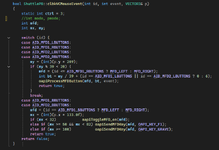
bool ShuttlePB::clbkVCMouseEvent(int id, int event, VECTOR3& p)
{
static int ctrl = 3;
int mode, pmode;
int mfd;
int mx, my;

switch (id) {
case AID_MFD1_LBUTTONS:
case AID_MFD1_RBUTTONS:
case AID_MFD2_LBUTTONS:
case AID_MFD2_RBUTTONS:
...
}

Why these 'AID_MFD1_LBUTTONS' are, if we take ShuttleA.h (from O2016), defined this way ? Can't they be declared as unsigned integers (UINT) ?? What is #define doing there ?
#define AID_MFD1_LBUTTONS 0
#define AID_MFD1_RBUTTONS 1
#define AID_MFD1_BBUTTONS 2
#define AID_MFD2_LBUTTONS 3
#define AID_MFD2_RBUTTONS 4
#define AID_MFD2_BBUTTONS 5
 
OK so back to our ship there's one thing I don't get with the code itself here :


Why these 'AID_MFD1_LBUTTONS' are, if we take ShuttleA.h (from O2016), defined this way ? Can't they be declared as unsigned integers (UINT) ?? What is #define doing there ?

"#define" is a C preprocessor statement (line starts with a #), that defines a new text macro called AID_....... this means: Whenever the name of the macro appears in the following source code, it is replaced by the content of the macro that follows the name before the source code is compiled. Yes, it is a slightly dated way to do things, since it is not type-safe, it operates on the pure source code. Today we also have constexpr for achieving 80% of what was done with #define.

Note that "const UINT AID = 0" is not the same. This creates a constant variable in program memory = it consumes RAM, but can be addressed by references and pointers.

And as said, #define is much more powerful than just this. You can insert multiple lines, can create macros with parameters containing complete functions (which you could also do better with "inline" in most cases) .... essentially rewriting your whole source code before it gets compiled. Old C developers really love #define (and the preprocessor in general). Younger developers, software architects or quality assurance engineers on the other hand curse it.
 
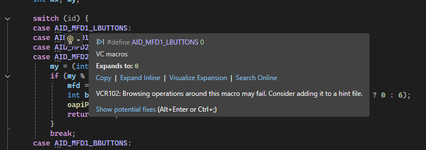
I have no problem using #define if it is the best way to do it, but note that VS2022 throws a warning at me, which isn't encouraging. Do I need to switch a solution property / option ?

1763744111876.png
 
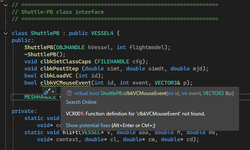
Also there is a VC function that can't be found, which is problematic to say the least. Do I need to include an additional .h file ?

1763744389800.png
 
Also there is a VC function that can't be found, which is problematic to say the least. Do I need to include an additional .h file ?

View attachment 45709

Maybe its a compatibility problem. Is the function defined identical in the cpp file?
 
Then its maybe gone with a clean rebuild. Do you get any errors when you compile it?
 
Oh ok my fault it was a rather stupid one. Sadly it happens. I called clbkLoadVC two times. Now it compiles fine.

I guess the lesson is to try to compile anyway, because the compiler usually gives you a clue about what is wrong.
 
I guess the lesson is to try to compile anyway, because the compiler usually gives you a clue about what is wrong.

That is right - the hints in the editor are merely that. Hints. Even just pressing enter can make then appear or disappear. What really counts is, what the compiler says. And that can differ a lot from what the editor says, since the compiler uses ALWAYS the ultimate correct settings and paths.
 
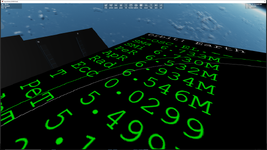
On the Blender export side, most funny display glitch ever.

I don't know why, sometimes Blender seems to shift the position of my MFDs mesh completely :unsure: Answer : be super careful about group names, empty meshgroups with 0 vertices (Orbiter's kryptonite), and also the fact that Blender merrily alters your textures paths with .001, .002 etc... as soon as you copy-paste a mesh, which tends to happen often.
1763748669536.png
 
Last edited:
On the Blender export side, most funny display glitch ever.

I don't know why, sometimes Blender seems to shift the position of my MFDs mesh completely :unsure: Answer : be super careful about group names, empty meshgroups with 0 vertices (Orbiter's kryptonite), and also the fact that Blender merrily alters your textures paths with .001, .002 etc... as soon as you copy-paste a mesh, which tends to happen often.

View attachment 45711
Almost there :LOL:
open-uri20150422-12561-1ew6d1l_5d68ce2b.jpeg
 
Yes, or a 'Table-MFD', war-room style. For bigger spacecrafts with a command bridge.
 
Yes, or a 'Table-MFD', war-room style. For bigger spacecrafts with a command bridge.
There, I would rather do a holotank. Which is of course Lostech in the Inner Sphere since the fall of the Star League, but standard equipment for Clan warships....

Damn, I wish I would have time to do some Battletech spacecraft.
 
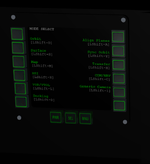
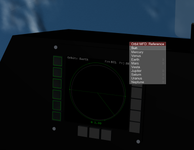
This is the best that I get. All the buttons of this MFD are functional. Very cool. Now I have to figure out how to display the labels on the side (dynamic) buttons (the three bottom ones are static).

1763775921085.png
 
Last edited:
At this point, if someone could guide me in the right direction (of displaying the labels on the buttons), it would massively save time. Thanks.
 
Back
Top